Social Media Search Engine Optimization: A Practical Guide to Better Discoverability
Social Media Search Engine Optimisation: How to Improve Your Discoverability
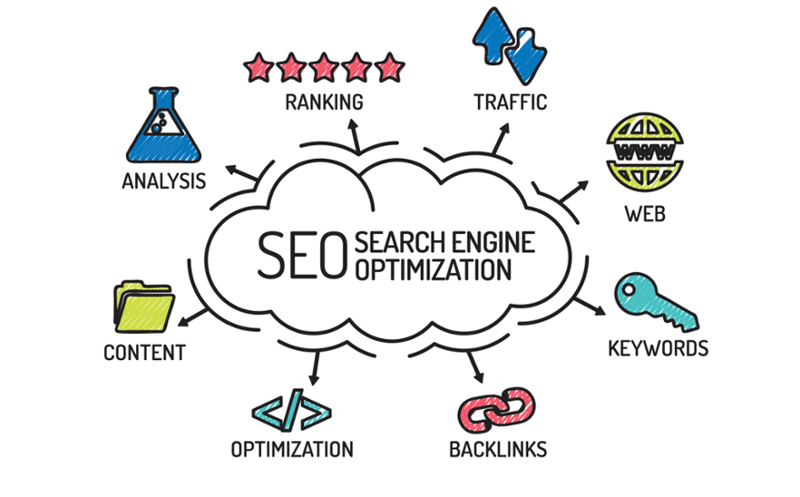
Social media search engine optimisation, often called social SEO, is the practice of making social media profiles and content easier to find through searches. It brings together traditional search engine optimisation (SEO) and the search features built into platforms such as Instagram, TikTok, YouTube, LinkedIn and Pinterest.
Social SEO matters because people increasingly use social platforms to find products, services, recommendations and answers. A well-optimised post can appear in a platform’s search results, reach people through recommendations and, in some cases, be discovered through external search engines. The aim is not simply to attract more views, but to help the right people find useful, relevant content.
How social media search works
Each platform uses its own systems to organise and recommend content. These systems may consider information such as the words in a post, its topic, the account that published it and how people interact with it. The precise factors vary by platform and can change over time.
External search engines may also display publicly accessible social media pages and posts. However, social activity should not be treated as a guaranteed way to improve a website’s rankings. Social SEO is best viewed as a way to increase discoverability, build an audience and create additional routes to your business.
Why social SEO is important
- People search on social platforms. Users may look for tutorials, local businesses, product reviews or inspiration directly within an app.
- Useful content can reach new audiences. Searchable posts may continue to attract attention after publication, rather than relying only on an initial burst of engagement.
- Clear profiles build trust. Accurate descriptions, contact details and consistent branding help people understand who you are and what you offer.
- Social content supports your wider marketing. Posts can introduce people to your expertise and guide them to relevant pages on your website.
How to optimise your social media presence
Understand what your audience searches for
Start by learning how your customers describe their needs. Look at questions received by your team, comments on social posts, website search data and keyword research. Search suggestions and related searches on social platforms can also offer clues about the phrases people use.
Focus on the meaning behind a search, not just a list of popular keywords. Someone searching for “how to choose running shoes” is likely looking for advice, while someone searching for a particular shoe model may be closer to making a purchase. Content should match the audience’s intent.
Optimise your profile
Your profile is often the first thing a potential customer sees. Use a clear account name and username where possible, and explain what the business does in straightforward language. Include relevant terms naturally in your profile description, rather than filling it with repetitive keywords.
Keep your branding, location and contact information consistent across platforms. Add a link to an appropriate page on your website, such as a service page, booking page or useful resource. Make sure the destination works well on mobile devices.
Make each post easy to understand
Use clear, descriptive language in captions, titles and on-screen text. Put the main subject near the beginning so that both people and platform systems can quickly understand what the content is about. For video, provide accurate captions or subtitles; these improve accessibility and make the content easier to follow without sound.
Hashtags can help categorise content on some platforms, but they are not a substitute for a clear description. Use a small number of relevant tags where they add context. Avoid unrelated trending tags, which can confuse audiences and weaken the relevance of a post.
Create content that answers real questions
Content with a clear purpose is more useful than content created solely to chase trends. Consider producing short guides, demonstrations, comparisons, explanations and answers to frequently asked questions. Organise related posts into a series or playlist where the platform supports it.
For example, a local café could publish a guide to its menu, explain how to find its premises and answer common questions about dietary options. A professional services firm could share practical advice that demonstrates its expertise and directs viewers to more detailed information on its website.
Use images and video thoughtfully
Visual content should support the topic rather than obscure it. Choose relevant images, write meaningful alternative text where the platform provides the option, and use descriptive file names when uploading content if appropriate. For video, create a strong title and opening, explain the subject clearly and include a helpful description.
Do not rely on text embedded in an image as the only way to communicate important information. Adding the same key details in a caption or description can make the content more accessible and easier to interpret.
Encourage genuine engagement
Invite useful discussion by asking specific questions and responding thoughtfully to comments. Engagement can help build relationships and show that an account is active, but it should not be pursued through spam, engagement bait or artificial activity. These tactics can damage trust and may conflict with platform rules.
Keep your information accurate
Review profiles and older content regularly. Update opening hours, service details, links and location information when they change. For businesses with physical premises, accurate local information can help people find and contact the organisation.
Social SEO across different platforms
There is no single optimisation formula that works everywhere. The best approach depends on how people use each platform:
- YouTube: Use descriptive titles, accurate descriptions, chapters where useful and clear spoken explanations. Organise related videos into playlists.
- Instagram: Make the account description and captions informative. Use relevant on-screen text and alt text where available, and keep content closely aligned with the account’s subject.
- TikTok: State the topic clearly in the video and caption. Use captions and relevant terms naturally, and make the opening explain what viewers will learn or see.
- LinkedIn: Use a complete company page and publish useful professional content with specific, descriptive language. Keep staff and organisation details consistent.
- Pinterest: Create descriptive Pin titles and descriptions, organise boards by topic and link Pins to relevant pages.
How to measure results
Measure social SEO by looking at more than follower numbers. Useful indicators may include:
- search impressions and reach, where platform analytics provide them;
- views, saves, shares and meaningful comments;
- visits to your profile and clicks on profile links;
- website visits from social platforms;
- enquiries, bookings, sign-ups or sales associated with social activity.
Use tracking links where appropriate and compare results over time. A post with fewer views may still be valuable if it attracts the right audience and leads to relevant enquiries. Review which topics and formats perform well, then use those insights to improve future content.
Common social SEO mistakes
- Adding keywords unnaturally or repeating them excessively.
- Using the same caption on every platform without adapting it to the audience and format.
- Choosing vague titles that do not explain what a post is about.
- Relying on hashtags instead of clear, useful descriptions.
- Posting frequently without a consistent subject or purpose.
- Ignoring accessibility, comments or outdated profile information.
- Expecting social activity alone to guarantee higher website search rankings.
Bringing social media and SEO together
Social media search engine optimisation works best as part of a broader digital strategy. Social posts can introduce people to a topic, while a detailed website page can provide additional guidance, evidence and ways to take action. Make sure the information is consistent across both, and link to pages that genuinely fulfil the promise of the post.
By understanding how audiences search, writing clearly and publishing useful content, businesses can make their social profiles easier to discover. Social SEO is not a quick fix; it is an ongoing process of listening, creating, measuring and refining.
Optimising Your Social Media Presence: 6 Essential SEO Tips
- Use relevant keywords in your profile name and bio.
- Write clear, descriptive captions with natural keywords.
- Add accurate alt text to images and videos.
- Use a small set of relevant hashtags.
- Encourage genuine shares, saves and comments.
- Keep your profile details consistent across platforms.
Use relevant keywords in your profile name and bio.
Use relevant keywords naturally in your social media profile name and bio to help people understand what you offer and make your account easier to discover in platform searches. Choose phrases your audience is likely to use, such as your service, specialism or location, while keeping the wording clear and readable. Avoid cramming in keywords; an accurate, helpful profile is more useful to potential followers.
Write clear, descriptive captions with natural keywords.
Write captions that clearly explain what your post is about and use the words your audience would naturally search for. Include relevant keywords in a way that reads smoothly, rather than repeating them or forcing them into the text. A descriptive caption helps people understand the value of your content and can make it easier to find through searches on social platforms.
Add accurate alt text to images and videos.
Add accurate alt text to images and videos to describe their key content and context. This helps people using screen readers understand your posts and makes your content more accessible. Keep descriptions clear and specific, focusing on what matters rather than repeating keywords or adding unnecessary detail. Where a platform supports captions or transcripts for video, use them too.
Use a small set of relevant hashtags.
Use a small set of relevant hashtags to help people and platform search features understand what your post is about. Choose specific tags that reflect the content, your industry or audience, rather than adding popular but unrelated ones. A focused selection keeps captions clear and helps attract people genuinely interested in the topic.
Encourage genuine shares, saves and comments.
Encourage genuine shares, saves and comments by creating content that people find useful, interesting or worth discussing. Share practical tips, answer common questions and invite thoughtful responses with a clear, relevant prompt. These interactions can help your content reach more people and show that it resonates with your audience. Avoid engagement bait or asking for interactions that feel forced; authentic participation builds trust and supports long-term discoverability.
Keep your profile details consistent across platforms.
Keep your profile details consistent across platforms so people can easily recognise and trust your business wherever they find you. Use the same business name, logo, description, contact details and website link where possible, and make sure information such as your location and opening hours is accurate. Consistency also helps platforms and search engines understand that your profiles belong to the same organisation, making it easier for people to find the right account and get in touch.