Local SEO Backlinko: A Practical Guide to Reaching Nearby Customers
Local SEO: A Practical Guide Inspired by Backlinko
When people search for a service “near me” or look for a business in a particular town, local search engine optimisation (SEO) can help the right businesses appear. Whether you run a café, trades business, clinic or shop, a clear local SEO strategy can make it easier for nearby customers to find and choose you.
Backlinko is known for publishing accessible SEO guides and practical marketing advice. Its approach to explaining SEO concepts can be a useful starting point, but local SEO also calls for work specific to your location, customers and industry. This guide covers the essentials.
What is local SEO?
Local SEO is the process of improving a business’s visibility in search results for location-related searches. These may include queries such as “plumber in Manchester”, “Italian restaurant near me” or a search for a business by name.
Local results can appear in standard organic listings as well as map-based results, often called the local pack. Search engines use factors such as relevance, distance and prominence to help decide which businesses to show. You cannot control every factor, but you can make your business information accurate, useful and consistent.
Set up and improve your Google Business Profile
A Google Business Profile is a key part of local SEO for businesses that meet customers in person or serve customers at their locations. Claim and verify your profile, then check that its details are complete and accurate.
- Use your real business name and select the most relevant categories.
- Add your address or service areas, phone number and website.
- Keep opening hours up to date, including special holiday hours.
- Describe your services clearly and add useful photographs.
- Review your profile regularly and respond professionally to customer reviews.
Do not add keywords to your business name unless they are genuinely part of the name customers know. Misleading profile details can undermine trust and may breach platform guidelines.
Make your website relevant to local searches
Your website should make it clear what you offer and where you offer it. Include your location naturally in relevant page titles, headings and copy. For example, a page for a wedding photographer in Bristol could explain the services available to couples in Bristol and the surrounding area.
If you serve several locations, create a useful page for each area rather than publishing near-identical pages that simply swap one place name for another. Each page should provide genuinely local information, such as the services offered there, relevant projects, travel details or answers to common customer questions.
Keep your business details consistent
Your business name, address and phone number should be accurate wherever they appear online. Check your website, business profiles, directories and social media pages for old or conflicting information. Consistency helps customers contact you and gives search engines clearer information about your business.
Only list your business in reputable directories that are relevant to your location or industry. There is little value in submitting your details to large numbers of low-quality sites.
Earn local backlinks
Backlinks are links from other websites to yours. In local SEO, links from credible, relevant organisations can help strengthen your website’s authority and connect your business with its community.
Consider opportunities such as:
- Local newspapers, magazines and community websites covering your work.
- Business associations, chambers of commerce or professional organisations.
- Local events, sponsorships and charitable partnerships.
- Suppliers, partners or clients who have a genuine reason to mention your business.
- Useful local guides or resources that other organisations may want to reference.
Focus on earning links through real relationships and worthwhile contributions. Avoid buying links or using automated link schemes: these tactics can create risk without delivering lasting value.
Encourage and manage customer reviews
Reviews can help potential customers understand what it is like to work with you. Invite customers to leave an honest review after a completed purchase or service, and make the process straightforward. Never offer rewards in exchange for positive reviews or attempt to suppress legitimate negative feedback.
Respond to reviews courteously and specifically. Thank customers for positive feedback, and address concerns calmly without sharing private information. A thoughtful response can demonstrate that your business takes customer experience seriously.
Create useful local content
Local content should answer real questions and provide value, not just repeat a town name. Depending on your business, you might publish local project case studies, practical area guides, event information or answers to questions customers commonly ask.
For example, a home-improvement company could explain which permissions may be relevant to a particular type of renovation, while a local food business could create a guide to seasonal produce from nearby suppliers. Accurate, helpful content can attract visitors and give other local websites a reason to link to you.
Make your website fast and mobile-friendly
Many local searches happen on mobile devices, often when someone is ready to call, book or visit. Make sure your site loads reliably, is easy to read on a small screen and displays clear contact details. Add obvious calls to action, such as “Call”, “Book an appointment” or “Get directions”, where appropriate.
Check that forms work, important pages are easy to navigate and your location details are easy to find. A technically sound website supports both a better visitor experience and your wider SEO efforts.
Measure what is working
Local SEO takes time, so track meaningful changes rather than relying on a single ranking. Use Google Business Profile performance data and website analytics to monitor actions such as calls, direction requests, bookings, form submissions and visits from local search.
It can also help to record your starting point and review progress regularly. Look at which pages attract local visitors, which searches bring people to your site and whether those visitors become customers. Use the findings to improve your content and prioritise the work with the greatest potential impact.
How Backlinko fits into a local SEO strategy
Backlinko can be a useful source of general SEO education, particularly for understanding topics such as keyword research, content and link building. Apply that advice thoughtfully: local search has its own practical priorities, including accurate business profiles, location-specific relevance, reviews and genuine community connections.
Rather than chasing every new SEO tactic, focus on making your business easy to understand, trust and contact. A strong local SEO strategy combines useful website content, accurate listings, credible local links and a good customer experience.
Conclusion
Local SEO helps connect your business with people searching for your products or services nearby. Start with accurate business information, improve your website’s local relevance, earn trustworthy local links and make it easy for customers to leave honest feedback. Resources such as Backlinko can help build your SEO knowledge, while consistent, customer-focused work will make the strategy relevant to your own community.
Top 16 FAQs on Local SEO and Backlinko: A Comprehensive Guide
- How do I find my local SEO ranking?
- What are the 4 types of SEO?
- How do I get local SEO backlinks?
- Is local SEO free?
- What is the difference between local SEO and SEO?
- What are the types of local SEO?
- What comes under local SEO?
- What is technical SEO Backlinko?
- Does SEO still work in 2022?
- What are the steps of local SEO?
- What is a local SEO strategy?
- Does local SEO work?
- How can I improve my local SEO ranking?
- How much should I pay local SEO?
- How do I optimize local SEO?
- What is local SEO ranking?
How do I find my local SEO ranking?
To check your local SEO rankings, search for your target service and location (for example, “accountant in Leeds”) and review where your business appears in Google’s organic results and local map pack. Bear in mind that results can vary by a searcher’s location, device and search history, so a single manual search is only a rough guide. For a more reliable view, track important local keywords over time using an SEO rank-tracking tool with location settings, and monitor Google Search Console for search impressions, clicks and average positions. You can also review Google Business Profile performance data to see how people find and interact with your listing.
What are the 4 types of SEO?
The four commonly recognised types of SEO are on-page, off-page, technical and local SEO. On-page SEO improves the content and elements on your website, such as headings, page titles and internal links. Off-page SEO focuses on signals beyond your site, including reputable backlinks and brand mentions. Technical SEO helps search engines crawl, understand and index your website, while local SEO improves visibility for searches connected to a particular place. These areas overlap, and the right balance depends on your business and audience.
How do I get local SEO backlinks?
To earn local SEO backlinks, build genuine relationships with organisations in your area and give them a useful reason to link to your website. You could partner with local charities, sponsor community events, join a relevant business association, contribute expert advice to a local publication or create a helpful guide about your area that other local websites may reference. Make sure each opportunity is relevant and reputable, and avoid buying links or using spammy tactics.
Is local SEO free?
Yes, local SEO can be done for free: creating a Google Business Profile, improving your website and asking customers for honest reviews do not require a payment to Google. However, it takes time and effort, and you may choose to pay for SEO tools, professional support, website improvements or local advertising. Organic local visibility itself is not bought, and results are not guaranteed.
What is the difference between local SEO and SEO?
Local SEO focuses on helping a business appear in searches with local intent, such as “dentist in Leeds” or “near me”, and in map results. It involves factors such as an accurate Google Business Profile, local reviews, location-specific website content and relevant local links. SEO is the broader practice of improving a website’s visibility in search results, whether or not the search is tied to a particular place. In short, local SEO is a specialised part of SEO designed to reach customers in a specific area.
What are the types of local SEO?
Local SEO generally includes two main types: on-site local SEO and off-site local SEO. On-site work makes your website relevant to local searches through location-focused pages, accurate contact details and locally useful content. Off-site work builds your local presence elsewhere, including managing your Google Business Profile, earning relevant local backlinks, keeping business listings consistent and gaining genuine customer reviews. Together, these activities help search engines understand where your business operates and help nearby customers find and trust it.
What comes under local SEO?
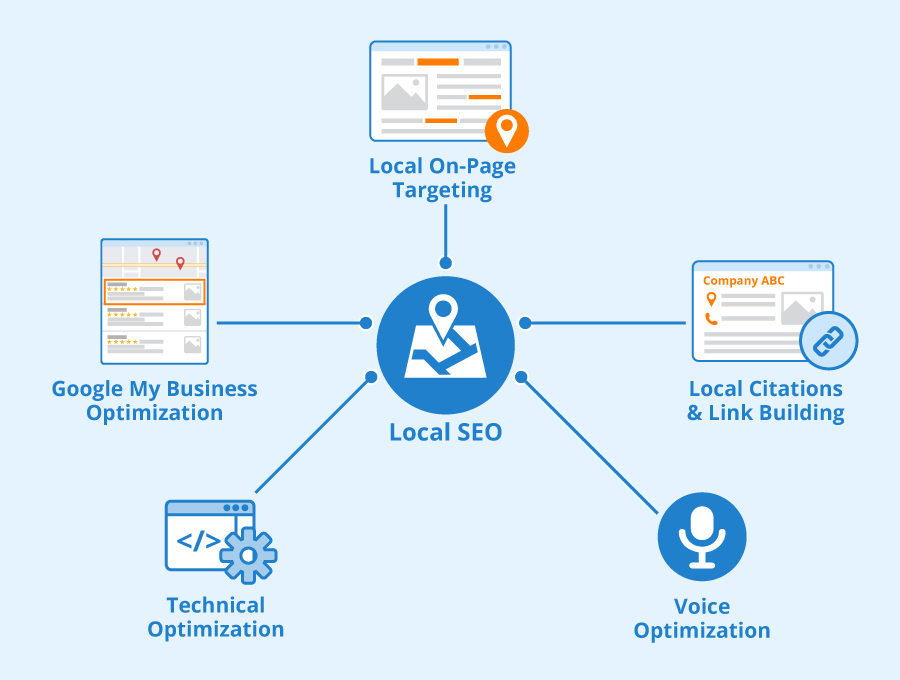
Local SEO covers the activities that help a business appear in search results for relevant local searches. These include optimising your Google Business Profile, keeping your name, address and phone number accurate across online directories, targeting location-specific keywords, creating useful local website content, earning relevant local backlinks, and encouraging and responding to customer reviews. It also involves making your website mobile-friendly and tracking local visibility, calls, visits and enquiries.
What is technical SEO Backlinko?
Technical SEO, as explained in SEO resources such as Backlinko, is the process of improving a website’s technical foundations so search engines can crawl, understand and index its pages effectively. It can include improving site speed and mobile usability, fixing broken links and crawl errors, using a clear site structure, adding structured data and securing the website with HTTPS. These improvements can support better search visibility and provide a smoother experience for visitors.
Does SEO still work in 2022?
Yes, SEO still worked in 2022, including for local businesses. Search engines continued to help people find relevant services and information, but effective SEO meant more than adding keywords to a website. Businesses needed useful, trustworthy content, a technically sound mobile-friendly site, accurate local listings and a strong Google Business Profile. Results took time and were never guaranteed, so tracking enquiries and other meaningful outcomes was just as important as monitoring rankings.
What are the steps of local SEO?
The main steps of local SEO are to define the areas you serve, research relevant local search terms, and optimise your website with accurate location-specific information. Claim and complete your Google Business Profile, keep your business details consistent across reputable directories, and create genuinely useful pages for the locations you serve. Encourage honest customer reviews, earn relevant local backlinks through partnerships and community activity, and make sure your website works well on mobile. Finally, track calls, enquiries, visits and local search performance, then refine your approach based on what brings in customers.
What is a local SEO strategy?
A local SEO strategy is a plan to help your business appear in search results when people look for relevant products or services in a specific area. It typically includes optimising your Google Business Profile, keeping your contact details consistent across the web, creating useful location-specific website content, earning trustworthy local backlinks and encouraging genuine customer reviews. The aim is to improve local visibility and make it easier for nearby customers to contact or visit your business.
Does local SEO work?
Yes, local SEO can work by helping your business appear more prominently when people nearby search for relevant products or services. Improving your Google Business Profile, keeping contact details consistent, earning genuine customer reviews and creating useful location-specific website content can all support local visibility. Results vary depending on your industry, location, competition and the quality of your efforts, so local SEO is best treated as an ongoing strategy rather than a quick fix.
How can I improve my local SEO ranking?
To improve your local SEO ranking, make sure your Google Business Profile is claimed, verified and complete, with accurate contact details, opening hours and business categories. Create useful website content that clearly explains your services and the areas you cover, and keep your name, address and phone number consistent across reputable directories. Encourage customers to leave honest reviews and respond to them professionally, while earning relevant local backlinks through community partnerships, events or useful resources. Also ensure your website works well on mobile and track calls, enquiries and other meaningful results so you can refine your approach over time.
How much should I pay local SEO?
The cost of local SEO depends on your location, competition and the work required. In the UK, a basic package may cost a few hundred pounds per month, while competitive markets or broader campaigns can cost £1,000 or more monthly; one-off audits or set-up work are usually priced separately. Before hiring an agency or freelancer, ask what’s included—such as Google Business Profile optimisation, local content, technical improvements and reporting—and look for clear goals, transparent pricing and realistic expectations. Be cautious of guaranteed rankings or unusually cheap packages that rely on spammy tactics.
How do I optimize local SEO?
To optimise local SEO, start by claiming and completing your Google Business Profile, ensuring your business name, address, phone number, opening hours and services are accurate and consistent across your website and relevant directories. Add location-specific information to useful website pages, make sure your site works well on mobile, and invite customers to leave honest reviews—responding to feedback professionally. You can also build local authority by earning links from reputable community organisations, publications and business partners. As Backlinko’s practical SEO guidance suggests, focus on useful content and genuine, trustworthy signals rather than shortcuts, and track calls, enquiries and other meaningful results over time.
What is local SEO ranking?
Local SEO ranking refers to where a business appears in search results for location-based queries, such as “dentist in Leeds” or “plumber near me”. Search engines consider factors including how relevant the business is to the search, its distance from the searcher and its prominence online. Accurate business details, a well-maintained Google Business Profile, positive customer reviews and useful local website content can all support visibility, although rankings may vary depending on the searcher’s location and the query.