Mobile Search Engine Optimisation: A Practical Guide to Better Rankings and User Experience

Mobile Search Engine Optimisation: A Practical Guide

Mobile search engine optimisation (SEO) is the process of making a website easy to find, use and understand on smartphones and tablets. It brings together technical SEO, useful content and a smooth mobile experience. As many people search while on the move, a site that works well on smaller screens can help visitors find information, contact a business or complete a purchase.

Why mobile SEO matters

Search engines need to crawl and understand your pages, while visitors need to use them without pinching, zooming or waiting for them to load. A poorly designed mobile site can make it difficult to read content, follow links or complete forms. This may lead people to leave before finding what they need.

Google uses the mobile version of a site for indexing and ranking through mobile-first indexing. This makes it important to ensure that the mobile version contains the same essential content and SEO signals as the desktop version. A mobile-friendly design alone is not enough if key information is missing or difficult for search engines to access.

Use a responsive design

Responsive design allows a website’s layout to adapt to different screen sizes. It is generally the simplest approach to manage because the same page and URL serve desktop, tablet and mobile visitors.

Check that your pages:

  • Fit the screen without horizontal scrolling.
  • Use readable text sizes and clear spacing.
  • Have buttons and links that are easy to tap.
  • Display images and videos correctly on smaller screens.
  • Keep navigation simple and straightforward.

Make sure mobile content is complete

Mobile pages should provide the information visitors need, not a reduced version that omits important details. Keep useful headings, product information, internal links, images and other key content available to mobile users. Search engines may have less context if essential material is hidden or removed from the mobile version.

Use clear headings to organise information, and put the most useful content where visitors can find it easily. Avoid making people work through unnecessary pop-ups or lengthy introductions before they can reach the answer to their search.

Improve page speed and Core Web Vitals

Mobile connections and devices vary, so pages should be built to load efficiently. Compress images, use modern image formats where appropriate, remove unnecessary scripts and limit features that add weight without improving the experience. Caching and a content delivery network may also help, depending on how your site is hosted.

Core Web Vitals are metrics used to assess aspects of page experience:

  • Largest Contentful Paint (LCP): how quickly the main content appears.
  • Interaction to Next Paint (INP): how quickly a page responds to user interactions.
  • Cumulative Layout Shift (CLS): how much the page layout moves unexpectedly.

Use tools such as Google Search Console and PageSpeed Insights to identify issues. Field data reflects real user experiences, while laboratory tests can help diagnose specific problems. Treat these metrics as part of a wider effort to make pages faster and easier to use, rather than as a substitute for useful content.

Optimise the mobile user experience

Good mobile SEO depends on more than technical settings. Consider how people use your site on a small screen. Make important actions—such as calling, booking or buying—easy to find. Keep forms short, use suitable input types for fields such as email addresses and telephone numbers, and show clear error messages when something goes wrong.

Make sure menus are easy to open and close, links are not crowded together, and interactive elements work with touch as well as a keyboard. Avoid intrusive interstitials that cover the content people have come to see.

Support local mobile searches

Mobile searches often have local intent, such as looking for a nearby service or checking opening times. Businesses with a physical location should keep their name, address and telephone number consistent across their website and relevant online listings. Create useful location pages where appropriate, and keep opening hours and contact details up to date.

Make it easy for visitors to act on local information. A clear telephone link, directions and booking details can help someone move from a search to a visit or enquiry.

Use structured data carefully

Structured data helps search engines interpret information on a page. Depending on your business and content, this might include details about products, articles, events or local businesses. Make sure the markup is accurate and reflects content that is visible to visitors. Structured data can make pages eligible for enhanced search results, but it does not guarantee that those results will appear.

Test your mobile pages regularly

Do not rely on checking a single page on one phone. Test key page types—such as product pages, service pages, articles and contact forms—on different screen sizes. You can use Google Search Console to review indexing and experience reports, and analytics tools to understand how mobile visitors use your site.

Look for practical signs of friction: pages that are slow, forms that are abandoned, buttons that are rarely used or important content that visitors struggle to find. Combine these observations with feedback from real users to decide what to improve.

A mobile SEO checklist

  • Use a responsive design that works across screen sizes.
  • Keep important content and SEO signals consistent between mobile and desktop.
  • Make pages quick to load and stable while they load.
  • Use readable text, clear navigation and accessible tap targets.
  • Make forms and key actions simple to complete.
  • Check local details and structured data for accuracy.
  • Test real page templates and monitor performance over time.

Conclusion

Effective mobile SEO starts with a simple goal: make it easy for people and search engines to access and understand your website on a mobile device. A responsive layout, complete content, fast pages and clear user journeys provide a strong foundation. Regular testing helps you spot problems and improve the experience as your audience and technology change.


Top 5 Tips for Optimising Mobile Search Engine Performance

  1. Use responsive design that adapts to every screen size.
  2. Improve mobile page speed by compressing images.
  3. Make text readable without zooming.
  4. Keep menus and buttons easy to tap.
  5. Check mobile usability in Google Search Console.

Use responsive design that adapts to every screen size.

Use responsive design so your website automatically adjusts to different screen sizes, from smartphones and tablets to desktop monitors. Text, images, menus and page layouts should remain clear and easy to use without horizontal scrolling or excessive zooming. A consistent experience across devices helps visitors find what they need and makes it easier to maintain your site.

Improve mobile page speed by compressing images.

Improve mobile page speed by compressing images before uploading them to your website. Large image files can take longer to load, particularly on slower mobile connections, so resizing images to the dimensions they’ll actually be displayed at and choosing efficient formats such as WebP can reduce file sizes without noticeably affecting quality. Faster-loading pages make it easier for visitors to find what they need and can support a better overall mobile experience.

Make text readable without zooming.

Make sure visitors can read your mobile content without pinching or zooming. Use a comfortably sized font, clear line spacing and strong contrast between text and background, and check that paragraphs fit the screen without horizontal scrolling. Readable text makes your pages easier to use and helps people find the information they need.

Keep menus and buttons easy to tap.

Keep menus and buttons easy to tap on smaller screens by making them large enough to select comfortably and leaving plenty of space between nearby links. Use clear labels and place important actions where visitors can find them without excessive scrolling. This makes your website easier to navigate, reduces accidental taps and helps mobile users complete tasks with less frustration.

Check mobile usability in Google Search Console.

Use Google Search Console to check how well your site works for mobile visitors. Review the available page experience and Core Web Vitals reports, and inspect individual URLs to identify issues that may affect usability or indexing. Fix problems such as slow-loading pages, unstable layouts or content that is difficult to access, then check the affected pages again after making changes. Regular monitoring can help you spot issues early and provide a smoother experience on smartphones and tablets.

local seo ranking

Local SEO Ranking: How to Improve Your Visibility in Local Search Results

Local SEO Ranking: How to Improve Your Visibility in Local Search

When someone searches for a nearby service, such as “plumber near me” or “dentist in Manchester”, search engines aim to show useful local options. Appearing prominently in these results can help a business reach nearby customers at the moment they are looking to take action.

Local SEO is the process of improving a business’s visibility in location-based search results. These can include the local map results, often called the local pack, as well as standard organic listings. There is no single change that guarantees a top position, but consistent, relevant information and a strong online reputation can help improve your chances.

How local search rankings work

Google says local results are mainly based on three factors: relevance, distance and prominence.

  • Relevance refers to how closely a business matches what the person is searching for.
  • Distance considers how far the business is from the searcher or the location included in the search.
  • Prominence reflects how well-known and established a business appears to be, based on information Google can find online and elsewhere.

These factors can interact. A business may rank differently depending on the searcher’s location, the wording of the search and the level of competition nearby. That is why local SEO is an ongoing effort rather than a one-off task.

Optimise your Google Business Profile

A complete and accurate Google Business Profile is an important starting point for many local businesses. Check that your business name, address, phone number, website and opening hours are correct. Choose the most suitable primary category and add relevant additional categories where appropriate.

Describe your services clearly and keep details such as holiday opening hours up to date. Add genuine, high-quality photographs that help customers understand what you offer. If your profile includes features such as services, products, appointment links or questions and answers, use the ones that are relevant to your business.

Follow Google’s guidelines when creating or updating your profile. For example, use your real-world business name rather than adding extra keywords, and do not create multiple profiles for the same eligible location.

Make your website useful for local customers

Your website should make it easy for both visitors and search engines to understand what you do and where you operate. Include your business’s contact details and service information in clear, accessible places. Ensure the details match those on your Business Profile and other important listings.

If you serve several areas, create location pages only where they provide genuinely useful information. Each page should explain the services available in that area and offer relevant details, rather than simply swapping the place name in an otherwise identical block of text. Avoid creating thin or repetitive pages solely to target more locations.

It also helps to make sure your site works well on mobile devices, loads reliably and has clear navigation. Many local searches happen on phones, where people may want to call, request directions or make an appointment quickly.

Keep business information consistent

Business details are often described as NAP: name, address and phone number. Check that these details are accurate across your website, business directories, professional associations and social profiles. Small variations may be harmless in some cases, but outdated addresses or incorrect phone numbers can confuse potential customers.

Focus on reputable, relevant listings rather than submitting your details to every directory available. If your business moves or changes its phone number, update the most important profiles and directories promptly.

Earn and respond to customer reviews

Reviews help potential customers assess a business, and they can contribute to its online prominence. Make it easy for satisfied customers to leave an honest review by sharing a review link after a completed job or visit. Do not buy reviews, offer rewards in exchange for positive feedback or pressure customers to leave a particular rating.

Respond to reviews in a professional and considered way. Thank customers for positive feedback and address concerns without sharing private information. A thoughtful response can show that the business takes customer experience seriously.

Build local relevance and reputation

Useful local content can demonstrate your knowledge of the areas and customers you serve. Depending on your business, this might include practical guides, project examples, event information or answers to common local questions. The aim should be to help readers, not to repeat location keywords unnaturally.

Links and mentions from trusted local organisations can also support your online presence. Consider relevant opportunities such as local news coverage, business associations, community partnerships or professional directories. The value comes from genuine relevance and trust, not from collecting as many links as possible.

Measure local SEO performance

Track progress using more than a single ranking position. Local results can vary by searcher location, device and query, so one manual search will not show the full picture. Useful measures include:

  • Website visits from organic search
  • Calls, direction requests and website clicks from your Business Profile
  • Enquiries, bookings or sales from local landing pages
  • Review volume, quality and response activity
  • Visibility for relevant local searches across the areas you serve

Google Search Console and Google Business Profile performance data can help you understand how people discover and interact with your business. Use these insights to identify gaps, update inaccurate information and improve pages that are not meeting customer needs.

Common local SEO mistakes to avoid

  • Adding keywords or locations to a business name when they are not part of its real-world name
  • Creating duplicate or ineligible Business Profiles
  • Publishing near-identical pages for many towns or postcodes
  • Using inaccurate addresses, phone numbers or opening hours
  • Buying reviews or links
  • Focusing only on rankings instead of calls, enquiries and other meaningful outcomes

Build a steady local SEO strategy

Improving local SEO rankings starts with accurate business information, a well-maintained Google Business Profile and a website that clearly explains your services. Add a trustworthy reputation, useful local content and consistent measurement, then review your results regularly.

Local visibility can take time to improve, and no ethical SEO provider can guarantee a particular position. However, a clear, customer-focused approach can make your business easier to find and choose when people nearby are searching for what you offer.


7 Essential Tips to Boost Your Local SEO Rankings

  1. Keep your Google Business Profile accurate and complete.
  2. Use consistent business details across online directories.
  3. Add your town or area naturally to key website pages.
  4. Ask satisfied customers for honest reviews.
  5. Reply promptly to reviews and customer questions.
  6. Create useful pages for the areas you serve.
  7. Keep your website mobile-friendly and quick to load.

Keep your Google Business Profile accurate and complete.

Keep your Google Business Profile accurate and complete so customers can quickly find reliable information about your business. Check that your name, address, phone number, website, opening hours and service details are up to date, and choose the most relevant business categories. Add useful photos and update special hours or other changes promptly. A well-maintained profile helps search engines understand what you offer and where you operate, while making it easier for local customers to contact or visit you.

Use consistent business details across online directories.

Keep your business name, address and phone number consistent across online directories, your website and your Google Business Profile. Accurate, matching details help customers contact or visit you and make it easier for search engines to verify your business information. Review your listings regularly, update any changes promptly and prioritise reputable directories that are relevant to your business and location.

Add your town or area naturally to key website pages.

Include your town or service area naturally on key website pages, such as your homepage, contact page and relevant service pages. This helps visitors and search engines understand where you operate. Add location details where they’re genuinely useful—for example, describe the areas you cover or mention a local project—rather than repeating place names unnaturally or creating pages with little unique value.

Ask satisfied customers for honest reviews.

Ask satisfied customers to share an honest review of their experience. Reviews can help potential customers decide whether to choose your business and contribute to your online reputation. Make it easy by sharing a direct review link after a purchase or completed service, but never offer incentives for positive feedback or pressure customers to leave a particular rating. Respond to reviews professionally, thanking customers for their feedback and addressing any concerns appropriately.

Reply promptly to reviews and customer questions.

Reply promptly to reviews and customer questions to show that your business is attentive, trustworthy and engaged with its customers. Thank people for positive feedback, and respond to concerns politely and constructively without sharing private information. Timely, helpful replies can strengthen your reputation, encourage potential customers to choose your business and support a positive local presence.

Create useful pages for the areas you serve.

Create useful pages for the areas you serve by explaining which services are available locally and what customers can expect. Include genuinely relevant details, such as local projects, service coverage, travel arrangements or answers to common questions. Make each page distinct and helpful rather than creating near-identical pages that only swap one place name for another. This gives visitors useful information and helps search engines understand where your business operates.

Keep your website mobile-friendly and quick to load.

Keep your website mobile-friendly and quick to load so local customers can find what they need without frustration. Make sure pages display clearly on smaller screens, buttons and contact details are easy to use, and visitors can quickly call, get directions or make an enquiry. Compressing images, limiting unnecessary scripts and choosing reliable hosting can help pages load faster. A smooth mobile experience makes it easier for people to engage with your business and supports a stronger overall local SEO strategy.

google local search optimization

Google Local Search Optimization: A Practical Guide for UK Businesses

Google Local Search Optimisation: A Practical Guide for UK Businesses

When someone searches Google for a nearby service, such as “plumber in Manchester” or “coffee shop near me”, the results may include a map and a selection of local businesses. Appearing prominently in these results can help potential customers discover your business, compare their options and get in touch.

Google local search optimisation is the process of improving your business’s visibility in location-based search results, including Google Search and Google Maps. It combines an accurate Business Profile, useful local website content and a strong reputation. While no tactic can guarantee a particular position, consistent optimisation can make it easier for Google and customers to understand what you offer and where you operate.

How Google local search works

Google generally considers three main factors when presenting local results:

  • Relevance: How well your business matches the search. A complete profile and clear website information can help explain your services.
  • Distance: How close your business is to the person searching, or to the location included in their query.
  • Prominence: How well-known or established your business appears to be. This can be influenced by information such as reviews, links and references to your business across the web.

These factors work together. For example, a business may be highly relevant to a search but less visible to someone searching from far away. Local results can vary depending on the searcher’s location and the wording of their query.

Set up and improve your Google Business Profile

Your Google Business Profile is one of the most important elements of local search optimisation. It can display your business name, address or service area, opening hours, contact details, photos, reviews and other information directly in Google Search and Maps.

Claim and verify your profile, then check that every detail is accurate and up to date. Choose the most appropriate primary category and add relevant additional categories where they genuinely describe your business. Write a clear business description that explains what you do, who you help and where you serve customers, using natural language rather than a list of keywords.

Keep practical details current, including opening hours, phone number, website address and holiday hours. Add good-quality photographs that represent your premises, team, products or work. If your business serves customers at their location rather than welcoming them to a shop or office, configure the profile to reflect your service-area business accurately.

Make your website useful for local customers

Your website should confirm the information on your Business Profile and help visitors take the next step. Make your services, locations and contact details easy to find. Include your business name, address and phone number where appropriate, and use the same details consistently across your website and other online listings.

Create helpful service pages that explain what you offer, rather than publishing thin pages that simply repeat a town or postcode. If you work in several areas, each location page should contain genuinely useful, location-specific information. Avoid making claims about having a local office if you do not have one.

Also make sure your website works well on mobile devices, loads reliably and offers clear ways to contact you. Many local searches happen when people are on the move, so a prominent phone number, booking option or directions link can make a real difference to the customer experience.

Build a strong review profile

Reviews help potential customers understand what it is like to deal with your business. Ask customers for honest feedback after a genuine interaction, and make it easy for them to leave a review. Do not offer rewards in exchange for positive reviews or try to pressure customers into changing their feedback.

Respond to reviews professionally, including critical ones. Thank customers for positive comments and address concerns calmly. A thoughtful response can demonstrate that your business listens and takes customer service seriously. Never include private customer information in a public reply.

Keep business information consistent

Google and customers may encounter your business details in directories, industry websites, social media profiles and local organisation listings. Check that your business name, address, phone number and website are accurate wherever they appear. Correct outdated or duplicate listings where possible.

Consistency is helpful, but it does not mean creating a large number of low-quality directory entries. Focus on reputable, relevant websites, such as established industry directories, local business groups or professional associations.

Publish useful local content

Local content can demonstrate your knowledge and answer the questions customers in your area are asking. Depending on your business, this might include practical guides, project examples, local event information or explanations of services available in particular areas.

Write for people first. Mention locations where they are genuinely relevant, but avoid awkwardly repeating town names or adding lists of places solely to influence rankings. Useful, specific content is more likely to support both search visibility and customer confidence.

Measure results and keep improving

Local search optimisation is ongoing. Review your Business Profile performance data and website analytics to understand how people find and interact with your business. Useful measures may include calls, website visits, direction requests, bookings, enquiries and the quality of leads.

Rankings alone do not show the full picture. Search results can differ by location and personal context, so consider visibility alongside real business outcomes. If a page or profile attracts attention but few enquiries, review whether the information is clear, the offer is relevant and the next step is easy to complete.

Avoid common local SEO mistakes

  • Using an inaccurate business address or creating a profile for a location where you are not eligible.
  • Adding search terms to your business name when they are not part of its real-world name.
  • Creating duplicate profiles or multiple near-identical location pages.
  • Buying reviews, offering incentives for positive feedback or posting misleading reviews.
  • Leaving opening hours, contact details or service information out of date.
  • Using automated or keyword-stuffed text that does not help customers.

Conclusion

Effective Google local search optimisation starts with accurate business information and a complete Google Business Profile. From there, support your visibility with a useful website, genuine customer reviews, consistent listings and content that reflects the needs of your local audience. A steady, customer-focused approach can strengthen your presence in Google Search and Maps and make it easier for nearby customers to choose your business.


Top 5 Tips for Optimising Your Google Local Search Presence

  1. Claim and verify your Google Business Profile.
  2. Keep your business name, address and phone number consistent.
  3. Choose accurate categories and add relevant services.
  4. Encourage genuine customer reviews and reply to them.
  5. Add local keywords and location details to your website.

Claim and verify your Google Business Profile.

Claiming and verifying your Google Business Profile is an essential first step in local search optimisation. It gives you control over how your business appears on Google Search and Maps, allowing you to add or update key details such as your address or service area, opening hours, phone number and website. Verification helps Google confirm that you’re authorised to manage the profile, while accurate, complete information makes it easier for local customers to find and contact you.

Keep your business name, address and phone number consistent.

Keep your business name, address and phone number (NAP) accurate and consistent across your website, Google Business Profile and other reputable online directories. Consistent details help customers contact or visit you, and make it easier for Google to recognise that different listings refer to the same business. If your contact information changes, update it everywhere promptly, and remove or correct outdated listings where possible.

Choose accurate categories and add relevant services.

Choose the most accurate primary category for your Google Business Profile, then add relevant additional categories only where they genuinely describe your business. List the services you provide using clear, specific names, and keep them up to date. This helps Google understand what your business offers and can make your profile more useful to people searching for those services locally.

Encourage genuine customer reviews and reply to them.

Encourage customers to leave an honest review after a genuine interaction with your business, making the process simple without offering incentives or pressuring them. Reviews can help prospective customers make informed choices and build confidence in your business. Take time to respond to both positive and negative feedback in a polite, professional manner; thoughtful replies show that you value customers and are willing to address their concerns.

Add local keywords and location details to your website.

Include relevant local keywords and location details naturally throughout your website to help Google and potential customers understand where you operate and which areas you serve. Mention your town, neighbourhood or region on appropriate service pages, in page titles and headings, and alongside clear contact details. Make each location page genuinely useful and specific to that area, rather than repeating place names or creating near-identical pages simply to influence rankings.

local seo google

Local SEO on Google: A Practical Guide for UK Businesses

Local SEO on Google: A Practical Guide for UK Businesses

When people search for a nearby service, they often turn to Google to find businesses in their area. Searches such as “plumber near me” or “best café in Manchester” can show local businesses in Google Maps and in local search results. Local SEO helps your business appear in these results and makes it easier for potential customers to find and contact you.

This guide explains how local SEO works on Google and outlines practical steps you can take to improve your local visibility.

What is local SEO?

Local SEO is the process of improving your online presence so your business is more likely to appear when people search for relevant products or services in a particular location. It can help businesses with physical premises, as well as service-area businesses that visit customers at their homes or workplaces.

Google’s local results commonly include a map and a selection of business profiles. The businesses shown can vary depending on the search, the searcher’s location and other factors. There is no guaranteed way to secure a particular position, but clear, accurate and useful information can help Google understand your business and help customers choose it.

Set up and improve your Google Business Profile

Your Google Business Profile is a key part of local SEO. It lets you manage how your business appears on Google Search and Maps. Claim and verify your profile, then check that the details are accurate and complete.

  • Use your real business name. Avoid adding extra keywords or locations unless they are genuinely part of your name.
  • Choose the most relevant categories. Select a precise primary category and add other relevant categories where appropriate.
  • Keep your contact details current. Check your phone number, website address and opening hours, including holiday hours.
  • Add useful photos. Show your premises, products, team or completed work, where relevant.
  • Describe your services clearly. Use the profile features available to your business to provide helpful information to potential customers.

If you serve customers at their location and do not receive them at a business premises, set up your profile as a service-area business and follow Google’s eligibility and address guidelines.

Keep business information consistent

Your business name, address and phone number should be accurate wherever they appear online. Check your website, Google Business Profile, social media accounts and relevant business directories. Inconsistent information can confuse customers and make it harder to verify which details are correct.

Consistency does not mean creating listings everywhere. Focus on reputable, relevant directories and local organisations, and keep existing listings up to date.

Build useful location pages on your website

Your website should clearly explain what you offer and where you offer it. If you have several locations, create a dedicated page for each genuine branch, with accurate contact details, opening hours, directions and information about the services available there.

For service-area businesses, explain the areas you genuinely cover. Avoid creating large numbers of near-identical pages for towns where you have no meaningful presence. Pages should answer real customer questions and provide useful local information, rather than simply repeating place names.

Earn and respond to customer reviews

Reviews can help people assess your business before they contact you. Invite customers to leave honest feedback, without offering rewards in exchange or asking only satisfied customers to review you. Follow Google’s review policies and never buy or fabricate reviews.

Respond to reviews professionally and courteously. Thank customers for positive feedback, and address concerns calmly. Do not share private customer information in a public reply.

Create helpful local content

Useful content can demonstrate your knowledge and help potential customers make informed decisions. Depending on your business, this might include guides to choosing a service, answers to common questions, project examples or information about local regulations and conditions.

Write for people first. Include location details naturally where they help explain your service, but avoid forcing the same keyword or town name into every heading and paragraph.

Make your website easy to use

A good local SEO strategy also depends on a website that works well for visitors. Make sure pages load reliably on mobile devices, contact details are easy to find and important actions—such as calling, booking or requesting a quote—are straightforward.

Use clear page titles and headings that accurately describe each page. Add structured data where appropriate to help search engines interpret information about your business, but make sure the information on your site matches what customers can see.

Measure your local SEO progress

Use Google Business Profile performance data, Google Search Console and website analytics to monitor activity. Useful measures may include calls, website visits, direction requests, search impressions and enquiries. Look at changes over time, rather than judging success by a single ranking check: local results can differ according to where and how someone searches.

Connect these measures to business outcomes where possible. More visibility is valuable, but the aim is to attract relevant visitors and turn them into customers.

A steady approach to local SEO

Local SEO on Google is not a one-off task. Review your business information regularly, keep your website helpful and current, and make it easy for customers to share genuine feedback. By combining an accurate Google Business Profile with a useful website and a trustworthy online presence, you can improve your chances of being found by people searching for local services.


Top 8 FAQs About Enhancing Your Local SEO on Google in the UK

  1. What is local SEO on Google?
  2. How do I improve my local SEO on Google?
  3. How do I set up a Google Business Profile for local SEO?
  4. How does Google decide which businesses appear in local search results?
  5. How long does local SEO take to work on Google?
  6. Are Google reviews important for local SEO?
  7. How can I rank higher on Google Maps?
  8. How much does local SEO cost in the UK?

What is local SEO on Google?

Local SEO on Google is the process of improving your business’s online presence so it is more likely to appear when people nearby search for relevant products or services. It includes keeping your Google Business Profile accurate and complete, maintaining consistent contact details across the web, earning genuine customer reviews and creating useful location-focused website content. These steps can help local customers find and choose your business in Google Search and Maps.

How do I improve my local SEO on Google?

To improve your local SEO on Google, claim and verify your Google Business Profile, then keep your business name, address, phone number, opening hours and services accurate and up to date. Choose the most relevant business categories, add genuine photos and encourage customers to leave honest reviews—responding to them professionally. Make sure your website is mobile-friendly and clearly explains what you offer and which areas you serve. Consistent business details across trusted directories and useful, location-relevant website content can also help customers—and Google—understand your business.

How do I set up a Google Business Profile for local SEO?

To set up a Google Business Profile for local SEO, sign in to Google with the account you want to manage the business, then create or claim the profile and complete Google’s verification process. Enter your real business name, choose the most relevant category, and add accurate contact details, opening hours, website address and service areas. If customers visit your premises, provide the correct address; if you travel to them and do not receive customers at your address, set the profile up as a service-area business and follow Google’s guidelines. Add useful photos and keep all details up to date so customers can find reliable information about your business.

How does Google decide which businesses appear in local search results?

Google generally considers three main factors when deciding which businesses to show in local search results: relevance, distance and prominence. Relevance is how well a business profile matches the search; distance is how far the business is from the person searching or the location they specify; and prominence reflects how well-known or established the business appears to be, informed by factors such as reviews and information across the web. Results can vary depending on the search and the user’s location, and there is no way to pay Google for a better local ranking.

How long does local SEO take to work on Google?

Local SEO can take several weeks to several months to show noticeable results on Google; the timescale depends on factors such as your location, competition, website condition and the accuracy of your business information. Updating your Google Business Profile may lead to quicker improvements, while building local authority, earning genuine reviews and improving website rankings usually takes longer. Results aren’t guaranteed, so track calls, enquiries and website visits over time, and keep your information accurate and your content useful.

Are Google reviews important for local SEO?

Yes, Google reviews can support local SEO by helping potential customers assess your business and giving Google useful information about your prominence and reputation. Reviews do not guarantee higher rankings, but earning genuine feedback consistently and responding professionally can strengthen trust and encourage more people to choose your business. Never buy reviews or offer incentives in exchange for them; follow Google’s review policies and invite customers to share honest feedback.

How can I rank higher on Google Maps?

To improve your chances of ranking higher on Google Maps, claim and verify your Google Business Profile, then keep your business details accurate and complete. Choose the most relevant categories, add current opening hours, services and high-quality photos, and make sure your website clearly explains what you offer and where you operate. Encourage customers to leave honest reviews and respond to them professionally. Google considers factors such as relevance, distance and prominence, so rankings can vary by searcher location and query; there’s no guaranteed shortcut or way to pay for a better organic position.

How much does local SEO cost in the UK?

The cost of local SEO in the UK varies depending on your location, competition, business needs and the amount of work required. A basic package may cover your Google Business Profile and local listings, while more comprehensive support can include website optimisation, content, link building and ongoing reporting. Some providers charge a monthly retainer, while others offer one-off projects or hourly work. Ask for a clear breakdown of services, timescales and measures of success, and be cautious of anyone promising guaranteed rankings.

free keyword ranking tool

Unlock Your SEO Potential with a Free Keyword Ranking Tool

The Power of Free Keyword Ranking Tools in SEO

The Power of Free Keyword Ranking Tools in SEO

Keywords are the backbone of any successful SEO strategy. Understanding how your website ranks for specific keywords is crucial for improving your online visibility and driving organic traffic. This is where free keyword ranking tools come into play, offering valuable insights without breaking the bank.

What Are Free Keyword Ranking Tools?

Free keyword ranking tools are online resources that allow website owners and digital marketers to track the position of their website for specific keywords on search engine results pages (SERPs). These tools provide data on keyword rankings, search volume, competition level, and more, helping users make informed decisions to optimise their SEO efforts.

The Benefits of Using Free Keyword Ranking Tools

Insightful Data: Free keyword ranking tools provide valuable data on how your website performs for different keywords. This information helps you identify high-performing keywords to focus on and low-ranking keywords that need improvement.

Competitor Analysis: Many free keyword ranking tools offer insights into how your competitors are ranking for similar keywords. This competitive analysis can guide your SEO strategy and help you stay ahead in the digital landscape.

Monitoring Progress: By regularly tracking your keyword rankings with free tools, you can monitor the progress of your SEO efforts over time. This allows you to identify trends, measure success, and make necessary adjustments to improve your website’s performance.

Popular Free Keyword Ranking Tools

There are several free keyword ranking tools available online that cater to different needs and preferences. Some popular options include:

  • Google Search Console: A free tool by Google that provides insights into how your site appears in search results and which keywords drive traffic to your site.
  • Keyword Surfer: A browser extension that shows estimated global and monthly search volumes directly in Google search results.
  • SERPWatcher: Offers a limited free plan for tracking keyword positions and monitoring SERP features.

In Conclusion

Free keyword ranking tools are invaluable assets for anyone looking to improve their website’s visibility and performance in search engine results. By leveraging these tools effectively, you can gain a competitive edge, attract more organic traffic, and ultimately achieve success in the ever-evolving world of SEO.


Top 5 Tips for Selecting and Using a Free Keyword Ranking Tool Effectively

  1. Choose a free keyword ranking tool that provides accurate and up-to-date data.
  2. Look for a tool that offers insights into your website’s performance for specific keywords.
  3. Consider the user interface and ease of use when selecting a keyword ranking tool.
  4. Compare different tools to find one that best suits your needs and preferences.
  5. Regularly monitor your keyword rankings and adjust your SEO strategy accordingly.

Choose a free keyword ranking tool that provides accurate and up-to-date data.

When selecting a free keyword ranking tool, it is essential to opt for one that offers accurate and up-to-date data. Reliable data is crucial for making informed decisions about your SEO strategy. By choosing a tool that provides precise information on keyword rankings, search volume, and competition levels, you can effectively track your website’s performance and make necessary adjustments to enhance your online visibility. Accuracy and timeliness in data are key factors in maximising the effectiveness of your SEO efforts and staying ahead in the competitive digital landscape.

Look for a tool that offers insights into your website’s performance for specific keywords.

When selecting a free keyword ranking tool, it is essential to prioritise those that provide detailed insights into your website’s performance for specific keywords. By choosing a tool that offers this level of granularity, you can gain a deeper understanding of how your website ranks for targeted keywords, identify areas for improvement, and refine your SEO strategy effectively. These insights empower you to make informed decisions that drive organic traffic and enhance your online visibility in a competitive digital landscape.

Consider the user interface and ease of use when selecting a keyword ranking tool.

When choosing a free keyword ranking tool, it is essential to consider the user interface and ease of use. A tool with a well-designed user interface and intuitive navigation can significantly impact your experience in tracking keyword rankings effectively. A user-friendly tool makes it easier to access and interpret data, saving time and effort in managing your SEO strategy. Prioritising tools that are easy to navigate and understand can streamline your keyword analysis process and enhance the overall efficiency of your SEO efforts.

Compare different tools to find one that best suits your needs and preferences.

When utilising a free keyword ranking tool, it is advisable to compare various options to determine the one that aligns most closely with your specific requirements and preferences. By evaluating different tools based on factors such as functionality, user interface, data accuracy, and additional features, you can select a tool that best suits your SEO objectives. Conducting this comparison ensures that you leverage a free keyword ranking tool that not only meets your immediate needs but also enhances the effectiveness of your overall search engine optimisation strategy.

Regularly monitor your keyword rankings and adjust your SEO strategy accordingly.

Regularly monitoring your keyword rankings using a free keyword ranking tool is essential for maintaining a successful SEO strategy. By keeping track of how your website performs for specific keywords, you can identify trends, measure progress, and pinpoint areas that require improvement. This data-driven approach allows you to make informed decisions and adjust your SEO tactics accordingly to stay competitive in the ever-changing digital landscape. Consistent monitoring and strategic adjustments based on keyword ranking insights can help you maximise your online visibility and drive organic traffic to your website effectively.

local seo ranking factors

Unlocking the Power of Local SEO Ranking Factors for Online Success

Local SEO Ranking Factors

The Key Local SEO Ranking Factors You Need to Know

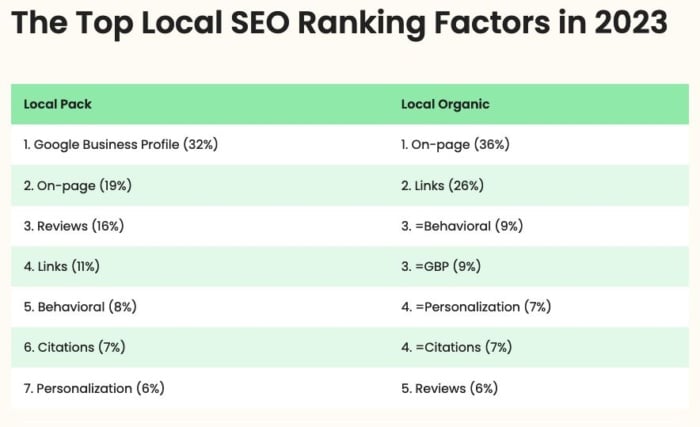
Local SEO is essential for businesses looking to attract customers in their vicinity. To rank well in local search results, it’s crucial to understand the key factors that influence your visibility. Here are some of the most important local SEO ranking factors:

Google My Business Listing

Having a complete and accurate Google My Business profile is vital for local SEO success. Make sure your business name, address, and phone number (NAP) are consistent across all platforms.

Local Citations

Citations from reputable online directories help establish your business’s credibility and improve its local search rankings. Ensure your NAP information is consistent across all citations.

Online Reviews

Positive reviews on platforms like Google, Yelp, and Facebook can boost your local SEO rankings. Encourage satisfied customers to leave feedback and respond promptly to any negative reviews.

Website Quality and Relevance

Your website should be well-designed, mobile-friendly, and contain relevant local keywords. Optimise your site’s meta tags, headings, and content to improve its visibility in local search results.

Local Link Building

Earning backlinks from locally relevant websites can enhance your site’s authority and improve its local search rankings. Engage with other businesses in your area to build valuable links.

On-Page Optimisation

Optimise your website’s title tags, meta descriptions, and image alt text with local keywords to improve its relevance for local searches.

Social Signals

Your social media presence can also impact your local SEO rankings. Stay active on platforms like Facebook, Twitter, and Instagram to engage with local customers and boost your online visibility.

In conclusion, mastering these key local SEO ranking factors can significantly enhance your business’s visibility in local search results. By optimising these elements effectively, you can attract more customers from your target area and grow your business locally.


9 Essential Tips to Boost Your Local SEO Rankings

  1. Optimize your Google My Business listing with accurate information
  2. Include local keywords in your website content and meta tags
  3. Get listed in local directories and citation sites
  4. Encourage online reviews from satisfied customers
  5. Create location-specific landing pages on your website
  6. Ensure your website is mobile-friendly for local searchers
  7. Use structured data markup to help search engines understand your location information
  8. Engage with the local community through social media and events
  9. Monitor your local SEO performance regularly and make adjustments as needed

Optimize your Google My Business listing with accurate information

Optimising your Google My Business listing with accurate information is a crucial step in improving your local SEO rankings. By ensuring that your business name, address, and phone number are consistent and up-to-date, you increase the chances of being discovered by local customers searching for products or services in your area. A complete and accurate GMB profile not only boosts your visibility in local search results but also enhances your credibility as a trustworthy and reliable business in the eyes of potential customers.

Include local keywords in your website content and meta tags

To improve your local SEO ranking, it is crucial to incorporate local keywords strategically within your website content and meta tags. By including relevant local terms that reflect your business’s location and services, you can signal to search engines the geographical relevance of your website. This practice not only helps attract local customers searching for specific products or services in your area but also enhances the overall visibility of your site in local search results. Remember, integrating local keywords thoughtfully can make a significant difference in boosting your online presence and attracting target audiences within your vicinity.

Get listed in local directories and citation sites

Getting listed in local directories and citation sites is a crucial step in improving your local SEO rankings. By having your business information consistently displayed across reputable online directories, you not only increase your online visibility but also establish credibility with search engines. These directories and citation sites help local customers find and connect with your business more easily, ultimately boosting your chances of appearing higher in local search results. Therefore, ensuring that your business details are accurately listed on these platforms can significantly enhance your overall local SEO strategy and drive more organic traffic to your website.

Encourage online reviews from satisfied customers

Encouraging online reviews from satisfied customers is a powerful strategy to boost your local SEO rankings. Positive reviews not only enhance your business’s credibility but also signal to search engines that your business is trustworthy and reliable. By actively seeking feedback from happy customers and responding graciously to their reviews, you can build a positive online reputation that attracts more potential customers to your business. Remember, each glowing review serves as a valuable endorsement that can help elevate your business in local search results, ultimately driving more traffic and leads to your website.

Create location-specific landing pages on your website

Creating location-specific landing pages on your website is a crucial strategy to improve your local SEO ranking. By tailoring content to specific geographic areas, you can target local keywords and provide valuable information to users searching for businesses in those locations. These landing pages not only enhance the user experience but also signal to search engines the relevance of your website for local searches. By incorporating location-specific details, such as addresses, contact information, and testimonials from customers in that area, you can boost your visibility in local search results and attract more qualified leads to your business.

Ensure your website is mobile-friendly for local searchers

Ensuring that your website is mobile-friendly is a crucial tip for improving your local SEO ranking. With the increasing number of users conducting searches on mobile devices, having a responsive and mobile-optimised site is essential to cater to local searchers effectively. A mobile-friendly website not only provides a better user experience but also signals to search engines that your site is relevant and accessible to mobile users, which can positively impact your local search visibility and rankings. By prioritising mobile-friendliness, you can enhance your chances of reaching and engaging with local customers searching for businesses like yours on their smartphones or tablets.

Use structured data markup to help search engines understand your location information

Utilising structured data markup is a powerful strategy to aid search engines in comprehending your location information effectively. By incorporating structured data markup on your website, you provide search engines with clear and organised details about your business’s location, making it easier for them to index and display your site in local search results. This not only enhances the visibility of your business to local customers but also boosts your chances of ranking higher in local SEO, ultimately driving more relevant traffic to your website.

Engage with the local community through social media and events

One effective tip to improve your local SEO ranking is to actively engage with the local community through social media and events. By participating in local events and interacting with residents on platforms like Facebook, Twitter, and Instagram, you can enhance your brand visibility and build relationships with potential customers. This engagement not only boosts your online presence but also signals to search engines that your business is relevant to the local area, ultimately improving your chances of ranking higher in local search results.

Monitor your local SEO performance regularly and make adjustments as needed

Monitoring your local SEO performance regularly and making adjustments as needed is a crucial tip for maintaining and improving your online visibility. By tracking key metrics such as search rankings, website traffic, and customer engagement, you can identify areas that require attention and fine-tune your local SEO strategies accordingly. This proactive approach allows you to stay ahead of the competition, adapt to algorithm changes, and ensure that your business continues to attract local customers effectively. Regular monitoring and adjustments are essential for achieving long-term success in local search results.

the best way to improve search engine ranking is with

The Best Way to Improve Search Engine Ranking is with Quality Content Creation

The Best Way to Improve Search Engine Ranking

The Best Way to Improve Search Engine Ranking

When it comes to boosting your website’s visibility and attracting more organic traffic, improving your search engine ranking is crucial. While there are various strategies and tactics you can employ, one of the most effective ways to achieve higher rankings is through:

Quality Content Creation

Content is king in the world of SEO, and search engines like Google value high-quality, relevant content that provides value to users. By creating compelling and informative content that addresses the needs and interests of your target audience, you not only engage visitors but also signal to search engines that your website is a valuable resource.

Here are some key tips for leveraging quality content to improve your search engine ranking:

  • Keyword Research: Conduct thorough keyword research to identify relevant terms and phrases that your audience is searching for. Incorporate these keywords naturally into your content to enhance its visibility.
  • Originality: Ensure that your content is original, unique, and offers a fresh perspective on the topic. Avoid duplicate content, as it can negatively impact your rankings.
  • User-Focused: Write for your audience first and foremost. Create content that addresses their questions, concerns, and interests while providing valuable insights and solutions.
  • Optimisation: Optimise your content for search engines by including meta tags, headers, alt text for images, and internal links. Make sure your content is well-structured and easy to read.
  • Frequent Updates: Regularly update your website with new content to keep it fresh and relevant. Search engines favour websites that consistently provide updated information.

In conclusion, focusing on quality content creation is undeniably one of the best ways to improve your search engine ranking. By producing valuable, engaging content that resonates with your audience and meets their needs, you can enhance your online visibility, drive more organic traffic, and ultimately climb higher in search engine results pages.


9 Essential Tips to Boost Your Search Engine Ranking Effectively

  1. Create high-quality, relevant content that provides value to your audience.
  2. Use relevant keywords strategically in your content and meta tags.
  3. Optimize your website’s loading speed for better user experience.
  4. Earn backlinks from reputable websites to increase your site’s authority.
  5. Utilize social media platforms to promote your content and engage with users.
  6. Ensure your website is mobile-friendly for a better user experience on all devices.
  7. Regularly update and refresh your content to show search engines that your site is active.
  8. Improve your website’s internal linking structure for easier navigation and indexation by search engines.
  9. Monitor and analyse your website’s performance using tools like Google Analytics to make data-driven improvements.

Create high-quality, relevant content that provides value to your audience.

Creating high-quality, relevant content that offers genuine value to your target audience is a cornerstone of effective search engine optimisation. By focusing on producing content that addresses the needs, interests, and queries of your visitors, you not only establish credibility and authority in your niche but also signal to search engines that your website is a trusted source of information. Engaging and informative content not only attracts and retains visitors but also increases the likelihood of earning backlinks and social shares, which are key factors in boosting your search engine ranking. Ultimately, prioritising the creation of valuable content is a strategic approach that can significantly enhance your online visibility and drive organic traffic to your site.

Use relevant keywords strategically in your content and meta tags.

Strategically incorporating relevant keywords into your content and meta tags is a fundamental technique for enhancing your search engine ranking. By conducting thorough keyword research and seamlessly integrating these keywords into your website’s content and metadata, you can signal to search engines the relevance of your pages to specific search queries. This strategic use of keywords not only helps improve the visibility of your website but also enhances its chances of appearing higher in search engine results, ultimately driving more organic traffic to your site.

Optimize your website’s loading speed for better user experience.

Optimising your website’s loading speed is a crucial strategy to enhance your search engine ranking. A faster loading website not only provides a better user experience but also signals to search engines that your site is reliable and user-friendly. By reducing loading times, you can decrease bounce rates, increase user engagement, and ultimately improve your site’s visibility in search results. Prioritising website speed optimisation is key to attracting and retaining visitors, as well as boosting your overall SEO performance.

Earning backlinks from reputable websites is a powerful strategy to enhance your site’s authority and improve search engine ranking. When high-quality websites link back to your content, search engines view your site as a trusted and valuable resource, boosting its credibility and visibility in search results. Backlinks act as endorsements from other sites, signalling to search algorithms that your content is relevant and deserving of higher rankings. By cultivating relationships with authoritative websites and securing quality backlinks, you can strengthen your site’s authority, attract more organic traffic, and ultimately elevate your position in search engine results pages.

Utilize social media platforms to promote your content and engage with users.

Utilising social media platforms to promote your content and engage with users is a powerful strategy for improving search engine ranking. By sharing your high-quality content across social channels, you not only increase its visibility but also drive traffic back to your website. Engaging with users through comments, shares, and discussions not only builds a loyal community but also signals to search engines that your content is valuable and relevant. Social signals play a significant role in SEO, so leveraging social media as part of your digital marketing strategy can have a positive impact on your search engine rankings.

Ensure your website is mobile-friendly for a better user experience on all devices.

Ensuring that your website is mobile-friendly is paramount for enhancing user experience across all devices and, consequently, improving your search engine ranking. With the increasing number of users accessing the internet via smartphones and tablets, a responsive design that adapts seamlessly to various screen sizes is essential. By prioritising mobile-friendliness, you not only cater to the needs of your audience but also signal to search engines like Google that your site is user-friendly and deserves higher visibility in search results.

Regularly update and refresh your content to show search engines that your site is active.

Regularly updating and refreshing your content is a crucial strategy to enhance your search engine ranking. By consistently adding new, relevant information and keeping your website up-to-date, you signal to search engines that your site is active and engaging for users. This practice not only demonstrates to search engine algorithms that your website is a valuable resource but also encourages higher indexing frequency, leading to improved visibility in search results. Keeping your content fresh and current helps maintain user interest, boosts organic traffic, and ultimately contributes to a stronger online presence.

Improve your website’s internal linking structure for easier navigation and indexation by search engines.

Improving your website’s internal linking structure is a crucial strategy to enhance your search engine ranking. By strategically linking relevant pages within your website, you not only facilitate easier navigation for visitors but also help search engines index and understand the content on your site better. A well-organised internal linking system establishes relationships between different pages, distributes link equity effectively, and improves the overall user experience. This practice not only boosts your SEO efforts but also contributes to higher visibility and credibility in search engine results.

Monitor and analyse your website’s performance using tools like Google Analytics to make data-driven improvements.

Monitoring and analysing your website’s performance using tools such as Google Analytics is a fundamental step in improving your search engine ranking. By delving into the data provided by these tools, you can gain valuable insights into how users interact with your site, which pages are performing well, and where there may be room for enhancement. This data-driven approach allows you to identify trends, track key metrics, and make informed decisions to optimise your website for better visibility and improved search engine rankings.

google local business seo

Maximise Your Local Presence with Google Local Business SEO Strategies

Google Local Business SEO: Boost Your Online Presence Locally

Google Local Business SEO: Boost Your Online Presence Locally

In today’s digital age, having a strong online presence is crucial for businesses of all sizes. When it comes to local businesses, leveraging Google Local Business SEO can significantly enhance visibility and attract more customers in your area.

What is Google Local Business SEO?

Google Local Business SEO is the process of optimising your online presence to appear in local search results on Google. By implementing specific strategies tailored to your location, you can increase your chances of being found by potential customers searching for products or services in your area.

The Benefits of Google Local Business SEO

Optimising your business for local search on Google offers several benefits:

  • Increased Visibility: By appearing in local search results, you can reach customers who are actively looking for businesses like yours in their vicinity.
  • Targeted Traffic: Local SEO helps you attract relevant traffic from people who are more likely to convert into customers.
  • Improved Brand Awareness: Being visible in local searches enhances brand recognition and trust among local consumers.
  • Competitive Edge: Optimising for local SEO can help you stand out from competitors and capture a larger share of the local market.

Key Strategies for Google Local Business SEO

To improve your local search rankings on Google, consider implementing the following strategies:

  1. Optimise Your Google My Business Profile: Ensure your business information is accurate, complete, and up-to-date on Google My Business.
  2. Create Location-Specific Content: Develop content that is relevant to your local audience and includes location-specific keywords.
  3. Acquire Local Citations: Get listed on online directories and websites that mention your business name, address, and phone number (NAP).
  4. Solicit Customer Reviews: Encourage satisfied customers to leave positive reviews on your Google My Business profile.
  5. Optimise Your Website for Local Keywords: Include location-based keywords in your website content, meta tags, and headings.

In Conclusion

Incorporating Google Local Business SEO into your digital marketing strategy can have a significant impact on attracting local customers and growing your business. By following best practices and staying consistent with your efforts, you can boost your online visibility and stay ahead of the competition in the local market.


Top 7 FAQs About Enhancing Your Business with Google Local SEO

  1. What is Google Local Business SEO?
  2. Why is Google Local Business SEO important?
  3. How can I optimise my Google My Business profile for local SEO?
  4. What are some key strategies for improving local search rankings on Google?
  5. How long does it take to see results from Google Local Business SEO efforts?
  6. What are the benefits of acquiring customer reviews for my business’s Google My Business profile?
  7. Is it necessary to have a physical storefront or office location to benefit from Google Local Business SEO?

What is Google Local Business SEO?

Google Local Business SEO refers to the process of optimising a business’s online presence to improve its visibility in local search results on Google. This strategy involves tailoring specific SEO techniques to target a local audience, making it easier for potential customers in the vicinity to discover and engage with the business. By focusing on enhancing local search rankings, businesses can attract more relevant traffic, increase brand awareness within their community, and gain a competitive edge in capturing the attention of nearby consumers actively seeking products or services like theirs.

Why is Google Local Business SEO important?

Google Local Business SEO is crucial for businesses seeking to enhance their online visibility and attract local customers. Optimising for local search on Google can significantly impact a business’s success by increasing visibility in relevant search results, targeting potential customers in the local area, and building brand awareness among the local community. By prioritising Google Local Business SEO strategies, businesses can gain a competitive edge, establish credibility with local consumers, and ultimately drive more foot traffic and online conversions. In essence, Google Local Business SEO is essential for businesses looking to thrive in today’s digital landscape by connecting with their target audience on a local level.

How can I optimise my Google My Business profile for local SEO?

To optimise your Google My Business profile for local SEO, start by ensuring that all information, such as your business name, address, phone number (NAP), and business hours, is accurate and up-to-date. Add high-quality images of your business, products, or services to showcase what you offer visually. Utilise relevant keywords in your business description and include a link to your website for additional information. Encourage satisfied customers to leave positive reviews on your profile as this can boost credibility and attract more local customers. Regularly update posts and offers to engage with your audience and improve visibility in local search results. By following these steps, you can enhance your Google My Business profile’s effectiveness in attracting local customers and improving your overall online presence.

What are some key strategies for improving local search rankings on Google?

When it comes to enhancing local search rankings on Google, implementing key strategies is essential for businesses looking to boost their online visibility. Some effective tactics include optimising your Google My Business profile with accurate information, creating location-specific content that resonates with your local audience, acquiring local citations from reputable directories, encouraging positive customer reviews, and incorporating relevant local keywords throughout your website. By focusing on these strategies and maintaining consistency in your efforts, you can improve your local search rankings on Google and attract more potential customers in your area.

How long does it take to see results from Google Local Business SEO efforts?

When it comes to Google Local Business SEO efforts, one frequently asked question is, “How long does it take to see results?” The timeline for seeing tangible results from your local SEO strategies can vary depending on various factors such as the competitiveness of your industry, the current state of your online presence, and the effectiveness of your optimisation efforts. Generally, businesses may start noticing improvements in their local search rankings and online visibility within a few weeks to a few months after implementing targeted SEO strategies. Consistent monitoring, analysis, and adjustments to your approach can help accelerate the progress and ensure long-term success in local search results.

What are the benefits of acquiring customer reviews for my business’s Google My Business profile?

Acquiring customer reviews for your business’s Google My Business profile offers a multitude of benefits. Positive reviews not only enhance your credibility and reputation but also play a crucial role in influencing potential customers’ purchasing decisions. By showcasing authentic feedback from satisfied clients, you can establish trust and build a positive brand image within your local community. Moreover, Google considers customer reviews as a ranking factor, meaning that businesses with a higher number of positive reviews are more likely to appear prominently in local search results, thereby increasing visibility and attracting more organic traffic to your website or physical location. In essence, customer reviews on your Google My Business profile serve as powerful testimonials that can drive growth and success for your business in the competitive digital landscape.

Is it necessary to have a physical storefront or office location to benefit from Google Local Business SEO?

For businesses wondering about the necessity of having a physical storefront or office location to reap the benefits of Google Local Business SEO, the answer lies in the nature of local search visibility. While having a physical location can certainly enhance your local SEO efforts by providing a point of contact for customers and reinforcing your local presence, it is not always a strict requirement. Businesses without a physical storefront can still benefit from Google Local Business SEO by focusing on other aspects such as service areas, customer testimonials, and building a strong online presence through website optimisation and local citations. Ultimately, while a physical location can be advantageous, businesses can leverage various strategies to improve their visibility in local search results even without one.

local seo google my business

Unlocking Local SEO Success with Google My Business: A Guide for UK Businesses

The Power of Local SEO with Google My Business

The Power of Local SEO with Google My Business

Local SEO is a crucial aspect of digital marketing for businesses looking to attract customers in their geographic area. One powerful tool that can significantly boost your local search visibility is Google My Business.

What is Google My Business?

Google My Business is a free and easy-to-use tool provided by Google that allows businesses to manage their online presence across the search engine and its various platforms, including Google Search and Google Maps. By creating a Google My Business listing, you can provide essential information about your business, such as your address, phone number, business hours, and website.

The Benefits of Local SEO with Google My Business

Optimising your business listing on Google My Business can have several benefits for your local SEO strategy:

  • Improved Visibility: A well-optimised Google My Business listing can help your business appear in local search results when potential customers are looking for products or services you offer in your area.
  • Increased Website Traffic: By providing accurate information on your listing, such as your website URL, you can drive more traffic to your website from users who discover your business through Google Search or Maps.
  • Enhanced Credibility: Having a verified and up-to-date Google My Business profile adds credibility to your business in the eyes of potential customers. Positive reviews and high ratings can also build trust and encourage more people to choose your business.
  • Local Engagement: Interacting with customers through features like messaging and responding to reviews on your listing can help you engage with the local community and build relationships with customers.

Tips for Optimising Your Google My Business Listing

To make the most of local SEO with Google My Business, consider implementing these best practices:

  1. Create a Complete Profile: Fill out all sections of your profile accurately, including business categories, photos, and contact information.
  2. Add Posts and Updates: Share posts about promotions, events, or new products/services to keep customers informed and engaged.
  3. Solicit Reviews: Encourage satisfied customers to leave positive reviews on your listing to boost credibility and attract more customers.
  4. Monitor Insights: Use the insights provided by Google My Business to track how users interact with your listing and make data-driven decisions for improvement.

In conclusion, leveraging the power of local SEO through an optimised presence on Google My Business can help businesses connect with local consumers effectively. By following best practices and regularly updating your listing, you can enhance visibility, credibility, and engagement within your target market.


Optimising Your Google My Business Profile: 8 Essential Local SEO Tips

  1. Ensure your Google My Business profile is complete and accurate with your business name, address, phone number, and website URL.
  2. Select the most relevant categories for your business on Google My Business to improve local search visibility.
  3. Regularly update your business hours, services offered, and any promotions on your Google My Business listing.
  4. Encourage satisfied customers to leave positive reviews on your Google My Business profile to build credibility and attract more customers.
  5. Include high-quality images of your business premises, products, and services on your Google My Business listing to engage potential customers.
  6. Respond promptly to customer reviews and messages on Google My Business to show that you value customer feedback.
  7. Use local keywords in your business description and posts on Google My Business to improve search engine rankings for local searches.
  8. Monitor insights provided by Google My Business to track how users interact with your listing and make data-driven decisions for optimization.

Ensure your Google My Business profile is complete and accurate with your business name, address, phone number, and website URL.

To maximise your local SEO impact using Google My Business, it is essential to ensure that your business listing is complete and accurate. Include vital information such as your business name, address, phone number, and website URL. A fully optimised profile not only helps potential customers find and contact you easily but also signals to search engines that your business is legitimate and trustworthy. By providing accurate details, you enhance your chances of appearing in local search results and driving more traffic to your website, ultimately boosting your online visibility and attracting local customers.

Select the most relevant categories for your business on Google My Business to improve local search visibility.

Selecting the most relevant categories for your business on Google My Business is a crucial tip to enhance your local search visibility. By accurately choosing categories that best describe your products or services, you increase the chances of appearing in relevant local search results. This strategic step not only helps potential customers find your business more easily but also signals to search engines the nature of your offerings, ultimately boosting your online presence in the local market.

Regularly update your business hours, services offered, and any promotions on your Google My Business listing.

To maximise the impact of your local SEO strategy using Google My Business, it is essential to regularly update crucial information such as your business hours, services provided, and any ongoing promotions on your listing. By keeping this information up-to-date and accurate, you not only ensure that potential customers have access to the latest details about your business but also improve your chances of appearing in local search results. Consistent updates demonstrate to both Google’s algorithm and users that your business is active and relevant, ultimately boosting your visibility and credibility within your target market.

Encourage satisfied customers to leave positive reviews on your Google My Business profile to build credibility and attract more customers.

Encouraging satisfied customers to leave positive reviews on your Google My Business profile is a highly effective strategy in enhancing your local SEO efforts. By showcasing testimonials from happy clients, you not only build credibility and trust with potential customers but also improve your visibility in local search results. Positive reviews act as social proof of your business’s quality and reliability, which can significantly influence other consumers to choose your products or services. Ultimately, this proactive approach to managing online reviews can help attract more customers and establish a strong reputation within your community.

Include high-quality images of your business premises, products, and services on your Google My Business listing to engage potential customers.

Including high-quality images of your business premises, products, and services on your Google My Business listing is a crucial tip for boosting local SEO. Visual content plays a significant role in engaging potential customers and giving them a glimpse of what your business has to offer. By showcasing appealing images that accurately represent your brand, you can capture the attention of users searching for local businesses and increase the likelihood of them choosing your establishment. High-quality photos not only enhance the visual appeal of your listing but also build credibility and trust with prospective customers, ultimately driving more traffic and conversions to your business.

Respond promptly to customer reviews and messages on Google My Business to show that you value customer feedback.

Responding promptly to customer reviews and messages on Google My Business is a crucial aspect of local SEO strategy. By engaging with customer feedback in a timely manner, businesses demonstrate their commitment to customer satisfaction and show that they value the opinions of their clientele. Prompt responses not only foster a positive relationship with customers but also contribute to building trust and credibility for the business. This proactive approach not only enhances the overall customer experience but also plays a significant role in improving local search visibility and attracting more potential customers to the business.

Use local keywords in your business description and posts on Google My Business to improve search engine rankings for local searches.

To enhance your local SEO strategy on Google My Business, it is essential to incorporate local keywords into your business description and posts. By including relevant terms that reflect your location and target audience in your content, you can improve your search engine rankings for local searches. Utilising local keywords helps search engines connect your business with users searching for products or services in your area, increasing the visibility of your listing and attracting potential customers looking for businesses like yours nearby.

Monitor insights provided by Google My Business to track how users interact with your listing and make data-driven decisions for optimization.

Monitoring insights provided by Google My Business is a crucial tip for enhancing your local SEO strategy. By tracking how users engage with your business listing, you can gather valuable data that informs your decision-making process. Understanding metrics such as search queries, customer actions, and profile views allows you to identify trends and opportunities for optimisation. By utilising these insights effectively, you can refine your online presence, improve user experience, and ultimately drive more traffic and conversions to your business.

google news seo

Mastering Google News SEO for Enhanced Online Visibility

Enhancing Your Online Visibility with Google News SEO

Enhancing Your Online Visibility with Google News SEO

In today’s fast-paced digital world, staying ahead of the competition requires more than just a well-designed website. With the vast amount of content available online, getting your news articles noticed can be a challenging task. This is where Google News SEO comes into play.

What is Google News SEO?

Google News SEO refers to the practice of optimising your news content to appear prominently in Google News search results. By implementing specific strategies and best practices, you can increase the visibility of your news articles and reach a wider audience.

Key Strategies for Google News SEO

Publish High-Quality Content: Creating informative, timely, and relevant news articles is essential for Google News SEO success. Focus on providing valuable content that engages readers and encourages them to share your articles.

Optimise Metadata: Pay attention to your article titles, meta descriptions, and URLs. Use relevant keywords that accurately reflect the content of your news articles to improve their visibility in search results.

Utilise Structured Data: Implement structured data markup such as schema.org to provide search engines with additional context about your news articles. This can help search engines understand the content better and display rich snippets in search results.

Focus on Site Speed: Ensure that your website loads quickly on both desktop and mobile devices. Site speed is a crucial ranking factor for Google News, so optimising your site’s performance can positively impact your visibility in search results.

The Benefits of Google News SEO

By incorporating Google News SEO strategies into your content creation process, you can enjoy several benefits:

  • Increased Visibility: Appearing in Google News search results can significantly boost the visibility of your news articles and drive more traffic to your website.
  • Better Credibility: Being featured in Google News lends credibility to your brand and establishes you as a trusted source of information within your industry.
  • Expanded Reach: With improved visibility in Google News, you have the opportunity to reach a broader audience and attract new readers to your website.
  • Higher Engagement: Optimised news articles are more likely to attract clicks and engagement from users who are actively seeking relevant information.

In Conclusion

Incorporating Google News SEO best practices into your content strategy can have a significant impact on the success of your news articles online. By focusing on creating high-quality content, optimising metadata, utilising structured data, and improving site speed, you can enhance your online visibility and attract more readers to your website through Google News.


Enhance Your Google News SEO: 8 Essential Tips for Optimising Content and Visibility

  1. 1. Create high-quality, relevant content for your Google News articles.
  2. 2. Use clear and descriptive headlines that accurately represent the article’s content.
  3. 3. Optimise your articles for search engines by including relevant keywords in the title and throughout the content.
  4. 4. Ensure your website is mobile-friendly to improve user experience and SEO rankings.
  5. 5. Regularly update your website with fresh news content to keep readers engaged and improve visibility on Google News.
  6. 6. Utilise structured data markup to help Google understand the context of your news articles better.
  7. 7. Focus on building backlinks from reputable sources to increase the authority of your news website.
  8. 8. Monitor performance using Google Search Console and make adjustments based on analytics data.

1. Create high-quality, relevant content for your Google News articles.

Creating high-quality, relevant content is paramount when it comes to optimising your Google News articles for search visibility. By focusing on producing timely and informative news pieces that resonate with your target audience, you not only enhance the credibility of your brand but also increase the likelihood of your articles being featured prominently in Google News search results. Quality content that addresses the interests and needs of readers not only attracts more traffic to your website but also establishes you as a reliable source of information within your industry.

2. Use clear and descriptive headlines that accurately represent the article’s content.

To enhance your visibility on Google News, it is crucial to utilise clear and descriptive headlines that accurately portray the content of your articles. By crafting headlines that succinctly summarise the essence of the article, you not only improve the chances of your content being discovered but also provide users with a clear expectation of what they will find. Clear and descriptive headlines help search engines understand the relevance of your news articles, increasing the likelihood of them appearing in relevant search results and attracting more readers to engage with your content.

3. Optimise your articles for search engines by including relevant keywords in the title and throughout the content.

To enhance your visibility on Google News, it is crucial to optimise your articles for search engines by strategically incorporating relevant keywords in the title and throughout the content. By including these keywords, you can improve the chances of your news articles being discovered by users searching for related topics. Ensuring that the keywords are seamlessly integrated into the content not only boosts your article’s search engine ranking but also enhances its relevance to the target audience, ultimately driving more traffic to your website.

4. Ensure your website is mobile-friendly to improve user experience and SEO rankings.

Ensuring that your website is mobile-friendly is a crucial aspect of Google News SEO. With an increasing number of users accessing news articles on their mobile devices, having a responsive design that adapts to different screen sizes is essential for providing a seamless user experience. Not only does a mobile-friendly website enhance usability and readability for visitors, but it also positively impacts your SEO rankings. Google prioritises mobile-friendly websites in its search results, making it easier for your news articles to be discovered by a wider audience and improving your overall online visibility. By optimising your site for mobile devices, you not only cater to the preferences of modern users but also boost your chances of ranking higher in search engine results pages.

5. Regularly update your website with fresh news content to keep readers engaged and improve visibility on Google News.

To enhance your visibility on Google News and keep readers engaged, it is crucial to follow the tip of regularly updating your website with fresh news content. By consistently publishing new and relevant articles, you not only cater to the interests of your audience but also signal to search engines that your website is active and authoritative. This proactive approach can lead to improved visibility in Google News search results, attracting more readers and establishing your brand as a reliable source of up-to-date information in the digital landscape.

6. Utilise structured data markup to help Google understand the context of your news articles better.

To enhance your Google News SEO strategy, it is crucial to utilise structured data markup effectively. By incorporating schema.org markup and other structured data formats, you can provide valuable context to Google about the content of your news articles. This helps search engines better understand the relevance and significance of your articles, ultimately improving their visibility in search results. Implementing structured data markup is a powerful technique that can elevate the performance of your news content and attract more readers to engage with your articles.

To enhance the authority of your news website in Google News SEO, it is crucial to focus on building backlinks from reputable sources. Backlinks from high-quality and credible websites not only signal to search engines that your content is trustworthy and valuable but also help increase the overall authority of your news website. By establishing a network of quality backlinks, you can improve your website’s visibility in Google News search results and attract a larger audience to your news articles.

8. Monitor performance using Google Search Console and make adjustments based on analytics data.

To maximise the effectiveness of your Google News SEO strategy, it is crucial to monitor performance using Google Search Console and make informed adjustments based on analytics data. By regularly analysing key metrics such as click-through rates, impressions, and keyword performance, you can gain valuable insights into the performance of your news articles. This data allows you to identify areas for improvement, refine your content strategy, and optimise your website for better visibility in Google News search results. Continuous monitoring and analysis enable you to adapt to changing trends and audience preferences, ultimately enhancing the impact of your SEO efforts on Google News.