local presence seo

Local Presence SEO: A Practical Guide to Getting Found in Your Area

Local Presence SEO: How to Help Nearby Customers Find Your Business

When people search for a service or product nearby, they often want to act quickly. They may be looking for a café around the corner, a plumber in their area or a shop they can visit today. Local presence SEO helps businesses appear in these location-based searches and gives potential customers the information they need to choose and contact them.

Building a strong local presence involves more than adding a town name to a website. It means making your business details clear and consistent, creating useful local content and earning the trust of customers in the areas you serve.

What is local presence SEO?

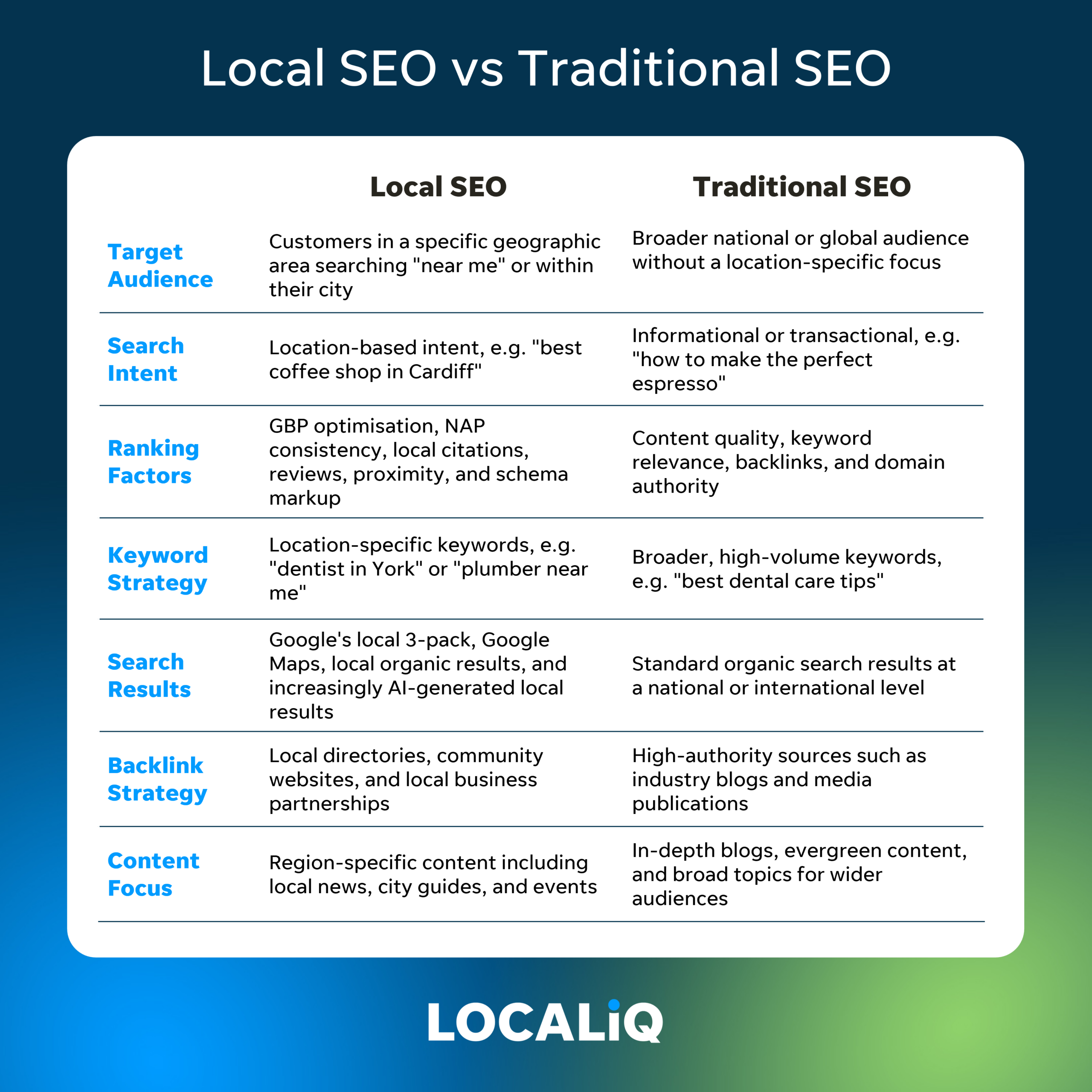
Local presence SEO is the work of improving how visible a business is in search results for a particular place or service area. This can include searches such as “accountant in Bristol” or “coffee shop near me”. It also helps search engines understand where a business operates and which customers it serves.

Local results can appear in several places, including map listings, business profiles and standard website results. The exact results vary depending on the search, the user’s location and other factors.

Keep your business information accurate

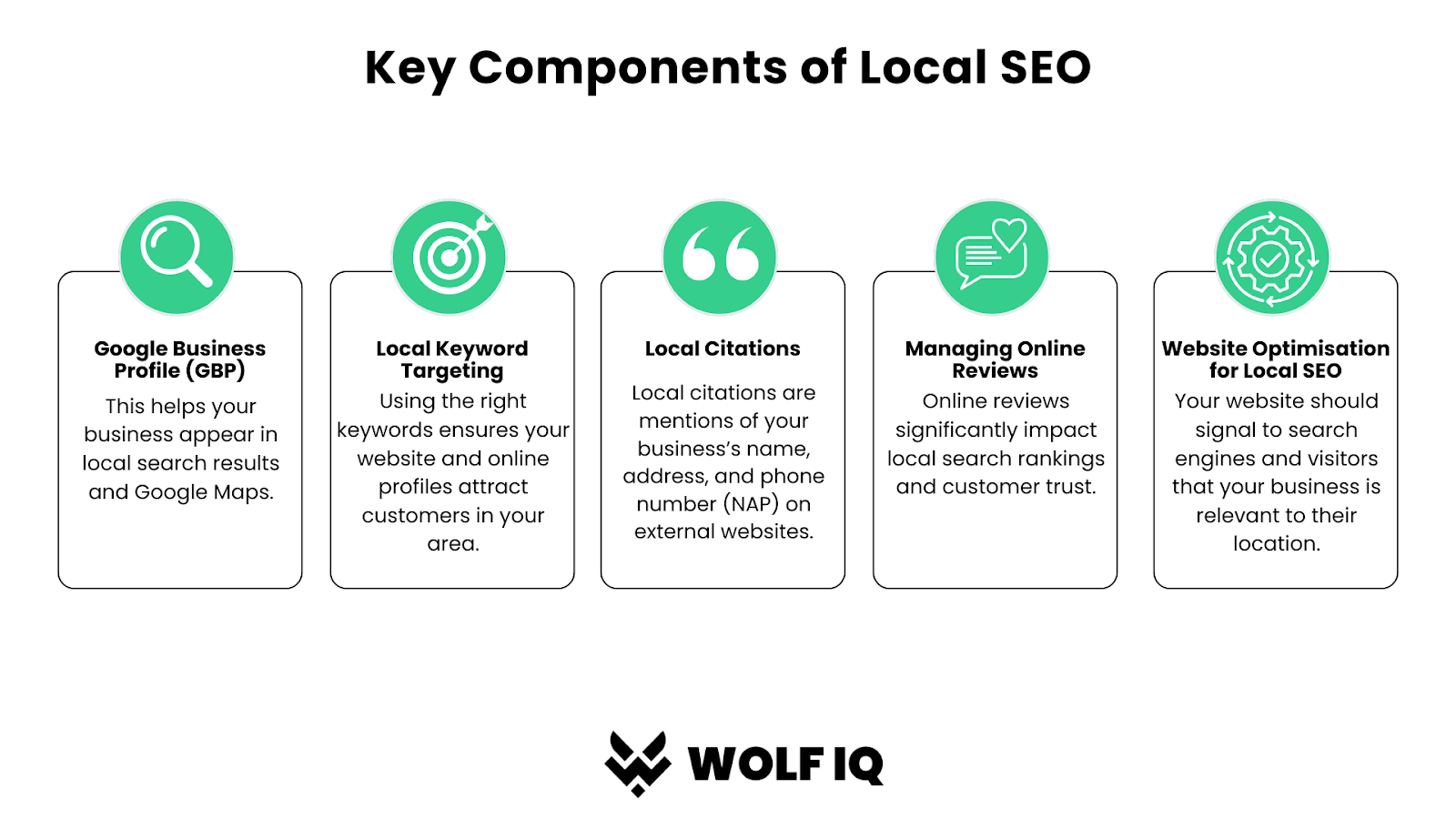
Search engines and customers need reliable information. Check that your business name, address, phone number, website and opening hours are correct wherever they appear online. These details are often referred to as NAP information: name, address and phone number.

Use the same business name and contact details across your website, business profiles and relevant directories. If you move premises, change your phone number or alter your opening hours, update your listings promptly. Inconsistent or outdated information can confuse customers and make it harder for them to reach you.

Make the most of your Google Business Profile

For many businesses, a Google Business Profile is an important part of local SEO. Complete the profile with accurate details, select relevant categories and describe your services in straightforward language. Add suitable photographs and keep your opening hours up to date, including any seasonal changes.

Use the profile to share useful updates where appropriate, such as new services, events or changes to your opening hours. Avoid adding information that is misleading or does not reflect what the business actually offers.

Create useful local website content

Your website should make it easy for visitors to understand what you do and where you do it. Include your service areas naturally on relevant pages, rather than repeating place names unnaturally throughout the site.

If you serve several locations, consider creating a dedicated page for each area where you genuinely operate. Each page should provide helpful, specific information, such as the services available, local contact details or what customers can expect. Avoid publishing near-identical pages that differ only by the name of a town; thin or repetitive content offers little value to visitors.

Local guides, project examples, community news and answers to common customer questions can also make your website more useful. Keep the focus on information your audience will genuinely find valuable.

Build trust through customer reviews

Reviews can help potential customers decide whether to contact your business. Invite customers to leave honest feedback after a genuine interaction, and make it easy for them to find the right review platform. Never buy reviews or offer incentives in exchange for positive ratings.

Respond professionally to reviews, including critical ones. A considerate response can show that you take feedback seriously. Do not share private customer information when replying.

Earn relevant local mentions

Links and mentions from reputable local organisations can help people discover your business and provide useful context about your community connections. Opportunities might include local business associations, community groups, event partners or relevant local publications.

Focus on genuine relationships and worthwhile contributions. A relevant mention is more valuable than a large number of low-quality directory listings created solely to influence rankings.

Make your website easy to use on mobile

Many local searches happen on mobile phones, often when someone is ready to call, get directions or compare nearby options. Make sure your website works well on smaller screens, loads efficiently and displays key information clearly.

Include easy-to-find contact details, opening hours and directions where relevant. Test forms and phone links to make sure they work as expected.

Measure what matters

Local SEO takes time, so track meaningful indicators rather than relying on a single ranking. Useful measures may include website visits from local searches, calls, direction requests, enquiries, bookings and visits to important service pages.

Review your results regularly and look for patterns. For example, you may find that one service page brings in more enquiries, or that customers often search for a particular service in a specific area. Use those insights to improve your website and business information.

Build your local presence consistently

Local presence SEO is an ongoing process. Accurate business details, helpful local content, positive customer experiences and a well-maintained website all contribute to a stronger online presence. By keeping these elements consistent and focusing on what local customers need, your business can become easier to find and easier to choose.


9 Essential Tips for Enhancing Your Local Presence SEO

  1. Claim and verify your Google Business Profile.
  2. Keep your business name, address and phone number consistent.
  3. Choose accurate business categories and services.
  4. Add clear, current photos of your premises and work.
  5. Keep opening hours updated, including bank holidays.
  6. Ask happy customers for honest reviews.
  7. Reply promptly and professionally to every review.
  8. Create local pages with useful, location-specific information.
  9. Earn links and mentions from trusted local organisations.

Claim and verify your Google Business Profile.

Claiming and verifying your Google Business Profile helps you manage how your business appears on Google Search and Maps. Once verified, you can keep essential details—such as your address, phone number, opening hours and services—accurate, add photos and respond to customer reviews. Complete, up-to-date information makes it easier for nearby customers to find and contact you, while helping Google understand your business and where it operates.

Keep your business name, address and phone number consistent.

Keep your business name, address and phone number (often called NAP details) consistent across your website, Google Business Profile and other online directories. Even small differences, such as an old phone number or an abbreviated street name, can confuse potential customers and make it harder for search engines to verify your details. Check your listings regularly and update them promptly whenever your contact information changes.

Choose accurate business categories and services.

Choose the most accurate business categories and services for your online listings so search engines and potential customers can quickly understand what you offer. Select a primary category that best describes your main business, then add relevant secondary categories and specific services where available. Avoid choosing categories simply because they seem popular: precise, honest information is more useful and helps your business appear for searches that genuinely match what you do.

Add clear, current photos of your premises and work.

Add clear, up-to-date photos of your premises and work to help potential customers know what to expect before they get in touch. Show your location, team, products or completed projects in good lighting, and replace outdated images when your business or services change. Make sure every photo is genuine, relevant and of good quality, so it builds trust and gives people a clearer sense of your local business.

Keep opening hours updated, including bank holidays.

Keep your opening hours accurate across your website and business listings, including changes for bank holidays and seasonal periods. Up-to-date hours help local customers know when they can visit or get in touch, prevent frustrating wasted journeys and give search engines reliable information about your business. Check your listings ahead of each holiday and update them as soon as your hours change.

Ask happy customers for honest reviews.

Ask happy customers to leave an honest review after a positive experience. Reviews can help people in your area feel more confident choosing your business and give you useful feedback on what you do well. Make it easy for customers to share their thoughts, but never pressure them, offer rewards for positive ratings or ask them to say anything they don’t genuinely believe. Respond courteously to all feedback to show that you value your customers.

Reply promptly and professionally to every review.

Replying promptly and professionally to every review shows customers that you value their feedback and take their experience seriously. Thank reviewers for positive comments, and respond to criticism calmly by acknowledging their concerns and offering a helpful next step. Keep replies courteous, personal and free of confidential information. Consistent, thoughtful responses can build trust with potential customers and strengthen your local reputation.

Create local pages with useful, location-specific information.

Create local pages that offer genuinely useful information for each area your business serves. Explain which services are available there, include relevant contact details and opening hours, and answer questions local customers are likely to have. You could also share local project examples or practical details about serving the area. Avoid simply swapping town names across near-identical pages; original, location-specific content is more helpful to visitors and gives search engines clearer context about your local presence.

Earn links and mentions from trusted local organisations to strengthen your local presence and help nearby customers discover your business. Build genuine relationships with community groups, business associations, charities, event organisers and local publications, and look for useful ways to contribute or collaborate. A relevant mention on a respected local website can bring visitors to your site and reinforce your connection to the area. Focus on authentic partnerships rather than collecting links for their own sake.

local seo strategy 2021

Local SEO Strategy 2021: A Practical Guide for UK Businesses

Local SEO Strategy for 2021: A Practical Guide

Local search engine optimisation (SEO) helps businesses appear when people nearby search for relevant products or services. In 2021, that meant more than adding a town name to a website. Businesses needed accurate online listings, useful local content and a strong reputation across search and review platforms.

This guide looks at the core elements of a local SEO strategy for 2021, including Google My Business (now Google Business Profile), local keywords, reviews and performance tracking.

Optimise Your Google My Business Profile

For many local searches, a Google My Business listing was one of the first things a potential customer saw. Keeping it complete and accurate helped customers understand what a business offered and how to contact or visit it.

In 2021, businesses could strengthen their profile by:

  • Using the correct business name, address and phone number.
  • Choosing the most relevant primary and secondary categories.
  • Adding opening hours, services and a clear business description.
  • Uploading recent, high-quality photographs.
  • Publishing updates, offers or event announcements through Google Posts.
  • Checking that the business’s service area and location details were accurate.

Businesses should follow Google’s guidelines and avoid adding promotional keywords to their business name. Consistency and accuracy matter more than trying to manipulate the listing.

Research Local Keywords

Local keyword research reveals how people search for services in a particular area. A useful starting point is to combine the service with a location, such as “electrician in Manchester” or “accountant near me”. Search terms may also include neighbourhoods, nearby landmarks or phrases such as “open now”.

Use keyword research tools alongside Google Search suggestions and conversations with customers. The aim is to understand the language people use, not to insert every possible phrase into a page. Each important service or location should have a clear purpose on the website.

Create Helpful Local Landing Pages

A well-written location page can explain what a business offers in a specific area and make it easier for customers to take the next step. Include genuinely useful details, such as the services available, areas covered, contact information and practical information about visiting or booking.

Avoid creating large numbers of nearly identical pages that differ only by town name. Thin, repetitive pages offer little value to visitors. Instead, make each page distinct and relevant to the people it serves.

Keep Business Information Consistent

Search engines and customers need to find reliable information about a business. Keep the business name, address and phone number (often referred to as NAP) consistent across the website, Google My Business and important directories.

Check existing listings for outdated addresses, duplicate profiles or incorrect telephone numbers. Correcting these details can also prevent customers from contacting the wrong number or travelling to an old location.

Earn and Respond to Reviews

Reviews can influence a customer’s decision and help communicate the quality of a business. Make it easy for satisfied customers to leave honest feedback, but do not offer incentives in exchange for reviews or write reviews on their behalf.

Respond to reviews in a professional and timely way. Thank customers for positive comments, and address negative feedback calmly. Where appropriate, take the conversation offline to resolve individual concerns.

Build Local Authority and Links

Links from relevant, reputable local websites can help people discover a business and provide useful context about its role in the community. Consider opportunities such as local news coverage, business associations, community organisations, charities and genuine partnerships.

Focus on relationships and relevance rather than buying links or pursuing large volumes of low-quality directory listings. A small number of meaningful local mentions is more valuable than a collection of irrelevant links.

Make the Website Mobile-Friendly

Many local searches take place on mobile devices, often when someone is ready to call, book or visit. A local business website should load quickly, display clearly on smaller screens and make key actions easy to find.

Check that phone numbers can be tapped to call, contact forms work correctly and directions are straightforward to access. Clear navigation and accurate opening hours also help visitors find what they need.

Add Structured Data Where Appropriate

Local business structured data can help search engines interpret details such as a business’s name, address, telephone number and opening hours. In 2021, businesses could use the relevant Schema.org markup, provided the information matched what visitors could see on the website.

Structured data does not guarantee enhanced search results, and it should not be used to present misleading or hidden information. Validate the markup and keep it updated whenever business details change.

Track Results and Make Improvements

Local SEO is an ongoing process. Use tools such as Google Search Console and Google Analytics to monitor organic traffic, search queries and website activity. Google My Business insights can also provide information about how customers found and interacted with a listing.

Look beyond rankings alone. Calls, enquiries, bookings, direction requests and completed purchases can give a clearer picture of whether the strategy is supporting business goals. Review performance regularly and update pages or listings when you spot inaccurate details or changing customer needs.

Putting a Local SEO Strategy into Practice

A strong local SEO strategy for 2021 brought together accurate business listings, relevant website content, positive customer experiences and a mobile-friendly site. Start with the basics: update the Google My Business profile, check business details across the web and make sure important service pages answer customers’ questions.

From there, build local visibility steadily through useful content, genuine community relationships and thoughtful review management. Consistent, customer-focused work can help a business become easier to find—and easier to choose—in local search results.


Essential Local SEO Strategies for 2021: 8 Tips to Boost Your Business Visibility

  1. Claim and verify your Google My Business profile.
  2. Keep your name, address and phone number consistent everywhere.
  3. Choose accurate categories and add relevant services.
  4. Publish local updates, offers and photos regularly.
  5. Ask satisfied customers for honest reviews and reply to them.
  6. Create pages for each location you serve.
  7. Earn links from local organisations and publications.
  8. Make your website mobile-friendly and fast.

Claim and verify your Google My Business profile.

Claiming and verifying your Google My Business profile was an essential first step in a local SEO strategy in 2021. Verification helped confirm that you were authorised to manage the listing, while giving you control over important details such as your business name, address, phone number, opening hours and services. Keep this information accurate and consistent with your website, choose the most relevant business categories, and add clear photos to help local customers find and trust your business.

Keep your name, address and phone number consistent everywhere.

Keep your business name, address and phone number (NAP) accurate and consistent across your website, Google My Business profile and online directories. Even small differences—such as an old phone number or an inconsistent address format—can confuse potential customers and make it harder for search engines to match your listings. Check key platforms regularly, correct outdated details and remove duplicate listings so people can contact or visit you with confidence.

Choose accurate categories and add relevant services.

Choose the most accurate primary category for your business, then add relevant secondary categories and services where available. These details help Google understand what you offer and when your listing may be useful to local searchers. Be specific, keep the information up to date and only select categories and services that genuinely match your business—irrelevant choices can confuse potential customers and weaken the accuracy of your listing.

Publish local updates, offers and photos regularly.

Publish local updates, offers and photos regularly to keep your Google My Business profile useful, current and engaging. Share timely news about your services, local events or seasonal promotions, and use clear, high-quality images that show your premises, team or products. Regular activity can help potential customers understand what’s happening at your business and give them a reason to get in touch, while keeping all information accurate and following Google’s guidelines.

Ask satisfied customers for honest reviews and reply to them.

Encourage satisfied customers to leave an honest review on platforms such as Google, making it easy for them to share their experience without offering incentives or pressuring them. Reviews can build trust and help prospective customers choose your business. Take time to reply to both positive and negative feedback: thank customers for their comments, and respond to concerns politely and constructively. This shows that you value customer feedback and are committed to providing a good service.

Create pages for each location you serve.

Create a dedicated page for each location your business serves to help local customers find relevant information quickly. Include useful, location-specific details such as the services available, areas covered, contact information and directions, rather than simply changing the place name on an otherwise identical page. Each page should offer genuine value to visitors, use clear language and make it easy to get in touch or make a booking.

Earn links from reputable local organisations and publications to strengthen your visibility and connect your business with the community. Consider contributing expert advice to a local news site, sponsoring a community event, joining a business association or partnering with a charity. Focus on genuine relationships and relevant coverage rather than buying links or submitting your website to low-quality directories; a few trustworthy local links can be more valuable than many unrelated ones.

Make your website mobile-friendly and fast.

Make sure your website is fast and easy to use on mobile, as local customers often search while they’re out and ready to call, book or visit. Use a responsive design, compress large images and remove unnecessary features that slow pages down. Keep key information—such as your phone number, opening hours, address and booking options—easy to find, and make buttons simple to tap. A smooth mobile experience helps visitors get what they need quickly and can support stronger local SEO performance.

mobile seo marketing

Mobile SEO Marketing: A Practical Guide to Reaching Customers on Their Phones

Mobile SEO Marketing: How to Reach Customers on Their Phones

Mobile SEO marketing is the practice of improving a website’s visibility and usability for people searching on smartphones and other mobile devices. It brings together search engine optimisation (SEO), mobile-friendly design and an understanding of how people search when they are on the move.

A strong mobile experience can help your business appear in relevant search results, make it easier for visitors to find what they need and encourage them to take action. It is not simply a matter of shrinking a desktop website to fit a smaller screen: mobile visitors may have different needs, search habits and expectations.

Why mobile SEO matters

People use mobile devices to research products, compare services, find nearby businesses and make purchases. Searches can be brief and immediate, especially when someone is looking for directions, opening times or a service close to their current location.

Google primarily uses the mobile version of a site for indexing and ranking. This means that important content, links and metadata should be available and accessible on mobile, as well as on desktop. A website that works well on a phone is also more convenient for visitors, which can make it easier for them to browse, contact a business or complete a purchase.

Make your website mobile-friendly

Responsive design is generally the simplest approach. It allows a website’s layout to adapt to different screen sizes while keeping content and URLs consistent. Visitors should not need to zoom in, scroll sideways or struggle to tap links and buttons.

  • Use readable text sizes and clear headings.
  • Give buttons and links enough space to tap comfortably.
  • Keep navigation simple and easy to use on a small screen.
  • Make forms short, clear and straightforward to complete.
  • Check that pop-ups do not obscure essential content.

Test key pages on a range of devices and screen sizes. Pay particular attention to pages that generate enquiries or sales, such as contact forms, booking pages and product listings.

Improve mobile page speed

Mobile users may be browsing on a slower connection, so pages should load efficiently. Large images, unnecessary scripts and heavy page designs can make a site feel slow and difficult to use.

Practical improvements include compressing images, using modern image formats where appropriate, reducing unused code and limiting third-party scripts. Review Google’s Core Web Vitals alongside real user data to understand how quickly pages load and how stable and responsive they feel. Performance can vary between devices and connections, so testing only on a fast office network may not reveal the whole picture.

Match content to mobile search intent

Mobile searches often have a specific purpose. Someone searching for “plumber near me” may want a local business they can call, while someone searching for “how to fix a dripping tap” may be looking for practical instructions. Research the questions and phrases your audience uses, then create useful content that meets those needs.

Make important information easy to find near the top of the page. Use concise paragraphs, descriptive subheadings and clear calls to action. This does not mean making every page extremely short; it means organising useful information so readers can scan it and find relevant details quickly.

Strengthen local mobile SEO

Local SEO is particularly important for mobile marketing because people often search for businesses and services nearby. Keep your business name, address and telephone number accurate and consistent across your website and relevant online listings. Create or maintain a Google Business Profile, choose appropriate categories and add up-to-date opening hours.

Make it easy for mobile visitors to call, get directions or make an appointment. Location pages can also help, provided they offer genuinely useful information rather than repeating near-identical content for multiple areas.

Check mobile technical SEO

Good mobile SEO depends on search engines being able to access and understand your pages. Check that mobile pages are not blocked from crawling, that important content is not hidden in a way that prevents access, and that page titles and meta descriptions are accurate. Structured data should reflect visible, up-to-date information on the page.

Also review internal links, image descriptions and canonical tags. If the mobile and desktop versions of a site use different URLs, make sure they are configured correctly; for most sites, responsive design avoids much of this additional complexity.

Measure performance and keep improving

Use tools such as Google Search Console and analytics software to monitor mobile traffic, search impressions, clicks and conversions. Look at performance by device and landing page. A page may attract plenty of visits but still need improvement if visitors cannot find key information or complete the next step.

Track meaningful outcomes, such as calls, form submissions, bookings and purchases, rather than relying on rankings alone. Test changes carefully and review the results over time, as search behaviour and website performance can vary by season and audience.

Common mobile SEO mistakes

  • Removing useful content from the mobile version of a page.
  • Using small text, crowded menus or hard-to-tap controls.
  • Allowing images and scripts to slow down important pages.
  • Showing intrusive pop-ups that interrupt visitors.
  • Ignoring local details such as opening hours and contact information.
  • Optimising for keywords without answering the visitor’s question.

Build a better mobile experience

Effective mobile SEO marketing combines discoverability with a useful, accessible experience. Start by checking how your key pages look and perform on phones, make essential information easy to find, and ensure that visitors can take action without unnecessary effort. By reviewing both search visibility and user behaviour, you can make steady improvements that support your wider digital marketing goals.


9 Essential Tips for Effective Mobile SEO Marketing

  1. Use responsive design that works on every screen size.
  2. Keep mobile pages fast by compressing images and reducing scripts.
  3. Make text readable without zooming.
  4. Use clear, tap-friendly buttons and links.
  5. Keep menus simple and easy to navigate.
  6. Write concise page titles and meta descriptions.
  7. Use local keywords to reach nearby customers.
  8. Check mobile usability and Core Web Vitals regularly.
  9. Test pages on real phones before publishing.

Use responsive design that works on every screen size.

Use responsive design to ensure your website adapts smoothly to every screen size, from smartphones to tablets and desktop computers. Text should remain easy to read, images should resize correctly, and menus and buttons should be simple to use without zooming or scrolling sideways. A consistent, user-friendly experience helps mobile visitors find information and take action, while also making it easier for search engines to crawl and understand your site.

Keep mobile pages fast by compressing images and reducing scripts.

Keep mobile pages fast by compressing images and reducing unnecessary scripts. Large image files and excessive code can slow loading, particularly on mobile connections, making pages frustrating to use. Optimise images before uploading them, remove scripts that are not needed and check your site’s performance regularly. Faster pages make it easier for visitors to find information and take action.

Make text readable without zooming.

Make text readable without zooming by choosing a clear font, an appropriate size and enough contrast against the background. Keep paragraphs concise and use headings to help mobile visitors scan the page. When people can read your content comfortably on a phone without pinching or enlarging the screen, they are more likely to stay, find the information they need and take the next step.

Use clear, tap-friendly buttons and links so mobile visitors can navigate your site without frustration. Make interactive elements large enough to tap comfortably, with enough space between them to prevent accidental clicks. Use concise, descriptive labels such as “Call us” or “Get a quote” so people know what will happen when they tap. This improves the user experience and makes it easier for visitors to take the next step.

Keep menus simple and easy to navigate.

Keep mobile menus simple and easy to navigate. Use clear, familiar labels and group related pages logically so visitors can find what they need without tapping through multiple layers. Make menu buttons large enough to tap comfortably, and ensure the navigation works smoothly on different screen sizes. A clear menu helps users explore your site and can make it easier for search engines to understand how your pages are organised.

Write concise page titles and meta descriptions.

Write concise, descriptive page titles and meta descriptions to help mobile users quickly understand what each page offers. Because space is limited on smaller screens, put the most important information first, use relevant search terms naturally and make each description specific to the page. Clear, compelling snippets can encourage the right people to click through from search results.

Use local keywords to reach nearby customers.

Use local keywords to help nearby customers find your business when they search on mobile. Include relevant towns, neighbourhoods or service areas naturally in your page titles, headings and website copy—for example, “emergency plumber in Camden”. Combine these terms with clear details about your services and location, and keep your business information accurate across your website and online listings. This can improve your visibility for relevant local searches and make it easier for potential customers to choose and contact you.

Check mobile usability and Core Web Vitals regularly.

Check mobile usability and Core Web Vitals regularly to make sure your website remains quick, responsive and easy to use on a range of devices. Use tools such as Google Search Console and PageSpeed Insights to spot issues with loading speed, visual stability or interaction, as well as problems such as small text or difficult-to-tap buttons. Fix the issues that affect visitors most, then retest: regular checks help you catch problems early and maintain a smoother mobile experience.

Test pages on real phones before publishing.

Before publishing, test your pages on real phones to see how they work for visitors in everyday conditions. Check that text is easy to read, buttons and links are simple to tap, images display correctly and forms are straightforward to complete. Try different screen sizes and, where possible, a slower internet connection. These checks can uncover issues that desktop previews miss, helping you deliver a smoother mobile experience and support your mobile SEO efforts.

seo sem social media marketing

SEO, SEM and Social Media Marketing: A Complete Guide

SEO, SEM and Social Media Marketing: How They Work Together

Businesses have more ways than ever to reach potential customers online. Search engine optimisation (SEO), search engine marketing (SEM) and social media marketing each help build visibility, attract audiences and support growth. They work in different ways, but combining them can create a more effective digital marketing strategy.

What is SEO?

SEO is the process of improving a website so it is more likely to appear in relevant unpaid search results. It involves understanding what people search for and making a website useful, accessible and easy for search engines to understand.

SEO commonly includes:

  • Keyword research: discovering the words and questions people use when looking for a product, service or information.
  • On-page optimisation: improving page titles, headings, content, internal links and other elements on a website.
  • Technical SEO: helping search engines access and understand a site, while supporting a fast, mobile-friendly experience.
  • Content creation: publishing relevant, original material that answers audience questions and demonstrates expertise.
  • Link building: earning links from credible websites that can help people discover your content and provide useful context about your site.

SEO is generally a long-term activity. Results can take time, but strong organic visibility may continue to bring visitors after individual campaigns have ended.

What is SEM?

SEM, or search engine marketing, refers to marketing through search engines. The term is sometimes used broadly to include both paid and organic search. In many marketing conversations, however, SEM refers specifically to paid search advertising, such as sponsored listings shown on search results pages.

Paid search campaigns can help businesses reach people who are actively searching for particular products or services. Advertisers may choose keywords, write adverts, set budgets and direct users to relevant landing pages. Depending on the platform and campaign, costs may be based on clicks or other forms of engagement.

SEM can generate visibility quickly, but it requires careful management. Campaigns should be monitored for spending, relevance and performance. Strong adverts alone are not enough: the landing page needs to deliver on the advert’s promise and make the next step clear.

What is social media marketing?

Social media marketing uses platforms such as Instagram, LinkedIn, Facebook, TikTok and YouTube to communicate with audiences. It can include organic posts, community management, influencer partnerships and paid social advertising.

Social media is useful for building awareness, sharing expertise, introducing products and maintaining relationships with customers. It can also help businesses understand what their audiences care about through comments, questions and engagement.

Unlike search advertising, social media often reaches people while they are browsing rather than actively looking for a specific solution. Content therefore needs to earn attention and suit the platform, audience and format.

Key differences between SEO, SEM and social media

  • SEO aims to improve visibility in unpaid search results over time.
  • SEM can provide paid visibility on search platforms, often reaching people with clear search intent.
  • Social media marketing builds awareness and engagement within social platforms, using both organic and paid activity.

These channels serve different purposes. SEO can support ongoing discovery, paid search can help capture immediate demand, and social media can introduce a brand to new audiences and keep it part of the conversation.

Why combine the three?

Using these channels together can make marketing more consistent and give businesses more ways to reach potential customers. For example, search data can reveal the questions people are asking. Those insights can inform website content and social posts. A successful organic page may also provide ideas for paid search adverts, while social campaigns can help promote useful content to a wider audience.

A combined approach can also help businesses learn. Paid campaigns may provide early feedback on which messages or search terms attract interest. SEO can build a longer-term presence around relevant topics, while social media can show how audiences respond to different ideas and formats.

How to build an integrated strategy

Start with clear objectives

Decide what the marketing activity needs to achieve. Objectives might include increasing qualified website visits, generating enquiries, supporting online sales or improving awareness among a particular audience. Clear goals make it easier to select channels and assess results.

Understand your audience

Identify the people you want to reach, the problems they need to solve and the language they use. Search queries, customer conversations, website analytics and social engagement can all provide useful insights.

Match content to intent

Someone searching for a specific service may be ready to compare providers, while someone browsing social media may be discovering a need for the first time. Create content that suits each stage, from helpful introductory advice to detailed service information and clear calls to action.

Make the website ready to convert

Marketing can bring people to a website, but the site needs to make it easy for them to take the next step. Ensure pages load reliably, work well on mobile devices and explain what the business offers. Calls to action should be clear, and landing pages should closely match the adverts or links that lead to them.

Measure performance and improve

Track results against your objectives rather than relying on a single metric. Depending on the campaign, useful measures may include organic search visibility, relevant website visits, advert clicks, enquiries, sales and cost per conversion. Use what you learn to refine targeting, content and budgets.

Common mistakes to avoid

  • Expecting SEO to produce immediate results.
  • Running paid search campaigns without tracking meaningful outcomes.
  • Publishing the same content across every social platform without adapting it.
  • Focusing on traffic numbers without considering relevance or conversions.
  • Making promises in adverts or posts that the landing page does not fulfil.
  • Treating SEO, SEM and social media as separate activities with no shared objectives.

Conclusion

SEO, SEM and social media marketing each offer distinct ways to connect with audiences. SEO supports organic discovery, paid search can put a business in front of people with immediate intent, and social media helps build awareness and relationships. When they share insights, messaging and objectives, these channels can contribute to a more coherent and adaptable digital marketing strategy.


Understanding SEO, SEM, and Social Media Marketing: Key FAQs for Small Businesses

  1. What is the difference between SEO, SEM and social media marketing?
  2. How do SEO, SEM and social media marketing work together?
  3. Which is better for a small business
  4. How much do SEO, SEM and social media marketing cost?
  5. How long does it take to see results from SEO, SEM and social media marketing?
  6. How can social media marketing support SEO?
  7. How do you measure the success of SEO, SEM and social media marketing?
  8. Should a business use paid search advertising as well as SEO?

What is the difference between SEO, SEM and social media marketing?

SEO (search engine optimisation) improves a website’s visibility in unpaid search results over time. SEM (search engine marketing) commonly refers to paid search advertising, which can place adverts in front of people actively searching for particular products or services. Social media marketing uses platforms such as Instagram, LinkedIn and Facebook to build awareness, share content and engage with audiences through organic posts and paid campaigns. In short, SEO attracts visitors through organic search, SEM buys visibility on search engines, and social media marketing connects with people on social platforms.

How do SEO, SEM and social media marketing work together?

SEO, SEM and social media marketing work best when they support the same goals and share insights. SEO builds long-term visibility in organic search, while SEM can deliver quicker exposure through paid search adverts. Social media helps businesses reach and engage audiences, share useful content and build brand awareness. Search trends and campaign results can guide content across all three channels, creating a consistent experience that helps attract potential customers and encourages them to take the next step.

Which is better for a small business

There’s no single best option for every small business: it depends on your goals, budget and audience. SEO can build long-term visibility in organic search, while paid search (often called SEM) may bring faster results for people actively looking for your services. Social media marketing can help you build awareness and relationships, particularly if your customers use those platforms. Start with the channel most closely aligned with your customers’ behaviour, measure the results and expand as your budget allows.

How much do SEO, SEM and social media marketing cost?

The cost of SEO, SEM and social media marketing depends on your goals, industry, competition and the amount of work involved. SEO usually requires an ongoing investment in strategy, technical improvements and content; SEM includes both the advertising budget and any campaign management fees; and social media costs can cover content creation, community management and paid promotion. A small, focused campaign may need a modest budget, while competitive markets and broader campaigns typically require more. Ask providers to explain what their fees include and how results will be measured.

How long does it take to see results from SEO, SEM and social media marketing?

The time it takes to see results varies by channel, budget, competition and the work involved. SEO is usually a longer-term investment: improvements may take several months to become noticeable, as search engines need time to discover and assess changes. SEM can generate traffic and enquiries soon after a campaign launches, although performance often improves as targeting and adverts are refined. Social media results also vary: paid campaigns may reach people quickly, while building organic engagement and a loyal audience typically takes consistent effort over time. These channels work best when progress is measured against clear goals and strategies are adjusted using performance data.

How can social media marketing support SEO?

Social media marketing can support SEO by increasing the reach of your content and helping more people discover your website. Sharing useful articles, guides and service pages may attract visits, encourage engagement and, in some cases, lead to natural links from other websites. Social activity can also help you learn which topics resonate with your audience, providing ideas for future content. Social signals such as likes and shares are not generally considered direct Google ranking factors, so social media works best as a complement to a strong SEO strategy rather than a replacement for it.

How do you measure the success of SEO, SEM and social media marketing?

The success of SEO, SEM and social media marketing is measured against clear business objectives, such as increasing qualified traffic, enquiries, sales or brand awareness. For SEO, useful measures include organic search visibility, relevant website visits and conversions; for SEM, track clicks, conversion rates, cost per acquisition and return on advertising spend; and for social media, assess reach, engagement, referral traffic and conversions. Looking at these metrics together—and reviewing them regularly—helps show which channels are contributing to your goals and where your strategy could improve.

Should a business use paid search advertising as well as SEO?

Yes, many businesses benefit from using paid search advertising alongside SEO, as the two can complement each other. Paid search can provide immediate visibility for targeted searches, while SEO builds organic presence over time. Running both can help a business reach potential customers in more places, test which keywords and messages perform well, and maintain visibility while SEO gains momentum. The right balance depends on your goals, budget and audience, so track enquiries or sales—not just clicks—to understand whether each channel is delivering value.

Small Businesses SEO: A Practical Guide to Growing Online visibility

SEO for Small Businesses: A Practical Guide

For a small business, being easy to find online can make a real difference. Search engine optimisation (SEO) helps your website appear in search results when potential customers look for the products or services you offer. It is not an overnight fix, but a steady, well-planned approach can help you attract relevant visitors and build trust over time.

Start with your customers

Effective SEO begins with understanding what your customers need. Think about the questions they ask, the problems they want to solve and the words they use when searching. A local plumber, for example, might be found through searches such as “emergency plumber in Bristol” or “boiler repair near me”. A specialist online shop may need to focus on product names, categories and detailed buying advice.

Make a list of relevant search terms, then group them by topic and intent. Some people are looking for information; others are ready to compare options or make a purchase. Your website should provide useful pages for each of these stages.

Make your website clear and useful

Each important product or service should have its own page with a clear description of what you offer, who it is for and how customers can take the next step. Use straightforward headings, concise paragraphs and descriptive page titles. Avoid repeating the same phrase unnaturally: content should be written for people first.

Useful content can also help your business demonstrate its expertise. Depending on your industry, this might include how-to guides, answers to common questions, case studies or advice on choosing the right service. Keep information accurate and up to date, and make sure it genuinely helps your audience.

Improve your local SEO

If your business serves a particular area, local SEO can help nearby customers find you. Create or update your Google Business Profile with accurate details, including your business name, address, telephone number, opening hours and services. Add suitable photos and respond professionally to reviews.

Keep your contact details consistent across your website and other reputable business directories. If you serve several locations, create a useful page for each area rather than publishing multiple pages with nearly identical wording.

Look after the technical essentials

A website needs to be accessible to both visitors and search engines. Check that it works well on mobile devices, loads promptly and uses HTTPS. Make sure important pages can be reached through clear navigation and that links lead to the right places.

Technical issues such as broken links, duplicate pages or pages that search engines cannot access may limit your visibility. Free tools such as Google Search Console can help you spot indexing problems and understand which searches bring people to your site. For more complex websites, a technical SEO review may be worthwhile.

Build credibility over time

Search engines consider many signals when assessing pages, and trustworthy references to your business can contribute to your online presence. Focus on earning relevant links naturally: for example, through useful resources, local partnerships, industry associations or genuine media coverage. Avoid buying links or using schemes that promise quick rankings; these can put your site at risk.

Customer reviews can also help prospective customers decide whether to contact you. Invite feedback in an honest, appropriate way, and never offer incentives in exchange for positive reviews.

Measure progress and be patient

SEO results take time and depend on factors such as your industry, location, website history and competition. Track useful measures, including organic visits, enquiries, sales and the search terms that lead people to your site. Ranking positions alone do not tell the whole story: the aim is to attract the right visitors and help them take meaningful action.

Review your performance regularly and use what you learn to improve your pages. A page that attracts visitors but few enquiries may need clearer information, stronger calls to action or a simpler contact process.

A manageable SEO plan for a small business

  1. Check that your website is secure, mobile-friendly and easy to navigate.
  2. Identify the main services, products and locations you want to be found for.
  3. Improve the key pages with clear, helpful and original information.
  4. Set up or update your Google Business Profile if you serve local customers.
  5. Use Google Search Console and website analytics to monitor results.
  6. Set aside time each month to review, update and improve your content.

Small businesses do not need to tackle every SEO task at once. Start with the changes most likely to help your customers, build a consistent routine and focus on providing a better online experience. Over time, those foundations can support stronger visibility and more opportunities to grow.


Essential SEO Insights for Small Businesses: Top 8 FAQs Answered

  1. How to optimize SEO for small business?
  2. What are the 4 P’s of SEO?
  3. What is the 80/20 rule in SEO?
  4. Do small businesses need SEO?
  5. What is SEO and how it works for small businesses?
  6. How many small businesses use SEO?
  7. Can a beginner do SEO?
  8. What is the best SEO for a small business?

How to optimize SEO for small business?

To optimise SEO for a small business, start by identifying the search terms your potential customers use, including relevant products, services and locations. Create clear, helpful pages around those topics, make sure your website works well on mobile and loads quickly, and use descriptive page titles and headings. If you serve local customers, keep your Google Business Profile and contact details accurate, and encourage genuine customer reviews. Use Google Search Console and website analytics to monitor performance, then regularly improve pages based on what people search for and which visits lead to enquiries or sales. SEO takes time, so focus on consistent, useful improvements rather than quick fixes.

What are the 4 P’s of SEO?

There is no universally accepted set of “4 P’s” in SEO; the phrase usually adapts the marketing mix: Product, Price, Place and Promotion. For a small business, this means clearly explaining what you offer, providing useful pricing information where appropriate, making it easy for customers in your service area to find you, and promoting your website through helpful content and reputable links. Together, these principles can make your site more relevant to customers and support your SEO, although they do not replace technical optimisation or keyword research.

What is the 80/20 rule in SEO?

The 80/20 rule in SEO is a useful guideline suggesting that around 80% of your results may come from 20% of your efforts. For a small business, this could mean prioritising the pages, search terms and activities that are most likely to attract relevant visitors and generate enquiries or sales—for example, improving key service pages, strengthening local listings or updating content that already performs well. It is not a fixed formula, but a reminder to focus your time and budget on the work with the greatest potential impact.

Do small businesses need SEO?

Yes, SEO can help small businesses reach people who are actively searching for their products or services. It can improve your visibility in search results, help local customers discover your business and bring relevant visitors to your website. SEO takes time and results are not guaranteed, but focusing on useful content, accurate business details and a well-organised website can build a strong foundation for long-term growth.

What is SEO and how it works for small businesses?

SEO (search engine optimisation) is the process of improving a website so it is more likely to appear in relevant search results. For small businesses, this can mean helping local customers find your services, products and contact details when they search online. SEO works by making your site useful, easy to navigate and accessible to search engines, while using the words and topics your potential customers are likely to search for. Improving local listings, publishing helpful content and maintaining a technically sound website can all contribute to better visibility over time, although results are not instant or guaranteed.

How many small businesses use SEO?

There is no single reliable figure for how many small businesses use SEO, as surveys define it differently and adoption varies by country and industry. Many use at least some SEO practices, such as improving their website content, managing a Google Business Profile or seeking customer reviews, even if they do not have a formal SEO strategy. For small businesses, these practical steps can help improve visibility in search results and make it easier for potential customers to find them.

Can a beginner do SEO?

Yes, a beginner can do SEO. Start with the basics: understand what your customers search for, create clear and useful pages, make sure your website works well on mobile, and keep your business details accurate online. Free tools such as Google Search Console can help you monitor how your site appears in search results. SEO takes time, so focus on steady improvements rather than quick fixes, and consider professional support if you encounter technical issues or need a more advanced strategy.

What is the best SEO for a small business?

The best SEO for a small business focuses on reaching the right customers, rather than chasing rankings alone. Start by making your website fast, mobile-friendly and easy to navigate, then create clear, useful pages for your products or services using the terms your customers are likely to search for. If you serve a local area, keep your Google Business Profile and contact details accurate, and encourage genuine customer reviews. Track visits, enquiries and sales to see what is working, and improve your site consistently—SEO takes time, but a focused, customer-first approach can build lasting visibility.

Social Media Search Engine Optimization: A Practical Guide to Better Discoverability

Social Media Search Engine Optimisation: How to Improve Your Discoverability

Social media search engine optimisation, often called social SEO, is the practice of making social media profiles and content easier to find through searches. It brings together traditional search engine optimisation (SEO) and the search features built into platforms such as Instagram, TikTok, YouTube, LinkedIn and Pinterest.

Social SEO matters because people increasingly use social platforms to find products, services, recommendations and answers. A well-optimised post can appear in a platform’s search results, reach people through recommendations and, in some cases, be discovered through external search engines. The aim is not simply to attract more views, but to help the right people find useful, relevant content.

How social media search works

Each platform uses its own systems to organise and recommend content. These systems may consider information such as the words in a post, its topic, the account that published it and how people interact with it. The precise factors vary by platform and can change over time.

External search engines may also display publicly accessible social media pages and posts. However, social activity should not be treated as a guaranteed way to improve a website’s rankings. Social SEO is best viewed as a way to increase discoverability, build an audience and create additional routes to your business.

Why social SEO is important

  • People search on social platforms. Users may look for tutorials, local businesses, product reviews or inspiration directly within an app.
  • Useful content can reach new audiences. Searchable posts may continue to attract attention after publication, rather than relying only on an initial burst of engagement.
  • Clear profiles build trust. Accurate descriptions, contact details and consistent branding help people understand who you are and what you offer.
  • Social content supports your wider marketing. Posts can introduce people to your expertise and guide them to relevant pages on your website.

How to optimise your social media presence

Understand what your audience searches for

Start by learning how your customers describe their needs. Look at questions received by your team, comments on social posts, website search data and keyword research. Search suggestions and related searches on social platforms can also offer clues about the phrases people use.

Focus on the meaning behind a search, not just a list of popular keywords. Someone searching for “how to choose running shoes” is likely looking for advice, while someone searching for a particular shoe model may be closer to making a purchase. Content should match the audience’s intent.

Optimise your profile

Your profile is often the first thing a potential customer sees. Use a clear account name and username where possible, and explain what the business does in straightforward language. Include relevant terms naturally in your profile description, rather than filling it with repetitive keywords.

Keep your branding, location and contact information consistent across platforms. Add a link to an appropriate page on your website, such as a service page, booking page or useful resource. Make sure the destination works well on mobile devices.

Make each post easy to understand

Use clear, descriptive language in captions, titles and on-screen text. Put the main subject near the beginning so that both people and platform systems can quickly understand what the content is about. For video, provide accurate captions or subtitles; these improve accessibility and make the content easier to follow without sound.

Hashtags can help categorise content on some platforms, but they are not a substitute for a clear description. Use a small number of relevant tags where they add context. Avoid unrelated trending tags, which can confuse audiences and weaken the relevance of a post.

Create content that answers real questions

Content with a clear purpose is more useful than content created solely to chase trends. Consider producing short guides, demonstrations, comparisons, explanations and answers to frequently asked questions. Organise related posts into a series or playlist where the platform supports it.

For example, a local café could publish a guide to its menu, explain how to find its premises and answer common questions about dietary options. A professional services firm could share practical advice that demonstrates its expertise and directs viewers to more detailed information on its website.

Use images and video thoughtfully

Visual content should support the topic rather than obscure it. Choose relevant images, write meaningful alternative text where the platform provides the option, and use descriptive file names when uploading content if appropriate. For video, create a strong title and opening, explain the subject clearly and include a helpful description.

Do not rely on text embedded in an image as the only way to communicate important information. Adding the same key details in a caption or description can make the content more accessible and easier to interpret.

Encourage genuine engagement

Invite useful discussion by asking specific questions and responding thoughtfully to comments. Engagement can help build relationships and show that an account is active, but it should not be pursued through spam, engagement bait or artificial activity. These tactics can damage trust and may conflict with platform rules.

Keep your information accurate

Review profiles and older content regularly. Update opening hours, service details, links and location information when they change. For businesses with physical premises, accurate local information can help people find and contact the organisation.

Social SEO across different platforms

There is no single optimisation formula that works everywhere. The best approach depends on how people use each platform:

  • YouTube: Use descriptive titles, accurate descriptions, chapters where useful and clear spoken explanations. Organise related videos into playlists.
  • Instagram: Make the account description and captions informative. Use relevant on-screen text and alt text where available, and keep content closely aligned with the account’s subject.
  • TikTok: State the topic clearly in the video and caption. Use captions and relevant terms naturally, and make the opening explain what viewers will learn or see.
  • LinkedIn: Use a complete company page and publish useful professional content with specific, descriptive language. Keep staff and organisation details consistent.
  • Pinterest: Create descriptive Pin titles and descriptions, organise boards by topic and link Pins to relevant pages.

How to measure results

Measure social SEO by looking at more than follower numbers. Useful indicators may include:

  • search impressions and reach, where platform analytics provide them;
  • views, saves, shares and meaningful comments;
  • visits to your profile and clicks on profile links;
  • website visits from social platforms;
  • enquiries, bookings, sign-ups or sales associated with social activity.

Use tracking links where appropriate and compare results over time. A post with fewer views may still be valuable if it attracts the right audience and leads to relevant enquiries. Review which topics and formats perform well, then use those insights to improve future content.

Common social SEO mistakes

  • Adding keywords unnaturally or repeating them excessively.
  • Using the same caption on every platform without adapting it to the audience and format.
  • Choosing vague titles that do not explain what a post is about.
  • Relying on hashtags instead of clear, useful descriptions.
  • Posting frequently without a consistent subject or purpose.
  • Ignoring accessibility, comments or outdated profile information.
  • Expecting social activity alone to guarantee higher website search rankings.

Bringing social media and SEO together

Social media search engine optimisation works best as part of a broader digital strategy. Social posts can introduce people to a topic, while a detailed website page can provide additional guidance, evidence and ways to take action. Make sure the information is consistent across both, and link to pages that genuinely fulfil the promise of the post.

By understanding how audiences search, writing clearly and publishing useful content, businesses can make their social profiles easier to discover. Social SEO is not a quick fix; it is an ongoing process of listening, creating, measuring and refining.


Optimising Your Social Media Presence: 6 Essential SEO Tips

  1. Use relevant keywords in your profile name and bio.
  2. Write clear, descriptive captions with natural keywords.
  3. Add accurate alt text to images and videos.
  4. Use a small set of relevant hashtags.
  5. Encourage genuine shares, saves and comments.
  6. Keep your profile details consistent across platforms.

Use relevant keywords in your profile name and bio.

Use relevant keywords naturally in your social media profile name and bio to help people understand what you offer and make your account easier to discover in platform searches. Choose phrases your audience is likely to use, such as your service, specialism or location, while keeping the wording clear and readable. Avoid cramming in keywords; an accurate, helpful profile is more useful to potential followers.

Write clear, descriptive captions with natural keywords.

Write captions that clearly explain what your post is about and use the words your audience would naturally search for. Include relevant keywords in a way that reads smoothly, rather than repeating them or forcing them into the text. A descriptive caption helps people understand the value of your content and can make it easier to find through searches on social platforms.

Add accurate alt text to images and videos.

Add accurate alt text to images and videos to describe their key content and context. This helps people using screen readers understand your posts and makes your content more accessible. Keep descriptions clear and specific, focusing on what matters rather than repeating keywords or adding unnecessary detail. Where a platform supports captions or transcripts for video, use them too.

Use a small set of relevant hashtags.

Use a small set of relevant hashtags to help people and platform search features understand what your post is about. Choose specific tags that reflect the content, your industry or audience, rather than adding popular but unrelated ones. A focused selection keeps captions clear and helps attract people genuinely interested in the topic.

Encourage genuine shares, saves and comments.

Encourage genuine shares, saves and comments by creating content that people find useful, interesting or worth discussing. Share practical tips, answer common questions and invite thoughtful responses with a clear, relevant prompt. These interactions can help your content reach more people and show that it resonates with your audience. Avoid engagement bait or asking for interactions that feel forced; authentic participation builds trust and supports long-term discoverability.

Keep your profile details consistent across platforms.

Keep your profile details consistent across platforms so people can easily recognise and trust your business wherever they find you. Use the same business name, logo, description, contact details and website link where possible, and make sure information such as your location and opening hours is accurate. Consistency also helps platforms and search engines understand that your profiles belong to the same organisation, making it easier for people to find the right account and get in touch.

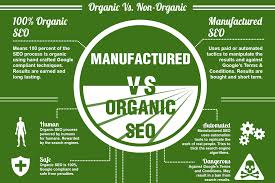
organic search rankings

Organic Search Rankings: A Practical Guide to Improving Your Visibility

Organic Search Rankings: What They Are and How to Improve Them

Organic search rankings determine where webpages appear in the unpaid results on search engines such as Google and Bing. A higher position can help a page reach more people, but ranking well is not simply a matter of adding keywords. Search engines aim to show results that are relevant, useful and trustworthy for each search.

What are organic search rankings?

When someone enters a query, a search engine uses automated systems to identify and order pages that may answer it. These unpaid listings are known as organic results, distinguishing them from advertisements that are labelled as sponsored or paid placements.

Rankings can vary according to the search query, location, device and other contextual factors. A page may appear prominently for one phrase and much lower for another. Search results can also change as search engines update their systems and as new or improved content becomes available.

Why do rankings matter?

Search visibility can help people discover a business, organisation or publication while they are looking for information, products or services. Strong rankings may contribute to relevant website visits and enquiries, but position alone does not guarantee results. The page also needs to meet visitors’ expectations and make it easy for them to take the next step.

Organic search is usually a longer-term investment than paid advertising. It can take time for search engines to discover, assess and rank content, and there are no reliable guarantees of a particular position.

What influences organic rankings?

Search engines use many signals to assess pages. Their systems are complex and change over time, but several broad principles can guide a sound search strategy.

Relevance to the search

A page should address the subject or need behind a search. This means understanding what people are trying to find, rather than focusing only on individual keywords. Someone searching for a basic explanation may need a clear guide, while someone comparing services may want details about options, costs or features.

Useful, original content

Content should provide accurate information and genuine value to its intended audience. It should be clear, well organised and sufficiently complete for the topic. Adding words simply to make a page longer, or publishing many near-identical pages, is unlikely to create a better experience.

Technical accessibility

Search engines need to be able to access and understand a page. Technical issues such as broken links, incorrect indexing settings, duplicate URLs or slow-loading pages can make this harder. A logical site structure, descriptive page titles and a mobile-friendly layout can support both visitors and search engines.

Reputation and links

Links from other websites can help search engines discover pages and provide context about their prominence. However, links should be earned naturally through useful resources, strong reporting or worthwhile products and services. Buying links or using manipulative schemes can put a website at risk of search engine penalties.

Page experience

A page should be easy to use across common devices. Readable text, clear navigation, accessible design and stable page layouts all contribute to a better experience. A technically polished page cannot compensate for content that fails to answer the visitor’s question, but usability is an important part of a well-rounded website.

How to improve organic search rankings

  1. Research your audience and topics. Find out what your potential visitors ask, how they describe their needs and which pages already address those subjects. Use this research to plan content that meets a clear purpose.
  2. Improve existing pages. Review important pages for accuracy, clarity and completeness. Update outdated details, remove unnecessary repetition and make the main information easy to find.
  3. Use descriptive titles and headings. Page titles and headings should explain what the page is about. Include relevant language naturally, without forcing keywords into every heading.
  4. Make your site easy to navigate. Organise related pages into sensible sections and use helpful internal links. This helps visitors find relevant information and assists search engines in understanding how pages relate to one another.
  5. Check technical health. Monitor indexing, mobile usability, page performance and broken links. Tools such as Google Search Console can help identify how Google accesses and displays a site.
  6. Build credibility over time. Publish dependable information, show who is responsible for it where appropriate, and earn attention by creating resources that others genuinely find useful.
  7. Measure meaningful outcomes. Track organic visits alongside enquiries, sales, sign-ups or other business goals. Rankings are useful indicators, but they are only one part of performance.

How to measure rankings and progress

Rankings can be monitored using search engine tools or specialist platforms, but individual checks should be treated with care. Results may differ by location, device and personal context, so a single search from one computer does not provide a complete picture.

Consider tracking a group of relevant search queries over time, along with impressions, clicks and click-through rates. Google Search Console provides data about a site’s appearance in Google Search, while analytics tools can show what visitors do after arriving. Comparing these measures can reveal whether a page is becoming more visible and whether that visibility is attracting the right audience.

Changes should be assessed over a suitable period. Search performance can fluctuate, and a short-term rise or fall does not always indicate a lasting trend. When reviewing results, consider seasonality, website changes and broader search updates as well as the work carried out on individual pages.

Common mistakes to avoid

  • Keyword stuffing: Repeating phrases unnaturally can make content awkward and less useful.
  • Chasing every ranking fluctuation: Frequent reactive changes may create confusion. Investigate sustained patterns before making major adjustments.
  • Publishing thin or duplicate pages: Pages with little unique value can make a site harder to manage and less helpful to visitors.
  • Expecting instant results: Search visibility often takes time to develop, particularly for new websites or competitive topics.
  • Focusing only on position: A high ranking for an irrelevant query may bring little value. Prioritise qualified traffic and useful outcomes.
  • Promising guaranteed positions: No legitimate SEO practitioner can guarantee a specific organic ranking, because search engines control their results.

A long-term approach to organic visibility

Improving organic search rankings is an ongoing process of understanding your audience, producing useful content, maintaining a healthy website and learning from performance data. Rather than looking for shortcuts, focus on making each important page the clearest and most helpful result you can provide for its intended search.


Organic Search Rankings: 9 Frequently Asked Questions

  1. What are organic search rankings?
  2. How do search engines determine organic search rankings?
  3. How can I improve my organic search rankings?
  4. How long does it take to improve organic search rankings?
  5. Why have my organic search rankings dropped?
  6. How can I check my website’s organic search rankings?
  7. Do keywords still affect organic search rankings?
  8. Can backlinks improve organic search rankings?
  9. Are organic search rankings different for each user or location?

What are organic search rankings?

Organic search rankings are the positions webpages appear in the unpaid results on search engines such as Google and Bing. Search engines rank pages according to how relevant and useful they appear for a particular search. Rankings can vary by query, location and device, and may change over time as search results are updated.

How do search engines determine organic search rankings?

Search engines determine organic search rankings using automated systems that discover, index and assess webpages, then match them to a person’s search query. They consider many factors, including how relevant and useful a page is, the quality and originality of its content, the website’s technical accessibility, its reputation and the experience it offers on different devices. The exact systems are complex and change over time, so no single factor guarantees a particular position. Rankings can also vary depending on the query, location and other context.

How can I improve my organic search rankings?

To improve your organic search rankings, create helpful, original content that matches what your audience is searching for, and organise it with clear titles, headings and internal links. Make sure your website is mobile-friendly, fast and easy for search engines to crawl, and keep important information accurate and up to date. Build your site’s credibility by earning relevant links naturally, rather than using manipulative tactics. Track performance with tools such as Google Search Console, and use the data to refine your pages over time. SEO takes patience, and no one can guarantee a particular ranking.

How long does it take to improve organic search rankings?

It can take anywhere from a few weeks to several months to see improvements in organic search rankings, depending on factors such as your website’s age and authority, the level of competition, and the changes made. Technical fixes or updates to established pages may show results sooner, while building visibility for a new website or competitive topic often takes longer. Search engines need time to crawl and reassess changes, so monitor trends over time rather than expecting an immediate or guaranteed ranking.

Why have my organic search rankings dropped?

Organic search rankings can drop for several reasons, and a short-term change does not always indicate a serious problem. Search engines regularly update their systems, competitors may improve their pages, and shifts in demand or seasonality can affect results. Technical issues—such as pages being blocked from indexing, broken links or a recent website migration—can also reduce visibility, as can outdated or less relevant content. Check Google Search Console for indexing issues and changes in impressions and clicks, then review affected pages, recent site updates and the search results for your key queries. Look for sustained patterns before making major changes, as rankings can fluctuate naturally.

How can I check my website’s organic search rankings?

You can check your website’s organic search rankings using Google Search Console, which shows the search queries your pages appear for, along with impressions, clicks and average position. For a broader view, SEO platforms can track selected keywords over time and compare visibility across locations or devices. Remember that rankings can vary by searcher and context, so treat them as a guide rather than a fixed position. Also review organic traffic and enquiries or sales to see whether your visibility is reaching the right audience.

Do keywords still affect organic search rankings?

Yes, keywords still affect organic search rankings, but search engines now look beyond exact-match phrases to understand a page’s topic and how well it answers a search. Use the words and phrases your audience naturally uses in relevant places, such as the page title, main heading and body text. Avoid keyword stuffing: clear, useful content that meets the reader’s needs is more valuable than repeating a phrase unnaturally.

Yes, backlinks can help improve organic search rankings. When reputable, relevant websites link to your content, those links may signal that it is useful or trustworthy and can also bring visitors to your site. However, backlinks are only one of many ranking factors, and their value depends on quality and relevance rather than quantity. Focus on earning links naturally by publishing helpful content and building genuine relationships; buying links or using manipulative tactics can harm your search visibility.

Are organic search rankings different for each user or location?

Yes. Organic search rankings can vary by location, device and the wording or context of a search, so two people may see different results for the same query. Search engines often prioritise locally relevant pages—for example, a nearby business when someone searches for a service—while personalisation may also influence results. For a more reliable view, compare performance across relevant locations and use tools such as Google Search Console, rather than relying on a single search from one device.

Ahrefs Local SEO: A Practical Guide to Improving Your Local Search Visibility

Ahrefs for Local SEO: How to Improve Your Visibility in Local Search

Local SEO helps businesses appear when people nearby search for the products or services they offer. For a business in London, that could mean reaching someone searching for “plumber in Camden” or “coffee shop near me”. Ahrefs can support this work by helping you research local keywords, analyse competitors, improve your website and monitor search performance.

Ahrefs is not a complete local listings platform: it does not replace your Google Business Profile or manage every aspect of local citations and reviews. It works best as part of a broader local SEO strategy, alongside accurate business information, a well-maintained profile and useful content.

What Ahrefs can do for local SEO

Ahrefs provides tools for researching keywords, exploring competitors, checking backlinks, auditing websites and tracking rankings. Used with a local focus, these tools can help you understand what potential customers search for and where your website has opportunities to improve.

Find local keyword opportunities

Use Ahrefs’ keyword research tools to explore the terms people use when looking for local services. Start with a core service, then consider adding a town, borough, neighbourhood or other relevant location. For example:

  • “accountant in Bristol”
  • “emergency electrician Leeds”
  • “family solicitor near Richmond”
  • “physiotherapy clinic Manchester”

Look beyond obvious service-plus-location phrases. People may search for specific problems, prices, opening hours or types of service. Keyword ideas can help you plan service pages, frequently asked questions and helpful articles.

Search volume estimates are useful for comparing opportunities, but they are not a precise forecast of visits or enquiries. Some local searches have modest recorded volume yet bring highly relevant customers. Check the search results themselves to see what Google shows: local businesses, map results, directories or informational pages may all appear for different queries.

Research local competitors

Ahrefs can help you examine websites that compete for relevant searches. Look at the pages earning organic traffic, the topics they cover and the websites linking to them. This can reveal gaps in your own content or opportunities to make your service pages more useful.

Choose competitors based on the search results, not only on the businesses you compete with offline. A directory or national company may outrank local firms for a particular query, making it useful to understand how its page is structured and what information it provides.

Track rankings by location

Rank tracking can help you monitor how selected keywords perform over time. Where available, set the tracking location as close as possible to the area you serve. Search results can vary between towns and neighbourhoods, so a national ranking may not reflect what a nearby customer sees.

Use ranking data as an indicator rather than the only measure of success. Local results can also depend on the searcher’s location, device and other factors. Keep an eye on qualified website visits, calls, enquiries and bookings as well as positions in search results.

Review your website and content

A site audit can flag technical issues that may make pages harder to crawl or use, such as broken links, missing page titles, slow-loading pages or problems with mobile usability. Fix issues according to their impact, rather than treating every audit warning as equally urgent.

For local visitors, make essential information easy to find. Your website should clearly explain:

  • what services you provide and where you provide them;
  • how customers can contact or visit you;
  • your opening hours, where relevant;
  • what makes your business suitable for the customer’s needs.

Create a separate location page only when it provides genuinely useful information about that area. Avoid producing many near-identical pages that simply swap one town name for another.

Explore backlink opportunities

Links from relevant, reputable websites can support your wider SEO efforts. Ahrefs’ backlink tools can show which sites link to your competitors and help you identify suitable prospects. For a local business, possible sources include local news publications, trade organisations, community groups, suppliers and event partners.

Focus on earning links through useful contributions, genuine partnerships and noteworthy local activity. Avoid buying low-quality links or pursuing large numbers of irrelevant directory listings. A link should make sense for your business and audience.

Ahrefs and Google Business Profile

Your Google Business Profile is central to many local searches, especially those that show a map or local business listings. Ahrefs can help with the website and search-research side of local SEO, but it is not a substitute for managing your profile.

Keep your profile accurate and complete. Use the correct business name, address or service area, telephone number, opening hours and categories. Add current photos, respond to reviews professionally and update information when it changes. Make sure your website displays consistent business details.

A practical Ahrefs local SEO workflow

  1. Define your service area. List the locations you genuinely serve and prioritise the ones that matter most to the business.
  2. Research search terms. Explore service, location and problem-based keywords, then review the search results to understand what users are looking for.
  3. Check competing pages. Identify relevant businesses and websites appearing for your priority searches. Note useful topics and content gaps.
  4. Improve key pages. Make service and location information clear, accurate and helpful. Ensure pages work well on mobile devices.
  5. Resolve important technical issues. Use a site audit to find problems that affect access, indexing or the visitor experience.
  6. Build local authority. Look for genuine partnerships, local coverage and industry relationships that may lead to relevant links.
  7. Measure outcomes. Review rankings alongside website traffic, calls, forms and other meaningful enquiries.

Common mistakes to avoid

  • Targeting every nearby town. Only create location pages for places you can genuinely serve and where you can offer useful, specific information.
  • Relying on keyword metrics alone. Search volume and difficulty estimates do not tell the whole story for local searches.
  • Ignoring your Google Business Profile. Website optimisation and keyword research do not replace accurate profile information and good customer service.
  • Chasing rankings without tracking enquiries. A higher position is valuable only if it helps attract the right visitors and supports business goals.
  • Using repetitive or unnatural location keywords. Write for people first and mention locations where they are genuinely relevant.

Is Ahrefs worth using for local SEO?

Ahrefs can be a valuable tool for local SEO when you need to research keywords, understand competing websites, audit your site, explore backlinks and monitor rankings. It is particularly useful for planning and measuring the organic search side of your strategy.

However, local visibility depends on more than a software subscription. Strong results usually come from combining a helpful website with accurate business details, a well-managed Google Business Profile, positive customer experiences and a clear understanding of the areas you serve.

Frequently asked questions

Can Ahrefs manage my Google Business Profile?

Ahrefs is not a replacement for managing your Google Business Profile. Use Google’s own profile tools to update business details, photos, opening hours and other listing information.

Can Ahrefs show local keyword rankings?

Ahrefs rank tracking can be configured for locations where the relevant options are available. Choose a location that reflects your target area, and remember that local results may differ from one searcher to another.

Should every service area have its own page?

No. Create a page when it helps people understand your services in that area and contains genuinely useful information. Avoid making multiple pages with only the place name changed.

What should a local business measure?

Track a mix of indicators: relevant keyword visibility, organic visits, calls, direction requests, form submissions, bookings and other qualified enquiries. The most useful measures depend on how customers contact and buy from your business.


8 Essential Tips for Mastering Local SEO with Ahrefs

  1. Use Keywords Explorer to find location-specific search terms.
  2. Check local search volumes before choosing target keywords.
  3. Use Rank Tracker to monitor rankings in your target locations.
  4. Review competitors’ backlinks in Site Explorer for local link ideas.
  5. Use Content Gap to spot local topics competitors cover.
  6. Run Site Audit to find technical issues on location pages.
  7. Build useful, unique landing pages for each service area.
  8. Track local mentions and links to find partnership opportunities.

Use Keywords Explorer to find location-specific search terms.

Use Ahrefs’ Keywords Explorer to discover the phrases people use when searching for businesses and services in your area. Enter a core service alongside a town, borough or neighbourhood—for example, “dentist in Hackney”—then review related keyword ideas and questions for additional opportunities. Use the findings to guide useful website content, such as service or location pages, but prioritise terms that match what you genuinely offer rather than forcing location keywords into your copy.

Check local search volumes before choosing target keywords.

Before choosing target keywords, use Ahrefs to check their estimated local search volumes for the areas you serve. This can help you compare phrases and prioritise searches that are both relevant to your services and likely to be used by nearby customers. Treat the figures as estimates rather than guarantees: local searches may have low recorded volumes but still bring valuable enquiries, so consider search intent and the actual results alongside the numbers.

Use Rank Tracker to monitor rankings in your target locations.

Use Ahrefs Rank Tracker to monitor how your website performs for important local keywords in the areas you serve. Set the target location as specifically as the tool allows, then review ranking changes over time to see which pages are gaining visibility and where further work may be needed. Local search results can vary by area, so location-based tracking gives a more relevant picture than checking national rankings alone.

Use Ahrefs’ Site Explorer to review the backlinks pointing to local competitors’ websites and spot potential link opportunities. Look for relevant local newspapers, community organisations, trade associations, event partners or business directories that have linked to similar companies. Treat these as leads to investigate, not links to copy automatically: focus on reputable websites and genuine opportunities to contribute something useful, such as expert insight, a local project or a community partnership.

Use Content Gap to spot local topics competitors cover.

Use Ahrefs’ Content Gap tool to find local topics your competitors cover that your website does not. Enter your site alongside competing local businesses, then review the keywords bringing traffic to their pages. Look for relevant gaps, such as neighbourhood-specific services, local guides or answers to common customer questions. Use these insights to plan genuinely helpful content for the areas you serve, rather than creating pages just to repeat location names.

Run Site Audit to find technical issues on location pages.

Use Ahrefs’ Site Audit to check your location pages for technical issues that could affect search visibility or user experience. It can help uncover problems such as broken links, missing or duplicate title tags, pages that cannot be crawled, and slow-loading content. Review the findings and prioritise fixes that prevent search engines or potential customers from accessing important information, such as your services, address and contact details.

Build useful, unique landing pages for each service area.

Create a useful, unique landing page for each service area you genuinely serve, explaining which services are available there and what local customers can expect. Ahrefs can help you research location-specific keywords and review the pages competing in search results, but use those insights to make each page more helpful—not simply to repeat place names. Include accurate contact details, relevant local information and clear next steps, and avoid publishing near-identical pages for areas where you have little to offer.

Use Ahrefs to monitor mentions of your business and explore the websites linking to similar local organisations. These can reveal potential partnership opportunities with community groups, suppliers, local publications and complementary businesses. Consider reaching out where there’s a genuine reason to collaborate, such as contributing expert advice, supporting a local event or creating useful resources together. Focus on building relevant relationships and earning links naturally, rather than asking for links without offering value.

search engine optimization marketing services

A Guide to Search Engine Optimization Marketing Services

Search Engine Optimisation Marketing Services: A Practical Guide

When people need a product, service or answer, they often begin with a search engine. Search engine optimisation (SEO) marketing services help businesses improve their visibility in organic search results, attract relevant visitors and make it easier for potential customers to take the next step.

SEO is not a quick fix or a guarantee of first-place rankings. It is an ongoing process that combines technical improvements, useful content and a clear understanding of what your audience is searching for. The right strategy can support long-term growth by helping your website reach people with genuine interest in what you offer.

What are SEO marketing services?

SEO marketing services are activities designed to improve a website’s performance in unpaid search results. They may be delivered by an in-house team, an agency or an independent consultant, and are usually tailored to a business’s goals, audience and level of competition.

Depending on your needs, an SEO programme may include:

  • SEO audits: Reviewing a website to identify technical issues, content gaps and opportunities to improve visibility.
  • Keyword and audience research: Finding the terms people use when searching, and understanding the intent behind those searches.
  • On-page optimisation: Improving page titles, headings, internal links, copy and other elements so pages are clear to visitors and search engines.
  • Technical SEO: Addressing issues such as crawling, indexing, site speed, mobile usability and structured data.
  • Content strategy: Planning and creating useful pages that answer relevant questions and support the customer journey.
  • Local SEO: Helping businesses improve their visibility in location-based searches, including local listings and map results.
  • Digital PR and link earning: Building awareness and authority through useful resources, outreach and legitimate editorial coverage.
  • Measurement and reporting: Tracking performance and explaining what the data means for your business.

How SEO supports marketing goals

SEO can connect your business with people at different stages of their decision-making process. Some may be researching a problem, while others are comparing providers or looking for a specific product. By creating relevant pages for these needs, a business can earn visibility across more of the customer journey.

Organic search can also complement other marketing channels. Search insights may inform paid advertising, content marketing and website improvements. In turn, a strong website experience can help visitors who arrive through search, social media, referrals or email.

Unlike paid advertising, organic visibility does not usually stop as soon as a campaign budget is paused. However, SEO requires ongoing attention: competitors change their websites, search behaviour shifts and search engines update how they present results.

What does an SEO campaign involve?

Set clear objectives

Effective work starts with business goals. These might include generating more qualified enquiries, increasing online sales, growing awareness in a particular area or improving the performance of important service pages. Rankings can be useful to monitor, but they should not be treated as the only measure of success.

Review the website and its market

An initial review looks at the website’s current performance, its technical health, existing content and competitors. It should also consider the audience: what they need, the language they use and the information they expect before making a decision.

Prioritise improvements

Not every recommendation needs to be implemented at once. A good plan prioritises changes according to their likely impact, effort and relevance to the business. Fixing a barrier that prevents important pages from being indexed, for example, may take precedence over minor copy edits.

Improve content and website experience

Pages should be helpful, accurate and easy to navigate. Content should answer the reader’s question clearly rather than repeat keywords unnaturally. Strong page structure, descriptive headings, useful internal links and clear calls to action can make the experience better for both visitors and search engines.

Measure, learn and refine

SEO performance is assessed over time using data such as organic visits, search visibility, engagement, enquiries and sales. Results should be interpreted in context: seasonal changes, website updates and wider market conditions can all affect performance. Regular reviews help identify what is working and where to focus next.

How to choose an SEO provider

SEO providers vary in their services, specialisms and working methods. Before choosing one, ask how they will understand your business, what work they recommend and how they will report progress. A reliable provider should be able to explain their approach in plain English and distinguish realistic expectations from guarantees.

It is also worth asking:

  • What will be included in the proposed service?
  • Who will carry out the work, and how will they work with your team?
  • How will success be measured beyond keyword rankings?
  • How often will progress and next steps be discussed?
  • Will you retain access to your website, analytics and search accounts?

Be cautious of promises of guaranteed rankings, instant results or large numbers of links without a clear explanation of how they will be earned. Ethical SEO focuses on sustainable improvements and avoids tactics that could put a website’s reputation or search visibility at risk.

SEO is an investment in long-term visibility

Search engine optimisation marketing services can help businesses make their websites more discoverable, useful and effective. The best results come from a strategy that connects technical quality, relevant content and a positive user experience with measurable business objectives.

Whether you are building a new website or improving an established one, start with a clear understanding of your audience and priorities. From there, consistent work and thoughtful measurement can turn organic search into a valuable part of your wider marketing strategy.


Essential FAQs About Search Engine Optimisation Marketing Services in the UK

  1. What are search engine optimisation marketing services?
  2. What services are included in an SEO marketing campaign?
  3. How much do SEO marketing services cost in the UK?
  4. How long does SEO take to deliver results?
  5. How can SEO marketing services help my business?
  6. How do I choose the right SEO agency or consultant?
  7. How do SEO providers measure and report results?
  8. Can an SEO provider guarantee first-page rankings?
  9. What is the difference between SEO and paid search advertising?

What are search engine optimisation marketing services?

Search engine optimisation (SEO) marketing services help improve a website’s visibility in unpaid search results and attract relevant visitors. They can include technical website audits, keyword research, on-page optimisation, content creation, local SEO and performance reporting. The specific services are tailored to a business’s goals and audience, with the aim of making its website easier to find, more useful to visitors and better able to generate enquiries or sales.

What services are included in an SEO marketing campaign?

An SEO marketing campaign may include a website audit, keyword and audience research, technical SEO, on-page optimisation, content planning and creation, local SEO, and digital PR or link-building. It may also cover competitor analysis, conversion improvements, and regular performance reporting. The exact mix depends on your website, industry and goals, with work prioritised to improve search visibility and attract relevant visitors.

How much do SEO marketing services cost in the UK?

The cost of SEO marketing services in the UK depends on your goals, industry, competition and the amount of work required. Small businesses might pay around £500–£2,000 per month, while more competitive campaigns can cost £2,000–£5,000 or more; one-off SEO audits and consultancy are usually priced separately. Ask providers for a clear breakdown of deliverables, reporting and fees, and be cautious of unusually cheap offers or guaranteed rankings.

How long does SEO take to deliver results?

SEO typically takes several months to show meaningful results, although the timeframe varies depending on your website’s current condition, competition, industry and the work involved. Technical fixes or improvements to existing pages may have an impact sooner, while building authority and gaining visibility for competitive searches often takes longer. A reputable SEO provider will set realistic expectations, track progress using relevant measures such as qualified traffic and enquiries, and refine the strategy over time. SEO is an ongoing investment rather than a one-off fix, so results are best assessed over the long term.

How can SEO marketing services help my business?

SEO marketing services can help your business appear more prominently in relevant search results, making it easier for potential customers to find your products or services. By improving your website’s technical performance, content and local visibility, SEO can attract more qualified visitors, build trust and support enquiries or sales over time. Results depend on factors such as your industry, competition and website, so SEO is best viewed as a long-term investment rather than a guarantee of instant rankings.

How do I choose the right SEO agency or consultant?

Choose an SEO agency or consultant by first defining your goals, such as increasing qualified enquiries, online sales or local visibility. Look for relevant experience and case studies, then ask how they would assess your website, prioritise work and measure results. A trustworthy provider will explain their approach clearly, offer transparent reporting and set realistic expectations; be wary of guaranteed rankings, instant results or vague promises. It is also important to find someone who communicates well and understands your business, audience and budget.

How do SEO providers measure and report results?

SEO providers measure results against agreed business goals, using metrics such as organic traffic, search visibility, relevant keyword rankings, leads, sales and conversion rates. They may also monitor technical health and how visitors engage with key pages. Regular reports should explain what has changed, what the data means for your business and which actions are planned next, rather than simply listing numbers. Results are best assessed over time, as SEO improvements can take months to build and may be affected by seasonality, competition and search engine updates.

Can an SEO provider guarantee first-page rankings?

No reputable SEO provider can guarantee first-page rankings. Search results are influenced by many factors, including competition, search engine algorithms and changes in how people search, so rankings cannot be controlled or promised. A trustworthy provider should explain its approach, set realistic expectations and focus on sustainable improvements—such as better technical performance, useful content and more qualified organic traffic—rather than guaranteed positions.

What is the difference between SEO and paid search advertising?

SEO improves a website’s visibility in organic search results through activities such as creating useful content, improving site performance and earning reputable links. Paid search advertising places sponsored listings in search results, usually charging the advertiser when someone clicks. SEO can build lasting visibility over time, but results are gradual and not guaranteed; paid search can generate traffic more quickly, but visibility generally stops when the campaign budget ends. Many businesses use both to support their marketing goals.

Mobile Search Engine Optimisation: A Practical Guide to Better Rankings and User Experience

Mobile Search Engine Optimisation: A Practical Guide

Mobile search engine optimisation (SEO) is the process of making a website easy to find, use and understand on smartphones and tablets. It brings together technical SEO, useful content and a smooth mobile experience. As many people search while on the move, a site that works well on smaller screens can help visitors find information, contact a business or complete a purchase.

Why mobile SEO matters

Search engines need to crawl and understand your pages, while visitors need to use them without pinching, zooming or waiting for them to load. A poorly designed mobile site can make it difficult to read content, follow links or complete forms. This may lead people to leave before finding what they need.

Google uses the mobile version of a site for indexing and ranking through mobile-first indexing. This makes it important to ensure that the mobile version contains the same essential content and SEO signals as the desktop version. A mobile-friendly design alone is not enough if key information is missing or difficult for search engines to access.

Use a responsive design

Responsive design allows a website’s layout to adapt to different screen sizes. It is generally the simplest approach to manage because the same page and URL serve desktop, tablet and mobile visitors.

Check that your pages:

  • Fit the screen without horizontal scrolling.
  • Use readable text sizes and clear spacing.
  • Have buttons and links that are easy to tap.
  • Display images and videos correctly on smaller screens.
  • Keep navigation simple and straightforward.

Make sure mobile content is complete

Mobile pages should provide the information visitors need, not a reduced version that omits important details. Keep useful headings, product information, internal links, images and other key content available to mobile users. Search engines may have less context if essential material is hidden or removed from the mobile version.

Use clear headings to organise information, and put the most useful content where visitors can find it easily. Avoid making people work through unnecessary pop-ups or lengthy introductions before they can reach the answer to their search.

Improve page speed and Core Web Vitals

Mobile connections and devices vary, so pages should be built to load efficiently. Compress images, use modern image formats where appropriate, remove unnecessary scripts and limit features that add weight without improving the experience. Caching and a content delivery network may also help, depending on how your site is hosted.

Core Web Vitals are metrics used to assess aspects of page experience:

  • Largest Contentful Paint (LCP): how quickly the main content appears.
  • Interaction to Next Paint (INP): how quickly a page responds to user interactions.
  • Cumulative Layout Shift (CLS): how much the page layout moves unexpectedly.

Use tools such as Google Search Console and PageSpeed Insights to identify issues. Field data reflects real user experiences, while laboratory tests can help diagnose specific problems. Treat these metrics as part of a wider effort to make pages faster and easier to use, rather than as a substitute for useful content.

Optimise the mobile user experience

Good mobile SEO depends on more than technical settings. Consider how people use your site on a small screen. Make important actions—such as calling, booking or buying—easy to find. Keep forms short, use suitable input types for fields such as email addresses and telephone numbers, and show clear error messages when something goes wrong.

Make sure menus are easy to open and close, links are not crowded together, and interactive elements work with touch as well as a keyboard. Avoid intrusive interstitials that cover the content people have come to see.

Support local mobile searches

Mobile searches often have local intent, such as looking for a nearby service or checking opening times. Businesses with a physical location should keep their name, address and telephone number consistent across their website and relevant online listings. Create useful location pages where appropriate, and keep opening hours and contact details up to date.

Make it easy for visitors to act on local information. A clear telephone link, directions and booking details can help someone move from a search to a visit or enquiry.

Use structured data carefully

Structured data helps search engines interpret information on a page. Depending on your business and content, this might include details about products, articles, events or local businesses. Make sure the markup is accurate and reflects content that is visible to visitors. Structured data can make pages eligible for enhanced search results, but it does not guarantee that those results will appear.

Test your mobile pages regularly

Do not rely on checking a single page on one phone. Test key page types—such as product pages, service pages, articles and contact forms—on different screen sizes. You can use Google Search Console to review indexing and experience reports, and analytics tools to understand how mobile visitors use your site.

Look for practical signs of friction: pages that are slow, forms that are abandoned, buttons that are rarely used or important content that visitors struggle to find. Combine these observations with feedback from real users to decide what to improve.

A mobile SEO checklist

  • Use a responsive design that works across screen sizes.
  • Keep important content and SEO signals consistent between mobile and desktop.
  • Make pages quick to load and stable while they load.
  • Use readable text, clear navigation and accessible tap targets.
  • Make forms and key actions simple to complete.
  • Check local details and structured data for accuracy.
  • Test real page templates and monitor performance over time.

Conclusion

Effective mobile SEO starts with a simple goal: make it easy for people and search engines to access and understand your website on a mobile device. A responsive layout, complete content, fast pages and clear user journeys provide a strong foundation. Regular testing helps you spot problems and improve the experience as your audience and technology change.


Top 5 Tips for Optimising Mobile Search Engine Performance

  1. Use responsive design that adapts to every screen size.
  2. Improve mobile page speed by compressing images.
  3. Make text readable without zooming.
  4. Keep menus and buttons easy to tap.
  5. Check mobile usability in Google Search Console.

Use responsive design that adapts to every screen size.

Use responsive design so your website automatically adjusts to different screen sizes, from smartphones and tablets to desktop monitors. Text, images, menus and page layouts should remain clear and easy to use without horizontal scrolling or excessive zooming. A consistent experience across devices helps visitors find what they need and makes it easier to maintain your site.

Improve mobile page speed by compressing images.

Improve mobile page speed by compressing images before uploading them to your website. Large image files can take longer to load, particularly on slower mobile connections, so resizing images to the dimensions they’ll actually be displayed at and choosing efficient formats such as WebP can reduce file sizes without noticeably affecting quality. Faster-loading pages make it easier for visitors to find what they need and can support a better overall mobile experience.

Make text readable without zooming.

Make sure visitors can read your mobile content without pinching or zooming. Use a comfortably sized font, clear line spacing and strong contrast between text and background, and check that paragraphs fit the screen without horizontal scrolling. Readable text makes your pages easier to use and helps people find the information they need.

Keep menus and buttons easy to tap.

Keep menus and buttons easy to tap on smaller screens by making them large enough to select comfortably and leaving plenty of space between nearby links. Use clear labels and place important actions where visitors can find them without excessive scrolling. This makes your website easier to navigate, reduces accidental taps and helps mobile users complete tasks with less frustration.

Check mobile usability in Google Search Console.

Use Google Search Console to check how well your site works for mobile visitors. Review the available page experience and Core Web Vitals reports, and inspect individual URLs to identify issues that may affect usability or indexing. Fix problems such as slow-loading pages, unstable layouts or content that is difficult to access, then check the affected pages again after making changes. Regular monitoring can help you spot issues early and provide a smoother experience on smartphones and tablets.