SEO and Social Media: How to Make Them Work Together
SEO and Social Media: How They Work Together
Search engine optimisation (SEO) and social media are often treated as separate parts of digital marketing. In practice, they can support one another. SEO helps people find your website through search engines, while social media gives you ways to share useful content, connect with your audience and build awareness of your brand.
Social media activity is not generally a direct ranking factor in traditional search results. However, it can contribute to SEO indirectly by helping your content reach more people, attract attention and earn links or mentions. A joined-up approach can therefore strengthen your overall online presence.
What SEO and social media each do
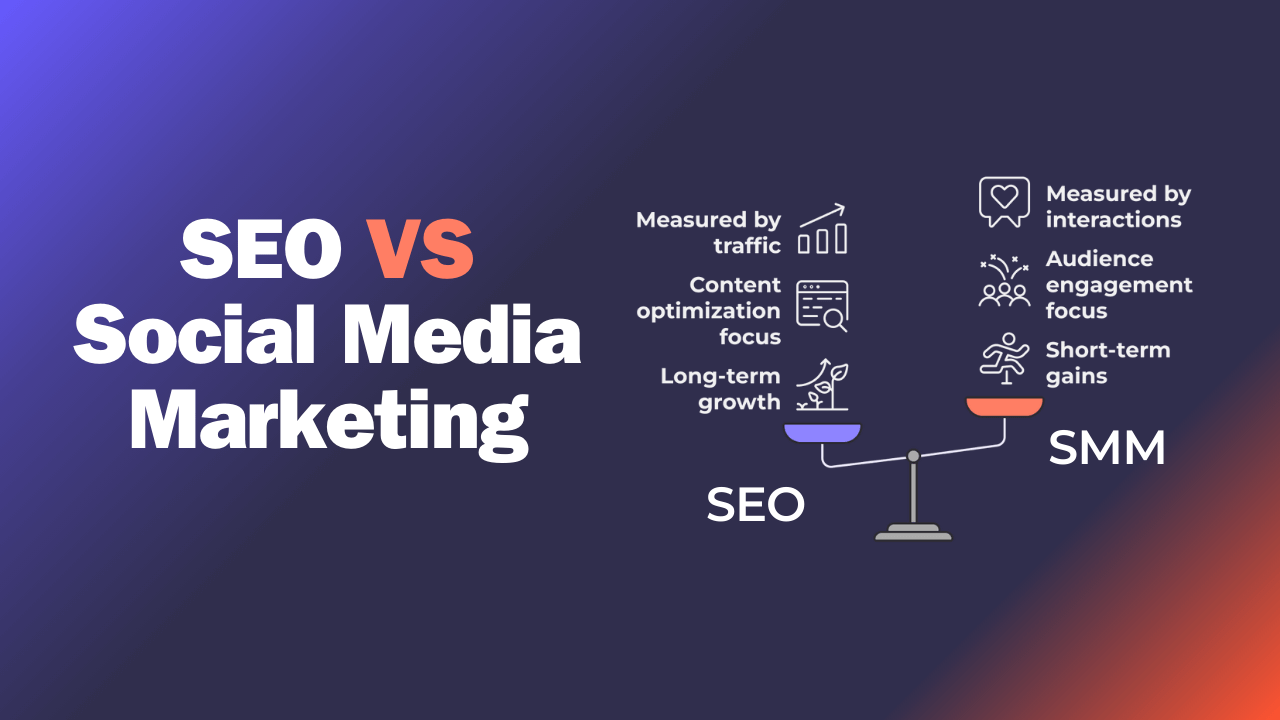
SEO focuses on improving a website’s visibility in unpaid search results. It includes work such as researching search terms, creating helpful content, improving site structure and ensuring pages can be crawled and understood by search engines.
Social media marketing uses platforms such as Instagram, LinkedIn, TikTok, Facebook and YouTube to publish content and engage with an audience. Each platform has its own discovery features, so social posts can help people find a business even when they are not actively searching for it on Google or another search engine.
How social media can support SEO
It can extend the reach of your content
Publishing a useful article is only part of content marketing. Sharing it through relevant social channels can put it in front of more potential readers. Those readers may visit your website, share the article, refer to it in their own content or link to it from another website.
Social shares do not automatically improve search rankings. Their value is that they can increase exposure and create opportunities for the kinds of attention and references that may support a site’s authority over time.
It can help you understand your audience
Comments, questions, direct messages and engagement patterns can reveal what your audience wants to know. Use these insights to identify topics, concerns and language that could inform your SEO content plan.
For example, if customers repeatedly ask how a service works or how much it costs, those questions may inspire a detailed website guide or a useful FAQ page. Search data can then help you understand how people phrase similar questions in search engines.
It can build brand awareness
Consistent, helpful activity on social media can make your brand more familiar to potential customers. Someone who sees your posts may later search for your business by name, visit your website directly or choose your result over an unfamiliar alternative.
Brand awareness is difficult to measure with one metric, but it can be assessed through indicators such as branded search activity, website visits, enquiries and engagement with your content.
It can highlight content that deserves further investment
Social engagement can offer early feedback on topics and formats that resonate with your audience. A post that attracts thoughtful questions or is widely shared may point to a subject worth developing into a comprehensive guide, video or landing page.
Social performance is not a substitute for keyword research or search analytics, but it can add another useful source of insight.
How to align your SEO and social media strategies
- Start with shared goals. Decide what you want to achieve, such as increasing relevant website visits, generating enquiries or improving awareness of a particular service.
- Plan content around audience needs. Use keyword research, customer questions and social conversations to choose topics that are genuinely useful.
- Create content for each channel. Share the main idea in a format that suits the platform. A detailed website article might become a short video, a LinkedIn post or a series of social updates.
- Make it easy to visit your website. Add clear links where appropriate and make sure the destination page matches what the post promises.
- Use consistent branding and information. Keep your business name, descriptions and contact details accurate across your website and social profiles.
- Measure results across channels. Track social engagement alongside website visits, search visibility, leads and sales. Use analytics tools and campaign tracking parameters to understand which activity is contributing to results.
Common mistakes to avoid
- Chasing likes instead of business outcomes. High engagement can be encouraging, but it does not necessarily mean more qualified visitors or customers.
- Posting links without context. Explain why a piece of content is useful and who it is for, rather than simply dropping a link into a feed.
- Duplicating the same post everywhere. Adapt the wording, format and call to action to suit each platform and its audience.
- Expecting immediate ranking gains. SEO takes time, and social activity should not be treated as a shortcut to higher search positions.
- Ignoring accessibility. Use descriptive link text, captions for video and alternative text for meaningful images where the platform allows it.
Measuring what matters
The right measures depend on your objectives. For SEO, you might monitor organic impressions, clicks, rankings for relevant searches and conversions from organic traffic. For social media, useful measures may include reach, engagement, referral visits and enquiries.
Look for connections between the channels rather than relying on a single figure. For example, a social campaign may bring new visitors to a guide, while search data later shows that the guide is gaining visibility for relevant queries. Regular reporting can help you understand what is working and where to refine your approach.
Conclusion
SEO and social media have different roles, but they can be more effective when planned together. Social media can help your content reach people, reveal audience interests and build familiarity with your brand. SEO can make your most useful website content easier to discover through search. By focusing on helpful content, a consistent brand experience and meaningful measurement, businesses can make both channels work towards shared goals.
Understanding the Interplay Between SEO and Social Media: 24 Key Questions Answered
- Is SEO and social media the same?
- How social media affects SEO?
- Can we use SEO for social media?
- What is the relationship between social media and SEO?
- How do SEO and social media work together?
- Why is social media optimization important to SEO?
- Does social media Affect Your SEO?
- Do you need social media for SEO?
- Does social media posting help SEO?
- Do links from social media help SEO?
- What is the role of SEO in social media marketing?
- Is SEO being phased out?
- Does SEO affect social media?
- What is the 80 20 rule of SEO?
- What is SEO for social media?
- What is SEO on social media?
- How social media impacts your SEO?
- What is the difference between social media and SEO?
- Is SEO needed for social media?
- How does SEO affect social media?
- What does SEO mean social media?
- How do I incorporate social media into SEO strategy?
- Can social media affect SEO?
- How important is SEO for social media?
Is SEO and social media the same?
No, SEO and social media marketing are not the same, although they can support each other. SEO helps your website appear in unpaid search engine results, while social media marketing uses platforms such as Instagram, LinkedIn and Facebook to share content and engage with audiences. Social activity can increase the reach of your content and build brand awareness, which may indirectly support your SEO, but social media engagement does not automatically improve search rankings.
How social media affects SEO?
Social media does not usually affect search rankings directly, but it can support SEO in several indirect ways. Sharing useful content can increase its reach, bring visitors to your website and encourage others to mention or link to it. Social conversations can also reveal the questions and topics your audience cares about, helping you create more relevant website content. Together, these benefits can strengthen brand awareness and contribute to a stronger online presence over time.
Can we use SEO for social media?
Yes. SEO principles can help people discover your social media content, although each platform has its own search and recommendation systems. Use clear, relevant keywords in profile descriptions, video titles, captions and post text, and make sure your business name and details are consistent across your profiles. Creating useful, well-structured content and adding accurate captions or hashtags can also improve discoverability. Social media SEO is different from optimising a website, so tailor your approach to the platform and the way your audience searches there.
What is the relationship between social media and SEO?
Social media and SEO support each other, although social media activity is not generally a direct ranking factor in search results. Sharing useful content on social platforms can increase its reach, bring visitors to your website and help build brand awareness. This exposure may lead to links, mentions and branded searches, which can contribute to your wider SEO efforts. Social conversations can also reveal the questions and topics your audience cares about, helping you create more relevant website content.
How do SEO and social media work together?
SEO and social media work together by helping people discover and engage with your brand in different ways. SEO improves your visibility in search results, while social media helps you share useful content, reach new audiences and learn what they care about. Social shares are not usually a direct search ranking factor, but wider exposure can encourage visits, brand searches and natural links to your website—all of which can support your wider SEO efforts.
Why is social media optimization important to SEO?
Social media optimisation is important to SEO because it helps your content reach a wider audience and encourages people to engage with your brand. Social signals such as likes and shares are not generally direct Google ranking factors, but greater visibility can lead to more website visits, brand searches and natural links or mentions—all of which may support your wider SEO efforts. An active, consistent social presence can also help you understand what your audience cares about, so you can create more relevant content for your website.
Does social media Affect Your SEO?
Social media does not usually affect search rankings directly, as likes, shares and follower numbers are not standard ranking factors. However, it can support SEO indirectly by helping your content reach a wider audience, attract website visits and earn links or brand mentions. Social platforms can also offer useful insight into the topics and questions your audience cares about. For the best results, use social media to share helpful content and build awareness, alongside a strong SEO strategy for your website.
Do you need social media for SEO?
No, you don’t need social media for SEO, and social media activity is not generally a direct Google ranking factor. However, it can support your SEO efforts by helping more people discover and share your content, increasing brand awareness and potentially attracting links to your website. Treat social media as a complementary channel: focus on useful content, an accessible website and sound SEO practices, then use social platforms to reach and engage your audience.
Does social media posting help SEO?
Social media posting does not usually improve search rankings directly, but it can support SEO in other ways. Sharing useful content can increase its reach, bring visitors to your website and help more people discover your brand. This exposure may lead to mentions or links from other websites, which can benefit your wider SEO efforts. Social platforms can also reveal the questions and topics your audience cares about, helping you plan relevant website content.
Do links from social media help SEO?
Links shared on social media can help people discover your website and may lead to visits, shares or links from other sites, but they do not usually improve search rankings directly. Search engines generally treat most social media links as “nofollow” or otherwise exclude them from passing ranking value. Their SEO benefit is indirect: sharing useful content can increase its reach, build brand awareness and create more opportunities for people to reference it elsewhere.
What is the role of SEO in social media marketing?
SEO supports social media marketing by helping you understand what your audience is searching for and shaping content around those interests. While social media activity does not directly determine traditional search rankings, optimising social profiles and sharing useful, relevant content can improve discoverability, drive visitors to your website and build brand awareness. Together, SEO and social media can help your content reach the right people across different channels.
Is SEO being phased out?
No, SEO is not being phased out; it is changing as search engines evolve and people discover information through more channels, including social platforms and AI-powered tools. The fundamentals still matter: creating useful, reliable content, making your website accessible and technically sound, and helping the right audience find it. Businesses may need to adapt their approach, but SEO remains an important way to build visibility and attract relevant visitors over time.
Does SEO affect social media?
SEO can support your social media strategy, and social media can help your SEO efforts, but neither directly controls the other. Social posts can increase the reach of your website content, introduce your brand to new audiences and provide insights into the topics people care about. This may lead to more website visits, brand searches or links from other websites. However, likes and shares are not generally direct ranking factors in traditional search results, so focus on useful content and a consistent experience across both channels.
What is the 80 20 rule of SEO?
The 80/20 rule of SEO applies the Pareto principle: a relatively small share of your SEO activities may drive most of your results. For example, a few high-performing pages, valuable search terms or important technical improvements could account for much of your organic traffic and enquiries. Use performance data to identify these priorities, then focus your time and resources on improving them. It is a useful way to guide decisions, rather than a guaranteed ratio or fixed rule.
What is SEO for social media?
SEO for social media means optimising your profiles and content so people can find them through searches on social platforms and, where relevant, search engines. This can include using clear profile descriptions, relevant keywords, accurate business details, descriptive captions and accessible text for images and videos. Social media SEO is distinct from website SEO, but both benefit from useful, well-structured content that matches what your audience is looking for.
What is SEO on social media?
SEO on social media means optimising your profiles and posts so people can find them more easily through a platform’s search and discovery features. This can include using relevant keywords in your profile name, bio and captions, adding accurate descriptions and hashtags, and publishing useful content that encourages genuine engagement. Social media SEO is different from website SEO, but it can help your content reach a wider audience and support your overall online visibility.
How social media impacts your SEO?
Social media activity does not usually directly affect your rankings in traditional search results, but it can support SEO in valuable ways. Sharing useful content can increase its reach, attract visitors and encourage other websites to mention or link to it. Social platforms can also help you understand your audience’s interests and questions, giving you ideas for content that meets their needs. Together, these benefits can strengthen brand awareness and create more opportunities for people to discover your website through search.
What is the difference between social media and SEO?
Social media focuses on connecting with audiences and sharing content on platforms such as Instagram, LinkedIn and Facebook, while SEO aims to improve a website’s visibility in unpaid search engine results. Social media can help build awareness, encourage engagement and bring visitors to your website; SEO helps people find relevant pages when they search for information, products or services. Although they use different channels and tactics, they can work together to strengthen your online presence.
Is SEO needed for social media?
SEO isn’t essential for posting on social media, but it can help people discover your profiles and content. Use clear, relevant wording in your profile details, captions and video titles, and include keywords naturally where they fit. Each platform has its own search and recommendation systems, so tailor your approach to the channel. Social media SEO is separate from website SEO, but both can support your wider online visibility.
How does SEO affect social media?
SEO can support your social media activity by helping you understand the words and topics your audience searches for, which can inform your posts, captions and profile descriptions. Optimised social profiles and useful, discoverable content may also appear in search engine results, helping more people find your brand. Social media engagement is not generally a direct ranking factor for traditional search results, but sharing content can increase its reach and create opportunities for website visits, brand mentions and links that may indirectly support SEO.
What does SEO mean social media?
When people ask “What does SEO mean on social media?”, they usually mean using search engine optimisation principles to make social profiles and posts easier to discover. This can include using relevant keywords in profile descriptions, captions, video titles and hashtags, as well as publishing useful content that matches what your audience is looking for. Social media SEO can help content appear in searches within a platform and, in some cases, in external search results. It is related to traditional SEO, but each social platform has its own search and recommendation systems.
How do I incorporate social media into SEO strategy?
Incorporate social media into your SEO strategy by using it to share helpful website content, reach relevant audiences and learn what questions your customers care about. Turn popular discussions and recurring questions into useful pages or articles, and tailor each social post to its platform with a clear link to the relevant content. Keep your brand details consistent across your website and social profiles, and track referral visits, engagement and conversions to see what is working. Social signals are not generally a direct search-ranking factor, but social activity can broaden your content’s reach and create opportunities for visits, mentions and links.
Can social media affect SEO?
Social media activity does not usually directly influence search rankings, but it can support SEO in several indirect ways. Sharing useful content can increase its reach, bring visitors to your website and encourage others to mention or link to it. Social platforms can also help you understand your audience’s interests and build brand awareness, which may lead people to search for your business by name. Treat social media as a way to strengthen your wider online presence, rather than as a shortcut to higher rankings.
How important is SEO for social media?
SEO is important for social media because it helps your profiles and content become easier to discover, both within social platforms and through search engines. Use relevant keywords naturally in profile descriptions, captions, titles and hashtags, and make sure your business information is accurate and consistent. Social media activity does not usually directly improve search rankings, but sharing useful content can increase its reach, attract website visitors and encourage links or brand mentions. Treat SEO and social media as complementary parts of your digital marketing strategy.