seo google my business

SEO Google My Business: A Practical Guide to Local Search Visibility

SEO for Google My Business: A Practical Guide to Getting Found Locally

For local businesses, appearing in Google Search and Google Maps can help potential customers find the right services nearby. The tool once known as Google My Business is now called Google Business Profile. Optimising your profile can support your local SEO by making your business information clearer and more useful to both customers and Google.

A well-maintained profile does not guarantee a particular position in search results. Local visibility depends on several factors, including relevance, distance and prominence. However, accurate information and a complete profile give your business a stronger foundation.

What is Google Business Profile?

Google Business Profile is a free listing that lets eligible businesses manage how they appear across Google Search and Maps. A profile may show your business name, address or service area, opening hours, contact details, website, photos, reviews and other information.

It is particularly useful for businesses that serve customers in person, either at a physical location or at customers’ locations. Businesses that operate solely online may not be eligible, so check Google’s current eligibility guidelines before creating a profile.

Why Google Business Profile matters for local SEO

Local SEO helps a business reach people searching for products or services in a specific area. Your profile can provide Google with reliable details about what you offer and where you serve customers. It also gives searchers practical information that can help them decide whether to contact or visit you.

Local search results can vary according to the searcher’s location and the wording of their query. There is no legitimate way to guarantee a top placement, but a complete, accurate profile can improve your chances of being considered relevant for appropriate searches.

How to optimise your profile

Claim and verify your business

Claim your profile and complete Google’s verification process. Verification helps establish that you are authorised to manage the business listing. Keep access details secure and make sure the profile is controlled by someone responsible for the business.

Use accurate business information

Check that your business name, address, phone number and website are correct. Your opening hours should reflect when customers can actually reach or visit you, including seasonal changes and bank holidays. If you serve customers at their locations rather than from a shopfront, set your service area appropriately and follow Google’s rules for displaying addresses.

Keep your core business details consistent across your website and other reputable online directories. Consistency can help customers and search engines identify the correct business, but do not create listings simply to repeat the same information across low-quality sites.

Choose the most relevant categories

Select the primary category that best describes your main business activity. Add secondary categories only when they accurately represent other services you provide. Categories help Google understand what your business does, so avoid choosing them solely because they seem popular or cover unrelated keywords.

Write a clear business description

Use your description to explain what your business offers, who it serves and what makes it useful to customers. Write naturally and include relevant services or locations where appropriate. Avoid keyword stuffing, promotional claims that cannot be substantiated, and links or content that breach Google’s guidelines.

Add services, products and attributes

Where available, fill in the sections for services, products and business attributes. Be specific and keep the information up to date. These details help potential customers understand what they can expect before they contact you.

Add current, high-quality photos

Photos can help customers recognise your premises, understand your services and get a sense of your business. Use clear, genuine images of your location, team, products or completed work. Avoid misleading images and make sure you have the rights and permissions to use everything you upload.

Encourage and respond to reviews

Reviews can influence customer decisions and contribute to your business’s online reputation. Invite genuine customers to leave honest feedback, but do not offer rewards for reviews or try to influence what customers write. Respond professionally to positive and negative reviews, taking care not to disclose private customer information.

A thoughtful response shows that feedback is taken seriously. If a review appears to violate Google’s policies, you can report it for review, but removal is not guaranteed.

Keep the profile active and accurate

Review your profile regularly. Update hours, contact details, services and photos when anything changes. You may also be able to publish updates or offers through your profile. Use these features to share useful, timely information rather than posting repetitive keyword-heavy content.

Connect your profile to your website

Your website should support the information shown on your Google Business Profile. Make sure it clearly states what you do, where you operate and how customers can get in touch. Local landing pages can be useful when they provide genuinely relevant information for each area you serve; avoid creating thin pages that differ only by place name.

Use clear page titles, helpful service descriptions and a mobile-friendly design. If appropriate, add structured data using Google’s guidelines, but remember that structured data does not guarantee enhanced search results. You can also use tracking links in your profile’s website field to help measure visits in your analytics platform.

Measure what is working

Google Business Profile provides performance information that may include how people found your profile and actions such as website visits, calls or requests for directions. Review these insights alongside website analytics, enquiries and sales. The most useful measure is not simply how often your profile appears, but whether it helps attract relevant customers.

Common mistakes to avoid

  • Adding keywords or locations to your business name when they are not part of its real-world name.
  • Choosing irrelevant categories or listing services the business does not provide.
  • Using a virtual office or an address where the business is not eligible to appear.
  • Creating duplicate profiles for the same business location.
  • Buying reviews, offering incentives for them or posting fake feedback.
  • Leaving outdated opening hours or contact details in place.

Make Google Business Profile part of your local SEO

Google Business Profile is an important part of local SEO, but it is not a substitute for a useful website, reliable customer service or accurate information elsewhere online. Start by verifying your profile, completing every relevant section and keeping details current. Then build a steady routine for adding genuine photos, responding to reviews and checking performance.

These practical steps can make it easier for nearby customers to understand what you offer and decide whether to get in touch.


Understanding SEO and Google My Business: Answers to 8 Common Questions

  1. Is SEO dead or evolving in 2026?
  2. Is SEO free on Google?
  3. Is Google business good for SEO?
  4. How do I add SEO to my Google business page?
  5. How does Google My Business SEO work?
  6. Can you use SEO on Google My Business?
  7. Does Google My Business help with SEO?
  8. What is the difference between Google My Business and SEO?

Is SEO dead or evolving in 2026?

No, SEO is not dead in 2026; it is evolving as Google changes how it presents results and people increasingly use AI-powered search tools. The fundamentals still matter: create helpful, original content, make your website technically sound, and provide accurate, consistent business information across your Google Business Profile and website. For local businesses, genuine reviews, relevant services and up-to-date details remain important, while visibility may now come from a mix of traditional listings, map results and AI-generated answers. Focus on being useful and trustworthy rather than chasing short-lived ranking tricks.

Is SEO free on Google?

Yes, many SEO activities on Google can be done without paying for advertising. Creating and managing a Google Business Profile is free for eligible businesses, and you can improve your visibility through useful website content, accurate business information and genuine customer reviews. However, SEO takes time and effort, and you may choose to invest in tools or professional support. Paid Google Ads are separate from SEO and do not guarantee higher organic or local search rankings.

Is Google business good for SEO?

Yes. A Google Business Profile (formerly Google My Business) can support local SEO by helping your business appear in Google Search and Maps, and by giving potential customers useful details such as your location, opening hours, services and reviews. A complete, accurate and regularly updated profile can improve your local visibility, although it cannot guarantee a particular ranking.

How do I add SEO to my Google business page?

There isn’t a separate SEO setting to switch on in your Google Business Profile. To improve its local visibility, choose the most relevant business categories, complete your profile with accurate details, and describe your services clearly using natural language rather than repeating keywords. Keep your opening hours and contact information up to date, add genuine photos, and invite customers to leave honest reviews—responding to them professionally. Also make sure your website provides useful information about your services and locations, and matches the details on your profile.

How does Google My Business SEO work?

Google My Business SEO—now known as Google Business Profile optimisation—helps your business appear in relevant local results on Google Search and Maps. Google considers factors such as how well your profile matches a search, the distance between the searcher and your business, and your business’s prominence online. You can support local visibility by verifying your profile, keeping your details accurate, choosing relevant categories, adding useful services and photos, and earning genuine customer reviews. These steps can improve the quality and relevance of your listing, but they cannot guarantee a particular ranking.

Can you use SEO on Google My Business?

Yes. SEO can be applied to your Google Business Profile (formerly Google My Business) by keeping your business details accurate, choosing the most relevant categories, adding clear information about your services, uploading genuine photos and encouraging customers to leave honest reviews. These steps can help Google understand your business and help potential customers find useful information. Local rankings also depend on factors such as relevance, distance and prominence, so optimisation cannot guarantee a particular position.

Does Google My Business help with SEO?

Yes. Google My Business, now called Google Business Profile, can support local SEO by helping your business appear in relevant Google Search and Maps results. A complete, accurate profile—with up-to-date contact details, opening hours, services, photos and genuine customer reviews—helps people understand what you offer and can strengthen your local presence. It does not guarantee higher rankings, though: local results also depend on factors such as relevance, distance and prominence, while your website’s content and overall SEO remain important.

What is the difference between Google My Business and SEO?

Google My Business, now called Google Business Profile, is a free tool for managing how your business appears on Google Search and Maps, including its address, opening hours, contact details and reviews. SEO, or search engine optimisation, is the broader process of improving your visibility in search results. Optimising your Business Profile can support local SEO, but SEO also includes work on your website, content, technical performance and links.
google maps marketing

Unlocking Success: The Art of Google Maps Marketing Strategies

The Power of Google Maps Marketing

The Power of Google Maps Marketing

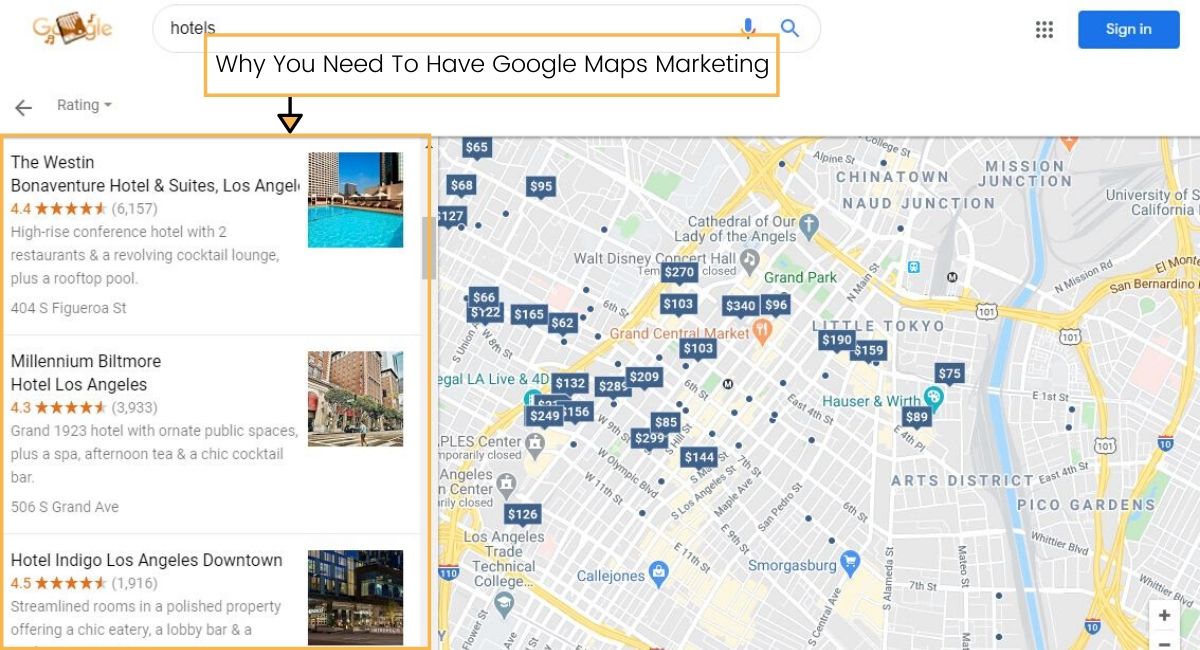
Google Maps is not just a tool for navigation; it has also become a powerful marketing platform for businesses looking to boost their online presence and attract local customers. Google Maps marketing is a strategic approach that leverages the visibility and reach of Google’s mapping service to drive foot traffic, enhance brand awareness, and increase sales.

Benefits of Google Maps Marketing:

  • Improved Local Visibility: By optimising your business listing on Google Maps, you can ensure that your company appears prominently in local search results when users are looking for products or services in their area.
  • Enhanced Brand Credibility: A well-maintained presence on Google Maps with positive reviews and accurate information can build trust with potential customers and establish your brand as a reputable local business.
  • Increased Website Traffic: Integrating Google Maps into your website can make it easier for visitors to find your physical location, leading to more foot traffic and potential conversions.
  • Mobile-Friendly Marketing: As more users rely on mobile devices for search, having a strong presence on Google Maps ensures that your business is easily accessible to consumers on the go.
  • Insightful Analytics: Google My Business provides valuable data and insights on how users interact with your listing, helping you make informed decisions to improve your marketing strategy.

Tips for Effective Google Maps Marketing:

  1. Create a Complete Business Profile: Ensure that your business listing on Google My Business is accurate, up-to-date, and includes relevant information such as contact details, opening hours, and photos.
  2. Solicit Customer Reviews: Encourage satisfied customers to leave positive reviews on your Google Maps listing to boost credibility and attract new clientele.
  3. Utilise Local SEO Strategies: Optimise your website content with local keywords and geo-targeted phrases to improve your ranking in local search results.
  4. Add Visual Content: Include high-quality images and videos of your business premises or products to engage users and showcase what sets you apart from competitors.
  5. Maintain Consistent NAP Data: Ensure that your business name, address, and phone number (NAP) are consistent across all online platforms to avoid confusion among potential customers.

In conclusion, Google Maps marketing presents a valuable opportunity for businesses to connect with local audiences, drive traffic to their physical locations, and establish a strong online presence. By implementing effective strategies and optimising their listings on this popular mapping service, businesses can reap the benefits of increased visibility, credibility, and customer engagement in today’s digital landscape.


Top 10 FAQs About Google Maps Marketing and Advertising

  1. Is Google Maps good for SEO?
  2. Is $20 a day good for Google Ads?
  3. How much does it cost to advertise on Google Maps?
  4. How do I get advertising on Google Maps?
  5. Can I get paid by Google Maps?
  6. Can you use Google Maps for marketing?
  7. How can I advertise on Google Maps?
  8. What is the Google Maps marketing strategy?
  9. How can I get Google Maps to advertise?
  10. Can I earn money with Google Maps?

Is Google Maps good for SEO?

When considering the impact of Google Maps on SEO, it is important to recognise the significant benefits it can offer to businesses. Google Maps plays a crucial role in local search engine optimisation (SEO) by enhancing a company’s online visibility, particularly for location-based searches. By optimising their presence on Google Maps through accurate business listings, positive reviews, and relevant keywords, businesses can improve their rankings in local search results and attract more potential customers. Therefore, leveraging Google Maps as part of an integrated SEO strategy can be highly advantageous for businesses looking to enhance their online presence and reach a wider audience.

Is $20 a day good for Google Ads?

When considering a daily budget of $20 for Google Ads, it is important to assess your specific advertising goals, target audience, and industry competition. While $20 a day can be a modest starting point for some businesses, it may not be sufficient for others with higher advertising costs or more competitive markets. It is advisable to conduct thorough research, monitor campaign performance closely, and adjust your budget accordingly to ensure optimal results and ROI from your Google Ads investment.

How much does it cost to advertise on Google Maps?

One of the frequently asked questions regarding Google Maps marketing is, “How much does it cost to advertise on Google Maps?” The cost of advertising on Google Maps can vary depending on several factors, such as the location of your business, the competitiveness of your industry, and the specific advertising options you choose. Google offers various advertising solutions, including local search ads and promoted pins, which allow businesses to target local customers and drive traffic to their physical locations. The pricing structure for advertising on Google Maps typically involves a pay-per-click (PPC) model, where businesses pay based on the number of clicks or interactions with their ads. It’s essential for businesses to set a budget that aligns with their marketing goals and objectives to maximise the effectiveness of their Google Maps advertising campaigns.

How do I get advertising on Google Maps?

To get advertising on Google Maps, businesses can utilise Google Ads to create location-based campaigns that target users within a specific geographic radius. By setting up a Google My Business account and linking it to Google Ads, businesses can promote their listings on Google Maps through features like Local Search Ads. These ads appear as pinned locations on the map, directing users to the business’s physical location or website. With detailed targeting options and bid strategies, businesses can effectively reach local customers searching for products or services in their vicinity through advertising on Google Maps.

Can I get paid by Google Maps?

When it comes to Google Maps, users often wonder if they can get paid by the platform. The answer is that Google Maps itself does not directly pay individuals for using or contributing to the service. However, businesses can leverage Google Maps marketing to attract customers and increase revenue through enhanced visibility and local search optimisation. By utilising Google Maps effectively as a marketing tool, businesses can drive traffic to their physical locations, ultimately leading to potential sales and business growth.

Can you use Google Maps for marketing?

Businesses can indeed utilise Google Maps for marketing purposes. Google Maps offers a valuable platform for businesses to enhance their online visibility, attract local customers, and drive foot traffic to their physical locations. By optimising their presence on Google Maps through strategies such as creating a detailed business profile, soliciting customer reviews, and incorporating local SEO techniques, businesses can effectively leverage this tool to promote their products or services, build brand credibility, and reach a wider audience of potential customers. With its mobile-friendly interface and insightful analytics capabilities, Google Maps serves as a powerful marketing tool that can help businesses connect with local consumers and grow their online presence.

How can I advertise on Google Maps?

To advertise on Google Maps, businesses can utilise Google Ads to create location-based campaigns that target users searching for products or services in specific geographic areas. By setting up a Google My Business account and linking it to Google Ads, businesses can showcase their ads on Google Maps when users perform relevant searches in their vicinity. Advertisers can customise their ads with location extensions, call-to-action buttons, and business details to attract local customers and drive foot traffic to their physical locations. With the ability to track ad performance and measure results, advertising on Google Maps offers businesses a targeted and cost-effective way to reach potential customers in their local area.

What is the Google Maps marketing strategy?

The Google Maps marketing strategy involves leveraging the power of Google’s mapping service to enhance a business’s online visibility and attract local customers. This strategic approach includes creating and optimising a Google My Business listing with accurate information, engaging visuals, and positive customer reviews. By utilising local SEO tactics, such as incorporating relevant keywords and geo-targeted phrases, businesses can improve their ranking in local search results and drive foot traffic to their physical locations. Consistency in NAP data (business name, address, phone number) across all online platforms is crucial for establishing credibility and ensuring a seamless customer experience. Ultimately, the Google Maps marketing strategy aims to boost brand awareness, increase website traffic, and build trust with potential customers through an effective online presence on this widely-used mapping platform.

How can I get Google Maps to advertise?

To get Google Maps to advertise your business, you can start by creating a Google My Business account and claiming your business listing. Once you have verified your ownership, you can set up an ad campaign through Google Ads that specifically targets users on Google Maps. By selecting location-based targeting options and creating engaging ad content, you can reach potential customers who are actively searching for products or services in your area. Utilising features such as local extensions and promoted pins can help increase the visibility of your ads on Google Maps and drive more traffic to your business.

Can I earn money with Google Maps?

Many individuals wonder whether it is possible to generate income through Google Maps. While Google Maps itself does not offer a direct way to earn money, businesses can leverage the platform for marketing purposes to attract customers and drive sales. By optimising their presence on Google Maps, businesses can enhance their visibility in local search results, increase foot traffic to their physical locations, and ultimately boost their revenue. Therefore, while Google Maps may not directly facilitate monetary transactions, it serves as a valuable tool for businesses looking to grow their customer base and improve their bottom line through effective marketing strategies.

local search marketing

Unlocking the Potential of Local Search Marketing: A Guide for UK Businesses

The Power of Local Search Marketing

The Power of Local Search Marketing

Local search marketing has become an essential strategy for businesses looking to attract customers in their local area. With the increasing use of mobile devices and voice search, consumers are turning to search engines to find products and services near them. This presents a significant opportunity for businesses to capitalise on local search marketing to drive foot traffic and increase sales.

Benefits of Local Search Marketing

One of the key benefits of local search marketing is increased visibility. By optimising your online presence for local searches, your business is more likely to appear in relevant search results when potential customers are looking for products or services in your area. This visibility not only helps attract new customers but also enhances brand awareness within the local community.

Local search marketing also improves customer engagement. When users find your business listing in local search results, they are more likely to visit your website or storefront, resulting in higher conversion rates. By providing accurate and up-to-date information about your business, such as address, phone number, and operating hours, you make it easier for customers to contact you or visit your premises.

Strategies for Local Search Marketing

To succeed in local search marketing, businesses need to implement effective strategies that target their local audience. This includes:

  • Optimising Google My Business: Claiming and verifying your Google My Business listing ensures that your business information appears accurately on Google Maps and Search results.
  • Localised Content: Creating content that is tailored to your local audience helps improve relevance and visibility in local searches.
  • Online Reviews: Encouraging satisfied customers to leave positive reviews can boost credibility and trustworthiness, leading to increased conversions.
  • Citations and Backlinks: Building citations (mentions of your business name) and backlinks from reputable sources can improve your website’s authority and ranking in local searches.

Conclusion

In conclusion, local search marketing is a powerful tool for businesses seeking to connect with nearby customers and drive sales. By implementing targeted strategies that enhance visibility, engagement, and credibility within the local community, businesses can reap the benefits of increased foot traffic and revenue. Embracing local search marketing not only strengthens your online presence but also establishes a strong connection with customers right at your doorstep.


Essential FAQs on Local Search Marketing for Businesses

  1. What is local search marketing?
  2. Why is local search marketing important for businesses?
  3. How can businesses improve their visibility in local searches?
  4. What are the key benefits of focusing on local SEO?
  5. What role does Google My Business play in local search marketing?
  6. How can online reviews impact a business’s performance in local searches?

What is local search marketing?

Local search marketing refers to the strategic practice of optimising a business’s online presence to attract customers within a specific geographic area. It involves utilising various digital marketing techniques to ensure that the business appears prominently in local search results when potential customers are looking for products or services nearby. By focusing on local search marketing, businesses can enhance their visibility, engage with local customers effectively, and drive foot traffic to their physical locations. This targeted approach helps businesses connect with their local community, build brand awareness, and ultimately boost sales within their immediate vicinity.

Why is local search marketing important for businesses?

Local search marketing is crucial for businesses due to its ability to target and attract potential customers in the immediate vicinity. By optimising online presence for local searches, businesses increase visibility to individuals actively seeking products or services within their geographic area. This heightened visibility not only drives foot traffic and boosts sales but also enhances brand recognition within the local community. Moreover, local search marketing fosters customer engagement by providing accurate business information, making it easier for interested consumers to connect with the business either online or in person. Ultimately, embracing local search marketing empowers businesses to establish a strong foothold in their local market and forge meaningful connections with nearby customers.

How can businesses improve their visibility in local searches?

To enhance their visibility in local searches, businesses can employ several strategies. Firstly, claiming and optimising their Google My Business listing is crucial, as it ensures accurate information appears in search results and on Google Maps. Creating locally relevant content on their website can also improve visibility, as search engines prioritise content that resonates with the local audience. Encouraging satisfied customers to leave positive reviews and building citations from reputable sources can boost credibility and trustworthiness, ultimately improving the business’s ranking in local searches. By implementing these strategies effectively, businesses can significantly enhance their visibility in local searches and attract more customers to their doorstep.

What are the key benefits of focusing on local SEO?

Focusing on local SEO offers a multitude of benefits for businesses aiming to enhance their online presence within a specific geographic area. By prioritising local SEO strategies, businesses can significantly improve their visibility in local search results, making it easier for potential customers to find them when searching for products or services nearby. This increased visibility not only drives more targeted traffic to their website but also boosts brand awareness within the local community. Moreover, by optimising for local search, businesses can engage with a more relevant audience, leading to higher conversion rates and ultimately driving foot traffic to their physical locations. Overall, the key benefits of focusing on local SEO include improved visibility, enhanced customer engagement, and increased opportunities for driving sales within the local market.

What role does Google My Business play in local search marketing?

Google My Business plays a crucial role in local search marketing by providing businesses with a powerful tool to enhance their online visibility within their local community. By claiming and optimising their Google My Business listing, businesses can ensure that accurate information about their location, contact details, operating hours, and services is displayed prominently in Google Search and Maps results. This not only helps potential customers find and contact the business easily but also improves the business’s chances of appearing in local search queries. Additionally, Google My Business allows businesses to interact with customers through reviews, posts, and messaging, further strengthening their online presence and credibility in the local market. Overall, leveraging Google My Business effectively is essential for businesses looking to attract local customers and boost their visibility in local search results.

How can online reviews impact a business’s performance in local searches?

Online reviews play a crucial role in influencing a business’s performance in local searches. Positive reviews not only enhance a business’s credibility and reputation but also signal to search engines that the business is trustworthy and reliable. Search engines like Google consider online reviews as a ranking factor in local search results, meaning that businesses with higher ratings and more positive reviews are likely to appear higher in search listings. Additionally, online reviews provide valuable feedback for potential customers, influencing their decision-making process and ultimately driving more traffic to the business. In summary, online reviews can significantly impact a business’s visibility, click-through rates, and overall success in local searches.